dify-mcp-client

MCP.Pizza Chef: 3dify-project

This is a plugin for Dify, the self-hosted workflow builder, so you need Dify running before any of it applies. Dropped into a workflow as an agent step, it reads a list of connected servers from a config box and lets your chosen model call their tools in a reasoning loop. The headline screen-control feature only runs in the author's local debug setup, not in a normal install. There has been no new work on it since July 2025.

Unmaintained · no commits since July 2025; still at version 0.0.6
Coding
Other

Use This MCP client To

Add outside tools to a Dify chatbot I already built Let a workflow look something up before it answers Point one agent step at several connected servers at once Reuse the same set of tools across my Dify workflows Give a support flow the ability to check live records

README

dify-mcp-client

MCP Client as Agent Strategy Plugin with Computer Using Agent (UI-TARS-SDK) support.

Important

Dify is not MCP Server but MCP Host.
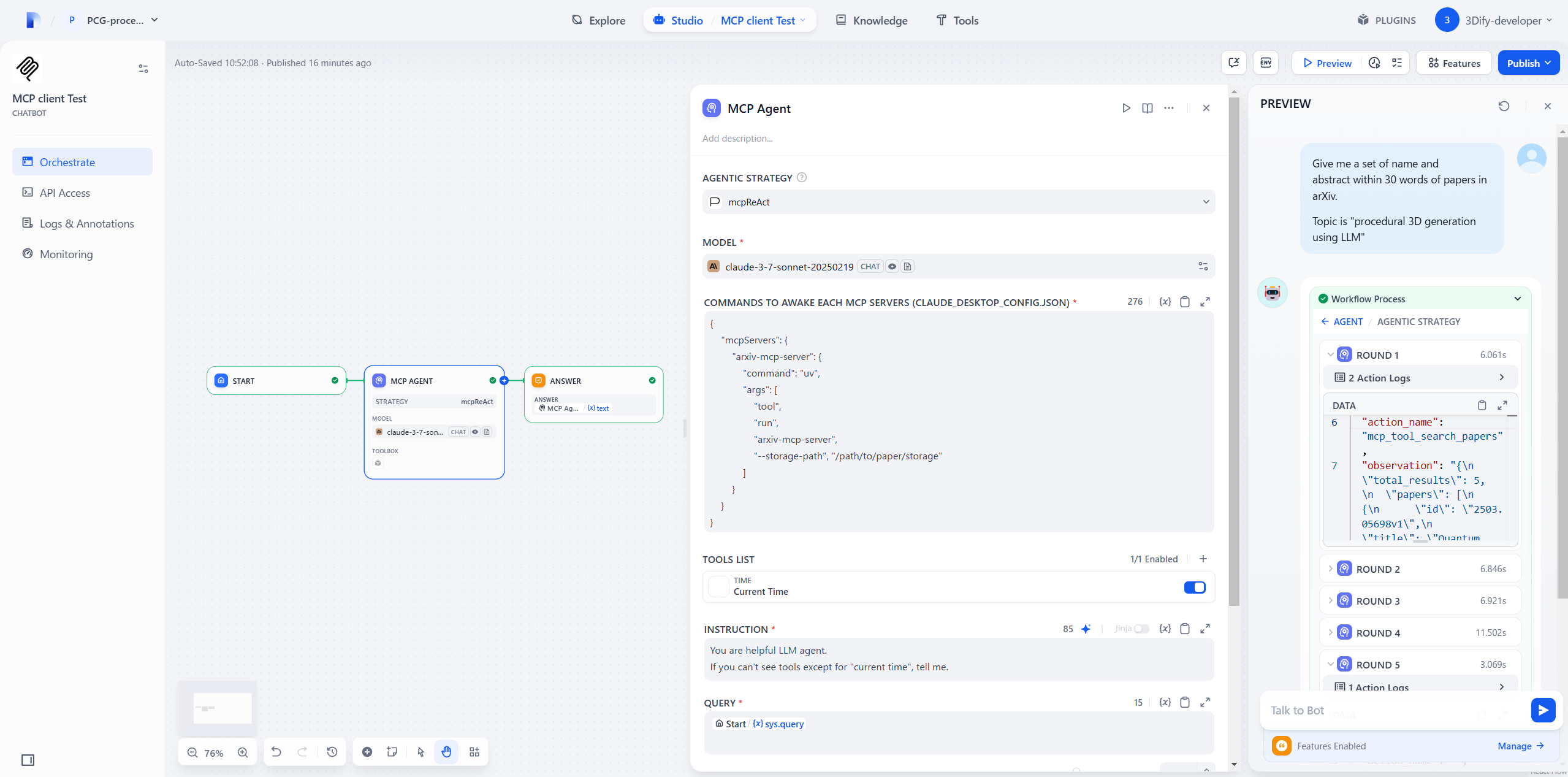
showcase1

How it works

Each MCP client (ReAct Agent) node can connect MCP servers.

  1. Tool, Resource, Prompt lists are converted into Dify Tools.
  2. Your selected LLM can see their name, description, argument type
  3. The LLM calls Tools based on the ReAct loop (Reason → Act → Observe).

Note

Most of the code in this repository contains the following files.

Dify Official Plugins / Agent Strategies

https://github.com/langgenius/dify-official-plugins/tree/main/agent-strategies/cot_agent

✅ What I did

  • Copied ReAct.py and renamed file as mcpReAct.py
  • Added config_json GUI input field by editing mcpReAct.yaml and class mcpReActParams()

in mcpReAct.py, I added

  • New 12 functions for MCP
  • __init__() for initializing AsyncExitStack and event loop
  • Some codes in _handle_invoke_action() for MCP
  • MCP setup and cleanup in _invoke()

dify-mcp-client FAQ

Do I need anything before installing this?
Yes, your own working Dify installation. This is a plugin inside Dify, not something you add to a desktop chat app.
Does the screen-control feature actually work?
Only in the author's local debug setup. The readme states plainly that a normal install cannot do it, because the plugin runs inside a Linux container with no access to your screen.
Does it cost anything extra?
The plugin is free, but the screen-control part needs a hosted model address of your own on Hugging Face, and that is billed separately. There is also a single-monitor limit and a known snag on Mac Retina displays.
Will it ask before it acts?
No. There is no built-in check with a person, so the author advises connecting only servers you trust and writing a request for permission into the instructions yourself.
Is it still being maintained?
There have been no commits since July 2025 and it is still at version 0.0.6, so treat it as unfinished and unattended.
Can I connect any server to it?
Not directly. It expects servers reachable at a web address. Ones that run as a local command need a separate bridge, or a container with Node.js already inside it.
Is there an install catch?
Some Dify setups reject it as unsigned, and the fix offered in the readme is to switch off signature checking for every plugin, which lowers your security bar.