amazon-bedrock-client-for-mac

MCP.Pizza Chef: aws-samples

A native Mac app that puts Amazon Bedrock's models behind one keyboard shortcut, Option+Space, from whatever application you are in. Upload a PDF, Word file or image and ask about it, generate pictures or short videos, search back through past conversations, or dictate instead of typing. It also loads MCP connectors, so it can use the same tools as other assistants and shows you which ones it used. You need macOS 14 or later and an AWS account with Bedrock enabled.

Files/PDF
Images/Design
Writing

Use This MCP client To

Ask a question from any app without switching windows Drop in a PDF and ask what it says Generate an image from a written description Search back through my old conversations Dictate a question instead of typing it Switch between models without changing apps

README

Amazon Bedrock Client for Mac

macOS Latest Release Swift License: MIT-0

A native macOS client that brings Amazon Bedrock's AI models directly to your desktop. Access Claude Opus 5, Sonnet 5, and other foundation models through a clean interface designed for macOS, with system-wide quick access and full AWS integration.
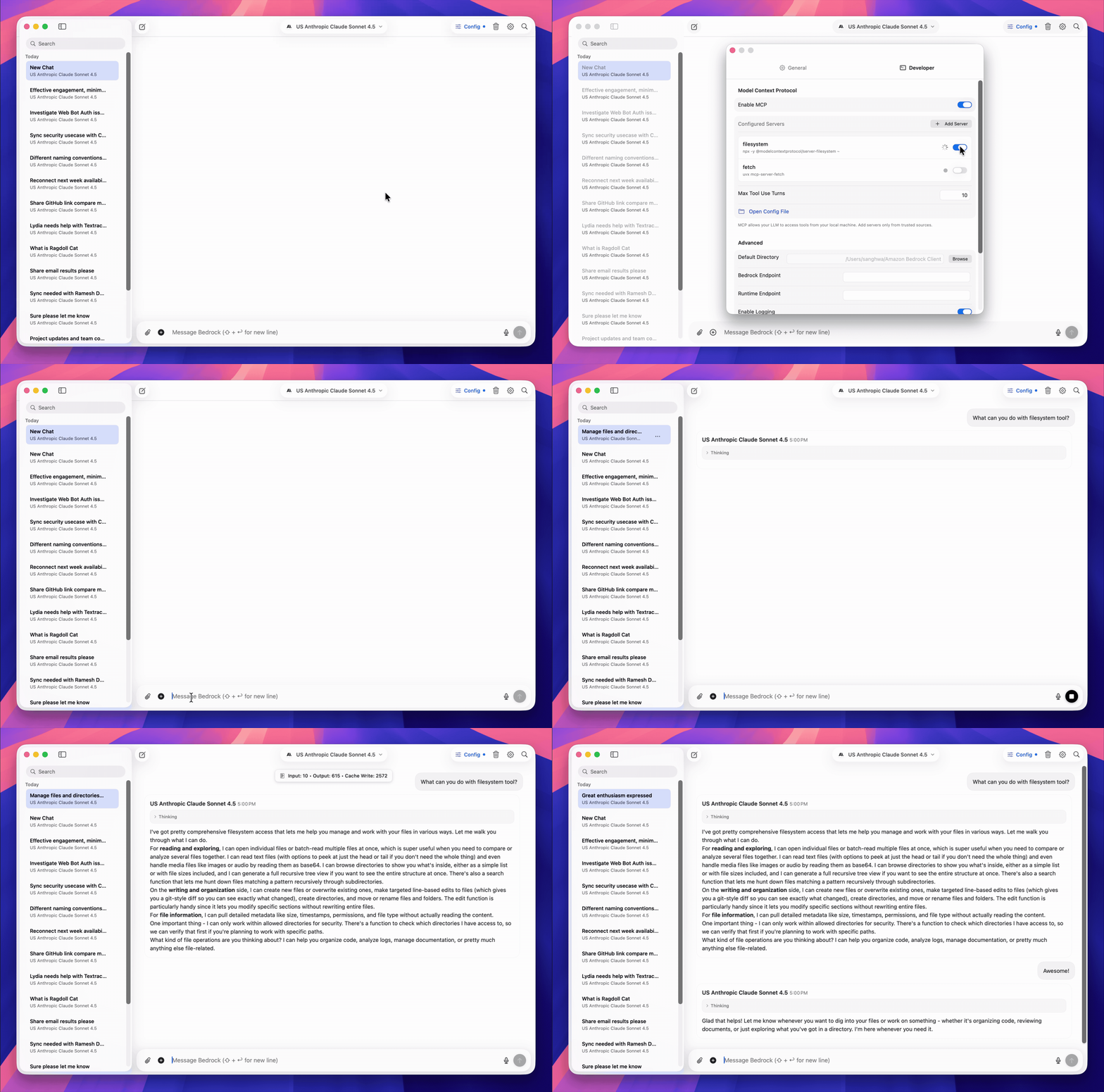
Amazon Bedrock Client for Mac

Get started

Install via Homebrew (recommended)

brew tap didhd/tap
brew install amazon-bedrock-client

Or download the DMG

Download Latest Release

Configure and launch

  1. Configure your AWS credentials (SSO or access keys in ~/.aws/credentials)
  2. Press Option+Space from anywhere to start using AI

Core capabilities

System-wide access
Press Option+Space from any application to open a lightweight AI assistant window. Ask questions, analyze code, or process documents without switching contexts.

Native AWS integration
Built on Amazon Bedrock's ConverseStream API with full support for AWS SSO, credential profiles, and multi-region deployments. Your credentials stay local and secure.

Latest foundation models
Access Claude Opus 5, Sonnet 5, Fable 5, Opus 4.8, Haiku 4.5, and other Bedrock models including Llama 4, Mistral, Qwen3, and DeepSeek V3. Adaptive thinking with configurable effort levels, multi-modal support for images and documents, and prompt caching.

OpenAI models via bedrock-mantle
GPT-5.6 Sol, Terra, and Luna through the Responses API, with per-tier reasoning effort (up to max) and prompt caching. GPT-5.5 and GPT-5.4 are also supported. Models are offered only in the regions that serve them.

Image & Video generation
Nova Canvas, Titan Image Generator, and Stability AI (SD3, Ultra, Core) with 13 specialized services. Nova Reel for video generation (6s-2min) with async S3 output.

Model Context Protocol
Extend capabilities with MCP tools and agents. Track tool usage and execution directly in your conversations.

Built for macOS
Native Swift 6 application optimized for macOS 14+. Liquid glass UI effects on macOS 26+, dark mode support, and keyboard-first navigation throughout.

Features

  • Real-time streaming responses with extended thinking support
  • Document and image upload (PDF, Word, images) with compression
  • Image generation: Nova Canvas, Titan Image, Stability AI
  • Video generation: Nova Reel with text-to-video and multi-shot modes
  • Conversation search and history management
  • Voice transcription for hands-free input
  • Custom system prompts and inference parameters
  • Code generation with syntax highlighting
  • Configurable hotkeys and keyboard shortcuts

Requirements

  • macOS 14 or later
  • AWS account with Amazon Bedrock access
  • AWS credentials configured via SSO or access keys

Usage

Navigate to your project directory and press Option+Space to open Quick Access, or launch the full application from your Applications folder.

Keyboard shortcuts:

  • Option+Space - Quick Access window (customizable)
  • Cmd+Shift+K - Toggle Quick Access from menu
  • Cmd+F - Search conversations
  • Cmd+N - New chat
  • Cmd+, - Settings

Model configuration:
Select models from the dropdown, configure system prompts, adjust temperature and reasoning parameters in Settings.

AWS profiles:
Switch between credential profiles and regions in Settings > Developer tab.

Troubleshooting

See the Troubleshooting Guide for common issues including AWS credential setup and parameter validation.

Contributing

Contributions are welcome. Fork the repository, create a feature branch, and submit a pull request. See the CONTRIBUTING.md file for details.

License

This project is licensed under the MIT-0 License. See the LICENSE file for details.


Developed by the AWS Community

amazon-bedrock-client-for-mac FAQ

Is this still maintained?
Yes. It was last updated in July 2026 and ships regular releases through Homebrew and direct download.
Can I use this to read a PDF and answer questions about it?
Yes — upload the file in the chat window and ask. Word files and images work the same way.
Do I need an account?
Yes, an AWS account with Bedrock access. Your sign-in details stay on your Mac and are read from your usual AWS settings.
Does it work with MCP connectors?
Yes. It loads MCP servers and shows the tools it used inside the conversation, so it works alongside the rest of the directory.
What does it cost?
The app itself is free and open source. You pay AWS for whatever the models use.
How hard is setup?
Install it with one Homebrew command or a downloaded disk image, point it at your AWS profile, then press Option+Space.