
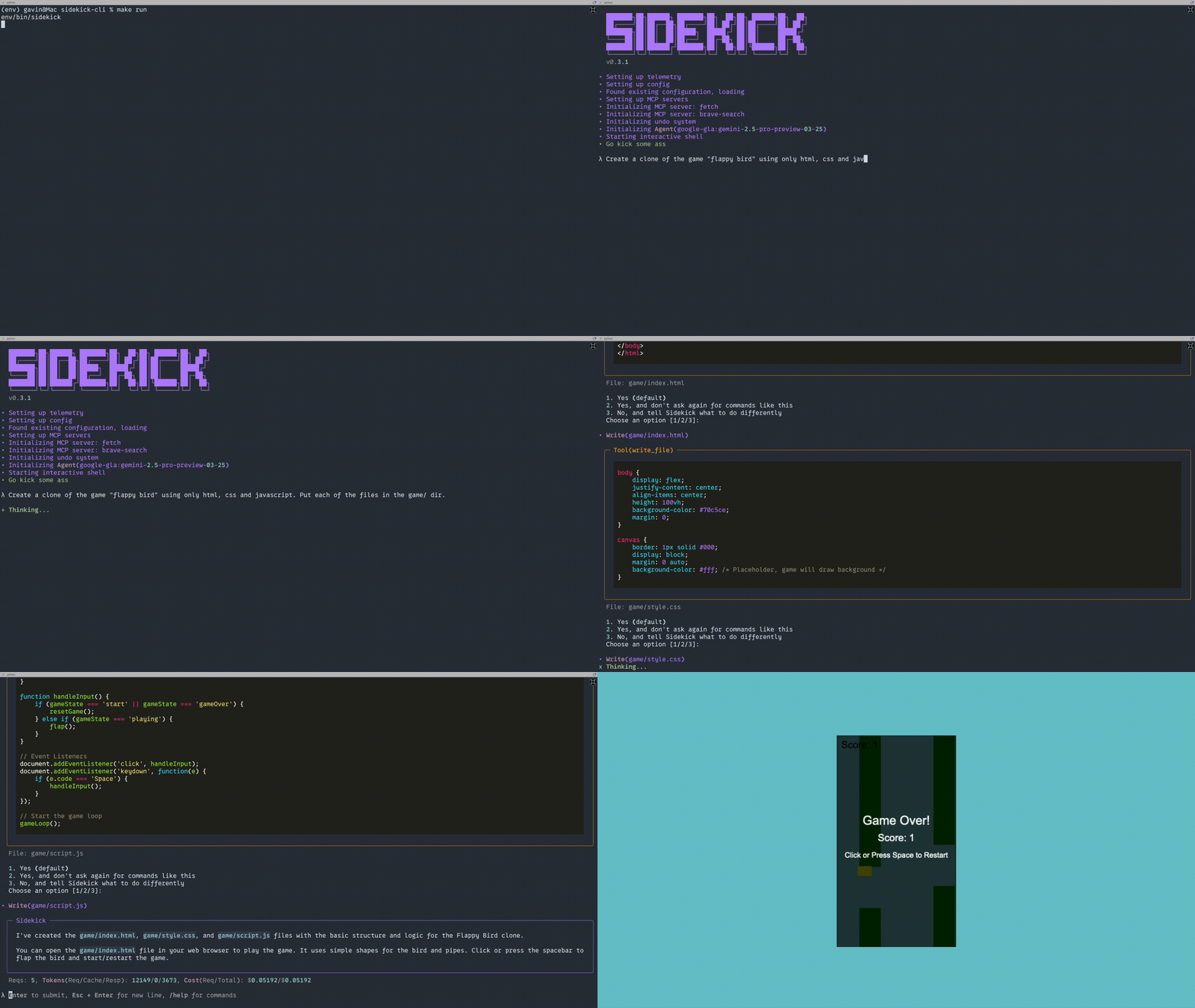
sidekick-cli

MCP.Pizza Chef: geekforbrains

Sidekick runs in a terminal window rather than an editor, and works with Anthropic, OpenAI, or Google Gemini — you pay whichever provider you choose, and can switch between them mid-session. It also loads other MCP tools you list in its settings file, so one session can reach past code into whatever else you connect. Worth knowing before installing: development appears to have stopped. The last release was May 2025 and the last code change July 2025, though the readme still describes it as actively developed.

Unmaintained · no code changes since July 2025, though readme still claims active development
Coding

Use This MCP client To

Ask questions about a project from my terminal Switch between Claude, GPT, and Gemini in one session Track what a coding session is costing me Add project instructions the assistant always follows Undo changes it made using my project's version history

README

Sidekick (Beta)

PyPI version Python 3.10+

Sidekick Demo

Your agentic CLI developer.

Overview

Sidekick is an agentic CLI-based AI tool inspired by Claude Code, Copilot, Windsurf and Cursor. It's meant to be an open source alternative to these tools, providing a similar experience but with the flexibility of using different LLM providers (Anthropic, OpenAI, Google Gemini) while keeping the agentic workflow.

Sidekick is currently in beta and under active development. Please report issues or share feedback!

Features

  • No vendor lock-in. Use whichever LLM provider you prefer.
  • MCP support
  • Easily switch between models in the same session.
  • JIT-style system prompt injection ensures Sidekick doesn't lose the plot.
  • Per-project guide. Adjust Sidekick's behavior to suit your needs.
  • CLI-first design. Ditch the clunky IDE.
  • Cost and token tracking.
  • Per command or per session confirmation skipping.

Roadmap

  • Tests 😅
  • More LLM providers, including Ollama

Quick Start

Install Sidekick.

pip install sidekick-cli

On first run, you'll be asked to configure your LLM providers.

sidekick

Configuration

After initial setup, Sidekick saves a config file to ~/.config/sidekick.json. You can open and edit this file as needed. Future updates will make editing easier directly from within Sidekick.

MCP Support

Sidekick supports Model Context Protocol (MCP) servers. You can configure MCP servers in your ~/.config/sidekick.json file:

{
  "mcpServers": {
    "fetch": {
      "command": "uvx",
      "args": ["mcp-server-fetch"]
    },
    "github": {
      "command": "npx",
      "args": ["-y", "@modelcontextprotocol/server-github"],
      "env": {
        "GITHUB_PERSONAL_ACCESS_TOKEN": "<YOUR_TOKEN>"
      }
    }
  }
}

MCP servers extend the capabilities of your AI assistant, allowing it to interact with additional tools and data sources. Learn more about MCP at modelcontextprotocol.io.

Available Commands

  • /help - Show available commands
  • /yolo - Toggle "yolo" mode (skip tool confirmations)
  • /clear - Clear message history
  • /model - List available models
  • /model <num> - Switch to a specific model (by index)
  • /usage - Show session usage statistics
  • exit - Exit the application

Customization

Sidekick supports the use of a "guide". This is a SIDEKICK.md file in the project root that contains instructions for Sidekick. Helpful for specifying tech stack, project structure, development preferences etc.

Telemetry

Sidekick uses Sentry for error tracking and usage analytics. You can disable this by starting with the --no-telemetry flag.

sidekick --no-telemetry

Requirements

  • Python 3.10 or higher
  • Git (for undo functionality)

Installation

Using pip

pip install sidekick-cli

From Source

  1. Clone the repository
  2. Install dependencies: pip install . (or pip install -e . for development)

Development

# Install development dependencies
make install

# Run linting
make lint

# Run tests
make test

Release Process

When preparing a new release:

  1. Update version numbers in:

    • pyproject.toml
    • src/sidekick/constants.py (APP_VERSION)
  2. Commit the version changes:

    git add pyproject.toml src/sidekick/constants.py
    git commit -m "chore: bump version to X.Y.Z"
  3. Create and push a tag:

    git tag vX.Y.Z
    git push origin vX.Y.Z
  4. Create a GitHub release:

    gh release create vX.Y.Z --title "vX.Y.Z" --notes "Release notes here"
  5. Merge to main branch and push to trigger PyPI release (automated)

Commit Convention

This project follows the Conventional Commits specification for commit messages:

  • feat: - New features
  • fix: - Bug fixes
  • docs: - Documentation changes
  • style: - Code style changes (formatting, etc.)
  • refactor: - Code refactoring
  • perf: - Performance improvements
  • test: - Test additions or modifications
  • chore: - Maintenance tasks (version bumps, etc.)
  • build: - Build system changes
  • ci: - CI configuration changes

Links

License

MIT

sidekick-cli FAQ

Is this still being developed?
It looks dormant. The readme calls it actively developed, but the last release was May 2025 and the last code change July 2025. Nothing has shipped since, and the author names no successor project.
Do I need a paid key?
Yes. It ships no model of its own — you supply a paid Anthropic, OpenAI, or Google Gemini account and are billed by them for usage.
Can I use this with a free local model like Ollama?
Not today. Ollama appears on the roadmap, not among the providers that actually work.
Does it run inside Cursor or Windsurf?
No. It is a standalone terminal program inspired by those tools, not a plugin for them.
Can I use this to connect other tools into a coding session?
Yes — you list them in its settings file and they become available in the session alongside its own file editing.
How hard is setup?
You need Python 3.10 or newer, install it with a single command, then answer a few setup questions on first run. Git is needed for the undo feature.
Does it send my information anywhere?
It reports errors and usage statistics to an outside monitoring service by default. Starting it with the no-telemetry option turns that off.