
Your own AI assistant. On your laptop. In code you can read in an afternoon.
Meet Waku — a local-first personal assistant that shows the four pillars behind every serious agent: Harness · Loop · Memory · Eval/LLM-Ops. No frameworks hiding the good parts. Built by seanchen.io.
- Local-first. Your memory is one SQLite file. Open it. Read it. It's yours.
- Memory is the hero. Semantic + episodic + procedural — with a gate that decides whether to remember, and a pass that decides what to keep.
- The loop is ~95 lines of plain Python. Step through it.
- Watch it think. A local dashboard lights up every message as it flows through the harness.
- Eval built in. Deterministic tests and LLM-as-judge, side by side, with a release gate.
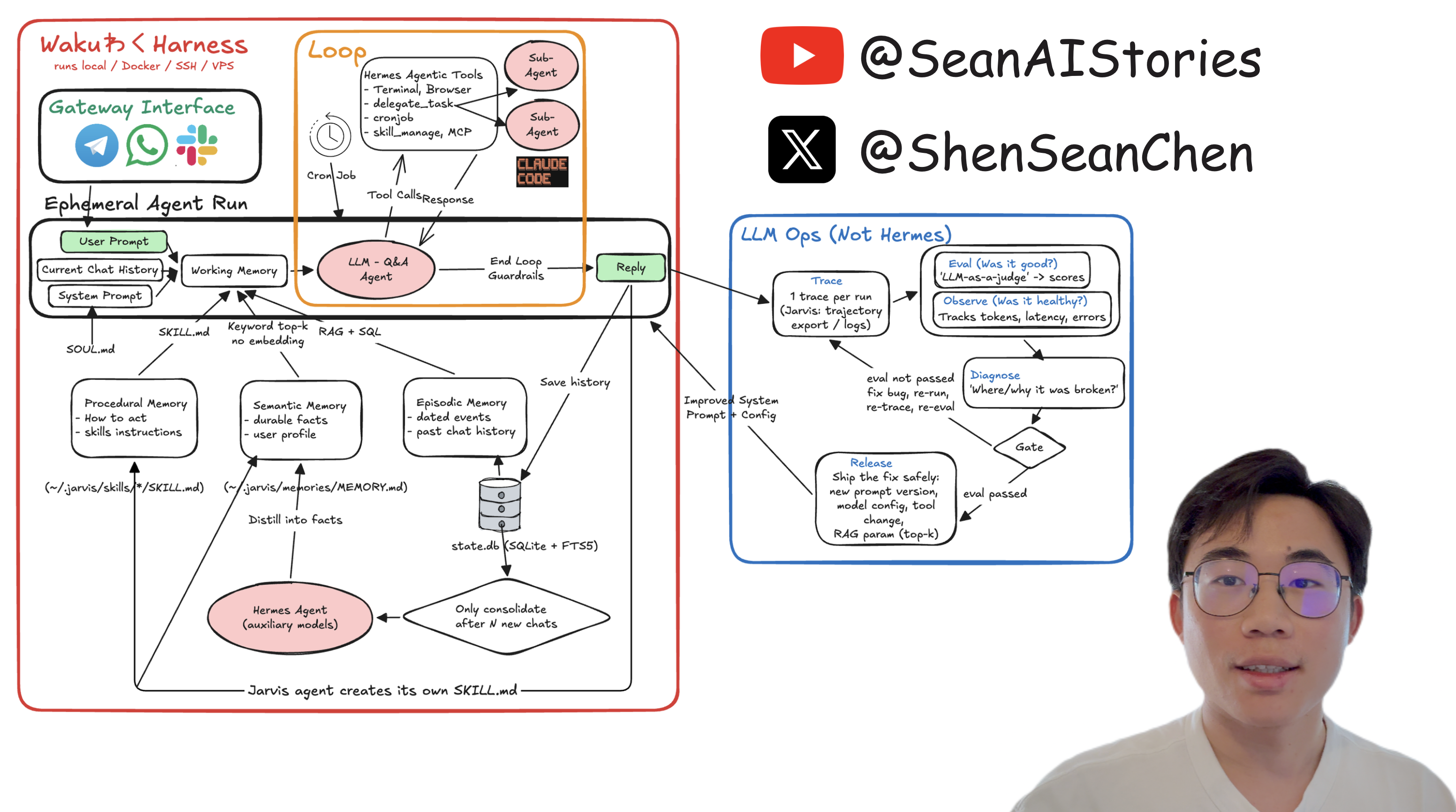
The system-design whiteboard from the series. Every box maps to a file — see the whiteboard maps to the code.
▶ Watch the 20-min code walkthrough — the loop, the memory pillars, the evals, the Telegram gateway and the "Waku Waku" wake word, live.
YouTube · X · LinkedIn · Instagram · TikTok · Discord · 哔哩哔哩 · 小红书 · 抖音
☕️ Buy me a coffee — it keeps this repo (and the videos) coming
Just want to run it:
pip install waku-agent
waku                                    # talk to your Waku in the terminal
waku dashboard                          # …or the browser cockpit → localhost:7777
It will tell you which key to set the first time. Want to read the code (the point of this repo) or contribute — clone it instead:
git clone https://github.com/ShenSeanChen/waku-agent && cd waku-agent
uv venv && uv pip install -e .          # create the env + install the `waku` command
cp .env.example .env                    # pick a provider, paste ONE key
uv run waku                             # talk to your Waku in the terminal
uv run waku dashboard                   # …or the browser cockpit → localhost:7777