Fire in da houseTop Tip:Paying $100+ per month for Perplexity, MidJourney, Runway, ChatGPT and other tools is crazy - get all your AI tools in one site starting at $15 per month with Galaxy AI Fire in da houseCheck it out free

npm-search-mcp-server

MCP.Pizza Chef: btwiuse

The npm-search-mcp-server is a Model Context Protocol server designed to facilitate searching for npm packages directly through the `npm search` command. It exposes a tool called `search_npm_packages` that accepts a search query string and returns relevant npm package results. This server integrates seamlessly into AI-enhanced workflows, allowing models to access up-to-date npm package information in real time. Installation is straightforward via Smithery or npm, making it easy to add npm package search capabilities to MCP clients like Claude Desktop. This server is ideal for developers and AI agents needing quick, programmatic access to npm package data within their environment.

Use This MCP server To

Search npm packages programmatically within AI workflows Integrate npm package discovery into developer copilot tools Enable real-time npm package lookup in chatbots or assistants Automate npm package recommendations based on queries Fetch npm package metadata for analysis or integration

README

npm-search MCP Server

smithery badge

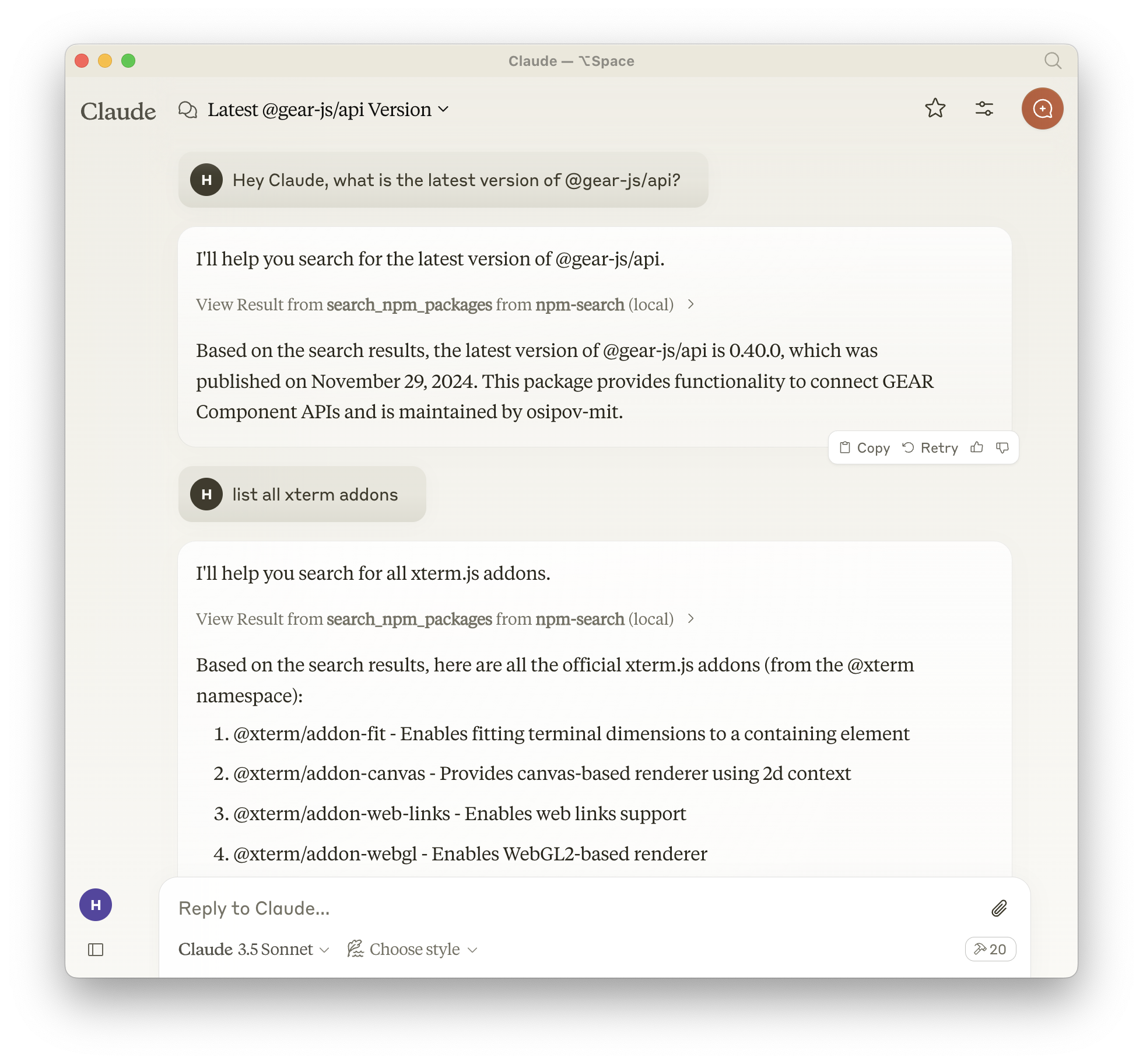
A Model Context Protocol server that allows you to search for npm packages by calling the npm search command.

npm-search-mcp-server MCP server

Available Tools

  • search_npm_packages - Search for npm packages.
    • Required arguments:
      • query (string): The search query.

Claude Screenshot

Installation

Installing via Smithery

To install npm-search for Claude Desktop automatically via Smithery:

npx -y @smithery/cli install npm-search-mcp-server --client claude

Using NPM (recommended)

Alternatively you can install npm-search-mcp-server via npm:

npm install -g npm-search-mcp-server

After installation, you can run it as a command using:

npm-search-mcp-server

Using uv

When using uv no specific installation is needed. We will use uvx to directly run npm-search-mcp-server.

Configuration

Configure for Claude.app

Add to your Claude settings:

Using npm installation
"mcpServers": {
  "npm-search": {
    "command": "npx",
    "args": ["-y", "npm-search-mcp-server"]
  }
}
Using uvx
"mcpServers": {
  "npm-search": {
    "command": "uvx",
    "args": ["npm-search-mcp-server"]
  }
}

Configure for Zed

Add to your Zed settings.json:

Using npm installation
"context_servers": {
  "npm-search-mcp-server": {
    "command": "npx",
    "args": ["-y", "npm-search-mcp-server"]
  }
},
Using uvx
"context_servers": [
  "npm-search-mcp-server": {
    "command": "uvx",
    "args": ["npm-search-mcp-server"]
  }
],

Example Interactions

  1. Search for npm packages:
{
  "name": "search_npm_packages",
  "arguments": {
    "query": "express"
  }
}

Response:

{
  "results": [
    {
      "name": "express",
      "description": "Fast, unopinionated, minimalist web framework",
      "version": "4.17.1",
      "author": "TJ Holowaychuk",
      "license": "MIT"
    },
    ...
  ]
}

Debugging

You can use the MCP inspector to debug the server. For uvx installations:

npx @modelcontextprotocol/inspector npx -y npm-search-mcp-server

Or if you've installed the package in a specific directory or are developing on it:

cd path/to/servers/src/npm-search
npx @modelcontextprotocol/inspector uv run npm-search-mcp-server

Examples of Questions for Claude

  1. "Search for express package on npm"
  2. "Find packages related to react"
  3. "Show me npm packages for web development"

Build

Docker build:

cd src/npm-search
docker build -t mcp/npm-search .

Contributing

We encourage contributions to help expand and improve npm-search-mcp-server. Whether you want to add new npm-related tools, enhance existing functionality, or improve documentation, your input is valuable.

For examples of other MCP servers and implementation patterns, see: https://github.com/modelcontextprotocol/servers

Pull requests are welcome! Feel free to contribute new ideas, bug fixes, or enhancements to make npm-search-mcp-server even more powerful and useful.

License

npm-search-mcp-server is licensed under the MIT License. This means you are free to use, modify, and distribute the software, subject to the terms and conditions of the MIT License. For more details, please see the LICENSE file in the project repository.

npm-search-mcp-server FAQ

How do I install the npm-search-mcp-server?
You can install it easily via Smithery using `npx -y @smithery/cli install npm-search-mcp-server --client claude` or globally via npm with `npm install -g npm-search-mcp-server`.
What command does the npm-search-mcp-server use to search packages?
It uses the standard `npm search` command to query the npm registry for packages matching the search term.
Can I use npm-search-mcp-server with different MCP clients?
Yes, while the example shows installation for Claude Desktop, the server can be integrated with any MCP client that supports server connections.
What argument is required to perform a package search?
The `search_npm_packages` tool requires a single argument called `query`, which is the search string for npm packages.
Is the npm-search-mcp-server limited to any specific npm registry?
It uses the default npm registry configured in your environment, so it supports the public npm registry or any custom registry you have set.
Does the server provide detailed package metadata?
It returns search results from the `npm search` command, which includes package names, descriptions, and other summary info useful for discovery.
How does this server enhance AI model capabilities?
By exposing npm package search results as structured context, it enables models like GPT-4, Claude, or Gemini to access live package data during interactions.
Is the npm-search-mcp-server secure to use?
Yes, it follows MCP principles for scoped and observable interactions, ensuring safe and controlled access to npm package data.