
Fire in da houseTop Tip:Paying $100+ per month for Perplexity, MidJourney, Runway, ChatGPT and other tools is crazy - get all your AI tools in one site starting at $15 per month with Galaxy AI Fire in da houseCheck it out free

mcp-server-github-repo

MCP.Pizza Chef: loglmhq

The mcp-server-github-repo is an MCP server that provides structured, real-time access to GitHub repository contents. It allows AI models to browse, navigate, and read files or directories from specified GitHub repositories, supporting branch-specific access. Files are served as plain text, and directories with a special MIME type, enabling seamless integration into AI workflows. Configuration requires a GitHub personal access token and repository details, making it ideal for AI-enhanced code exploration, documentation retrieval, and repository analysis.

Use This MCP server To

Browse GitHub repo files for code analysis Retrieve documentation from GitHub repositories Navigate repo directories in AI workflows Access branch-specific files in GitHub repos Integrate GitHub repo content into AI assistants

README

MCP GitHub Repository Server

An MCP (Model Context Protocol) server that provides access to GitHub repository contents. This server allows AI assistants to browse and read files from specified GitHub repositories.
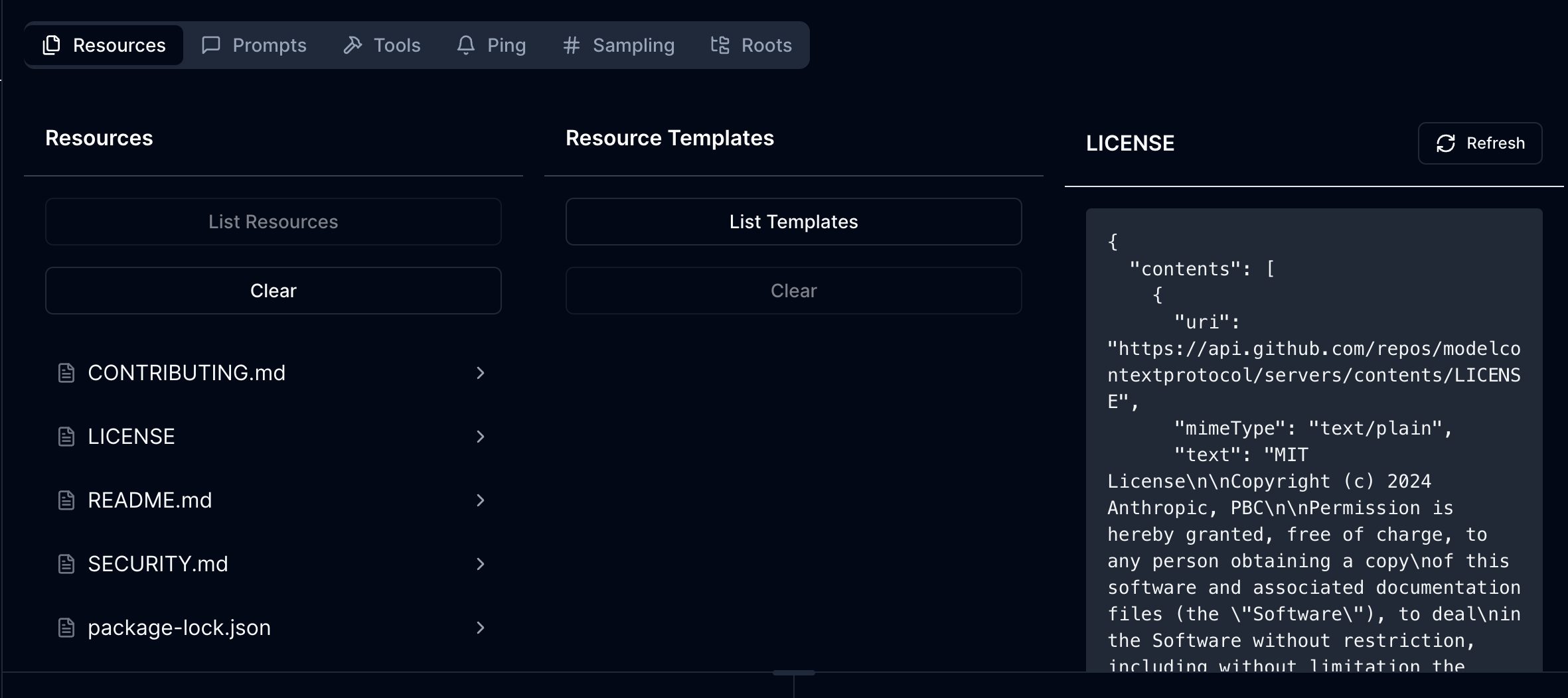
Demo

demo

Features

Resources

  • Access any file in a GitHub repository via URI
  • List repository contents and navigate directories
  • Support for branch-specific file access
  • File contents are served as plain text

Resource URIs

  • Base URL format: https://api.github.com/repos/{owner}/{repo}/contents/{path}
  • Supports both files and directories
  • Files are served with text/plain MIME type
  • Directories are served with application/x-directory MIME type

Configuration

The server requires the following environment variables:

GITHUB_PERSONAL_ACCESS_TOKEN=your_github_token
GITHUB_OWNER=repository_owner
GITHUB_REPO=repository_name
GITHUB_BRANCH=branch_name  # Optional

Development

Install dependencies:

npm install

Build the server:

npm run build

For development with auto-rebuild:

npm run watch

Installation

To use with Claude Desktop, add the server configuration:

Config Location

  • MacOS: ~/Library/Application Support/Claude/claude_desktop_config.json
  • Windows: %APPDATA%/Claude/claude_desktop_config.json
{
  "mcpServers": {
    "mcp-server-github-repo": {
      "command": "/path/to/mcp-server-github-repo/build/index.js"
    }
  }
}

API Implementation

The server implements three main MCP endpoints:

  1. ListResources - Lists files and directories in the repository
  2. ReadResource - Retrieves contents of a specific file

Authentication

The server uses GitHub Personal Access Token for authentication. Make sure your token has appropriate permissions to access the repository contents.

Error Handling

The server includes error handling for:

  • Missing environment variables
  • GitHub API errors
  • Invalid paths (e.g., trying to read a directory as a file)
  • Authentication failures

Debugging

Since MCP servers communicate over stdio, debugging can be challenging. Use the MCP Inspector for debugging:

npm run inspector

This will provide a URL to access debugging tools in your browser.

Security Notes

  • Keep your GitHub Personal Access Token secure
  • Consider using tokens with minimal required permissions
  • Be aware of repository size limitations when accessing large repositories

License

MIT

mcp-server-github-repo FAQ

How do I configure the mcp-server-github-repo?
Set environment variables GITHUB_PERSONAL_ACCESS_TOKEN, GITHUB_OWNER, GITHUB_REPO, and optionally GITHUB_BRANCH to specify the repository and access token.
What types of GitHub resources can this server access?
It can access both files and directories within the specified GitHub repository, serving files as plain text and directories with a directory MIME type.
Does the server support accessing different branches?
Yes, you can specify a branch via the GITHUB_BRANCH environment variable to access branch-specific content.
How are files served by the server?
Files are served with a 'text/plain' MIME type, making them easy to read and process by AI models.
Is authentication required to use this MCP server?
Yes, a GitHub personal access token is required to authenticate and access private or public repositories securely.
Can this server list the contents of a repository directory?
Yes, it supports listing and navigating directories within the GitHub repository.
What is the base URL format for accessing repository contents?
The base URL format is https://api.github.com/repos/{owner}/{repo}/contents/{path}, where you replace placeholders with actual values.
How does this server enhance AI model interactions?
By providing structured, real-time access to GitHub repo contents, it enables AI models like OpenAI, Claude, and Gemini to perform code exploration and analysis efficiently.