mcp-zenml

MCP.Pizza Chef: zenml-io

mcp-zenml is an MCP server that bridges MCP clients such as Cursor and Claude Desktop with ZenML's MLOps and LLMOps pipelines. It enables standardized, secure, and real-time interaction between AI models and ZenML's machine learning infrastructure, facilitating seamless integration of model context and operational workflows through the Model Context Protocol.

Use This MCP server To

Connect ZenML pipelines to AI clients via MCP Expose ZenML MLOps data to LLMs in real time Enable LLM-driven automation of ML workflows Integrate ZenML with AI copilots like Claude Desktop Provide standardized API access to ZenML resources Facilitate secure data exchange between ZenML and LLMs

README

MCP Server for ZenML

This project implements a Model Context Protocol (MCP) server for interacting with the ZenML API.
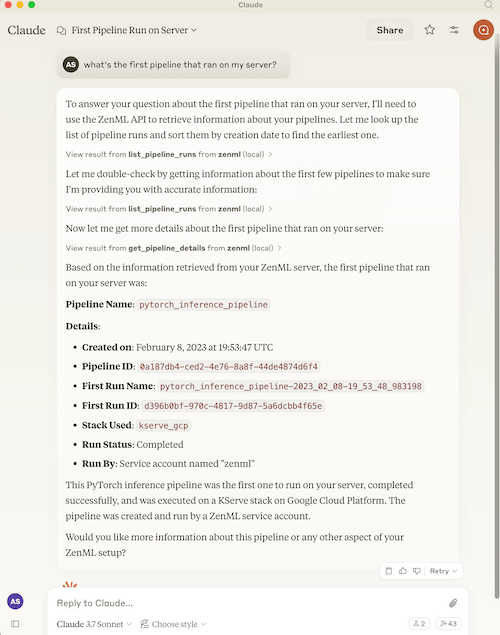
ZenML MCP Server

What is MCP?

The Model Context Protocol (MCP) is an open protocol that standardizes how applications provide context to Large Language Models (LLMs). It acts like a "USB-C port for AI applications" - providing a standardized way to connect AI models to different data sources and tools.

MCP follows a client-server architecture where:

  • MCP Hosts: Programs like Claude Desktop or IDEs that want to access data through MCP
  • MCP Clients: Protocol clients that maintain 1:1 connections with servers
  • MCP Servers: Lightweight programs that expose specific capabilities through the standardized protocol
  • Local Data Sources: Your computer's files, databases, and services that MCP servers can securely access
  • Remote Services: External systems available over the internet that MCP servers can connect to

What is ZenML?

ZenML is an open-source platform for building and managing ML and AI pipelines. It provides a unified interface for managing data, models, and experiments.

For more information, see the ZenML website and our documentation.

Features

The server provides MCP tools to access core read functionality from the ZenML server, providing a way to get live information about:

  • Users
  • Stacks
  • Pipelines
  • Pipeline runs
  • Pipeline steps
  • Services
  • Stack components
  • Flavors
  • Pipeline run templates
  • Schedules
  • Artifacts (metadata about data artifacts, not the data itself)
  • Service Connectors
  • Step code
  • Step logs (if the step was run on a cloud-based stack)

It also allows you to trigger new pipeline runs (if a run template is present).

Note: This is a beta/experimental release. We're still exploring how people will use this integration, so we welcome your feedback and suggestions! Please join our Slack community to share your experience and help us improve.

How to use

mcp-zenml FAQ

How do I install the mcp-zenml server?
You can install mcp-zenml via pip or from source following the GitHub repository instructions, ensuring Python and dependencies are met.
Can mcp-zenml connect with multiple MCP clients simultaneously?
Yes, mcp-zenml supports multiple concurrent MCP client connections for flexible integration.
Is mcp-zenml compatible with different LLM providers?
Yes, it works with any MCP-compliant client, supporting models from OpenAI, Claude, Gemini, and others.
How does mcp-zenml ensure secure access to ZenML pipelines?
It uses secure authentication and scoped permissions to control client access to ZenML resources.
Can I extend mcp-zenml to support custom ZenML components?
Yes, mcp-zenml is designed to be extensible, allowing developers to add support for custom ZenML pipeline elements.
Does mcp-zenml support real-time updates from ZenML pipelines?
Yes, it can stream live context and status updates from ZenML to connected MCP clients.
What platforms does mcp-zenml support?
mcp-zenml is cross-platform and runs on any system supporting Python and ZenML, including Linux, macOS, and Windows.
How do I troubleshoot connection issues with mcp-zenml?
Check network settings, ensure MCP client compatibility, and review server logs for detailed error messages.