



Mureka-mcp

MCP.Pizza Chef: SkyworkAI

Four tools sit behind this: one drafts lyrics from a description, one turns lyrics into a full sung track, one produces instrumental background music, and one plays a saved audio file through your speakers. Finished audio is downloaded to your Desktop unless you name another folder, which it will create for you. A Mureka account with credit on it is required, and every track you make spends some. This is Skywork's own release, but it has not been touched since May 2025.

Unmaintained · No commits in 15 months.
Other
Writing

Use This MCP server To

Write a birthday song for someone by name Turn lyrics I already wrote into a finished track Make calm background music for a coffee shop Draft Christmas lyrics I can edit myself Play a track it just made without opening a music app Save generated music into a folder I choose

README

export

Discord Community Twitter PyPI

Official Mureka Model Context Protocol (MCP) server that enables interaction with powerful lyrics, song and bgm generating APIs. This server allows MCP clients like Claude Desktop, OpenAI Agents and others to generate lyrics, song and background music(instrumental).

Quickstart with Claude Desktop

  1. Get your API key from Mureka.
  2. Install uv (Python package manager), install with curl -LsSf https://astral.sh/uv/install.sh | sh or see the uv repo for additional install methods.
  3. Go to Claude > Settings > Developer > Edit Config > claude_desktop_config.json to include the following:
{
    "mcpServers": {
        "Mureka": {
            "command": "uvx",
            "args": [
                "mureka-mcp"
            ],
            "env": {
                "MUREKA_API_KEY": "<insert-your-api-key-here>",
                "MUREKA_API_URL": "https://api.mureka.ai",
                "TIME_OUT_SECONDS":"300"
            }
        }
    }
}

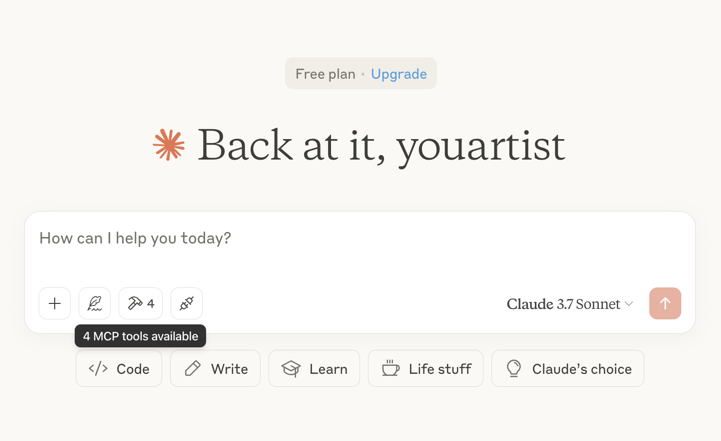
Then restart the Claude app and see 4 MCP tools available in the window, indicating successful loading
Optional features

You can add the TIME_OUT_SECONDS environment variable to the claude_desktop_config.json to set the timeout period for song or bgm generation waiting(Default 60s).

Example usage

⚠️ Warning: Mureka credits are needed to use these tools. Try asking Claude:

  • "Please create a song for my daughter Jessica to wish her a happy birthday and play it"
  • "Please generate lyrics about Christmas"
  • "Please generate a song based on the lyrics just now"
  • "Please generate background music suitable for playing in the coffee shop"

bgm 1 download

bgm 2 download

Troubleshooting

Logs when running with Claude Desktop can be found at:

  • Windows: %APPDATA%\Claude\logs\mcp-server-Mureka.log
  • macOS: ~/Library/Logs/Claude/mcp-server-Mureka.log

Quickstart with Openai agents sdk

Install Agents SDK

pip install openai-agents

Run example: openapi_agents_example/main.py

Key is required to be filled in:

MUREKA_API_KEY = "<insert-your-api-key-here>"

After running, you can see the composition process in the console

Mureka-mcp FAQ

Do I have to pay?
Yes. You need a Mureka account with credits on it, and every song or piece of background music you ask for spends some. Drafting lyrics also goes through the paid service, so there is no completely free way to try it.
Where does my key go?
Into your assistant's settings file on your own machine. It is never typed into the conversation and is only sent to Mureka.
How hard is setup?
Middling. You install one small Python helper once, then paste a short block into your assistant's settings. No coding needed.
Where do finished tracks end up?
On your Desktop by default. You can name any folder instead and it will create that folder if it does not exist yet.
Songs take a while to make. Will it give up on me?
It waits sixty seconds by default and then reports a timeout. The instructions suggest raising that to three hundred seconds, which is worth doing before your first full song.
Can it actually play the music out loud?
Yes, through the speakers of the computer running it. Give it the complete path to the file. The shortcut for shorter paths looks for a setting named after an entirely different product, a leftover from copied code, so it will not behave the way you expect.
Is it still maintained?
It is the company's own release, but nothing has changed since May 2025, so expect it to lag behind whatever Mureka adds next.
Can I use this to make a jingle for a video?
Yes. Describe the mood, the instruments and the length you want and it will produce an instrumental you can drop straight into an edit.
Which apps does it work in?
Claude Desktop is the documented route and the project also ships an OpenAI Agents example, but any assistant that can start a command should work.