

Fire in da houseTop Tip:Paying $100+ per month for Perplexity, MidJourney, Runway, ChatGPT and other tools is crazy - get all your AI tools in one site starting at $15 per month with Galaxy AI Fire in da houseCheck it out free

nautobot-app-mcp

MCP.Pizza Chef: gt732

Nautobot-app-mcp is a Nautobot plugin that integrates the Model Context Protocol (MCP) server with Nautobot, enabling AI assistants to interact with network data through a standardized protocol. It provides AI-ready tools and interfaces for network automation and management, allowing seamless real-time access and control of network infrastructure data within Nautobot environments.

Use This MCP server To

Expose network topology data to AI assistants via MCP Enable AI-driven network automation workflows Provide real-time network inventory access for AI models Integrate AI tools with Nautobot for network management Facilitate AI-based network configuration validation Support AI querying of network device status and metrics Automate network change impact analysis using AI Enable AI-enhanced troubleshooting with live network data

README

Nautobot MCP

Nautobot Python License

This Nautobot app integrates the MCP (Model Context Protocol) server with Nautobot, providing AI-ready tools and interfaces for network automation and management.

Overview

Nautobot MCP enables AI assistants or applications to interact with your network data through a standardized protocol. The app runs an MCP server alongside Nautobot that exposes tools which can be used by AI systems.

https://modelcontextprotocol.io/introduction

Demo using Librechat - Connected to Nautobot MCP

nautobot_mcp.mp4

Installation

1. Install the package

pip install nautobot-mcp

2. Add to INSTALLED_APPS in your Nautobot configuration

# In your nautobot_config.py
PLUGINS = [
    "nautobot_mcp",
    # ... other plugins
]

3. Configuration

Configure the app through Nautobot's configuration system:

# In your nautobot_config.py
PLUGINS_CONFIG = {
    "nautobot_mcp": {
        "MCP_PORT": 8005,  # MCP server port
        "MCP_HOST": "0.0.0.0",  # Default is 0.0.0.0
        "MCP_CUSTOM_TOOLS_DIR": "/path/to/your/custom/tools",  # Directory for custom tools
        "MCP_LOAD_CORE_TOOLS": False,  # Load built-in tools
    },
}

4. Run nautobot post upgrade

nautobot-server post_upgrade

Custom Tools

You can create your own custom tools by defining Python functions in the directory specified in MCP_CUSTOM_TOOLS_DIR.

Example custom tool:

# In /path/to/your/custom/tools/my_tools.py

def some_tool(param1: str, param2: str) -> dict:
    """Some tool description"""
    # Your implementation here
    return {"result": f"Tool result for {param1} and {param2}"}

The MCP server will automatically discover and register all function-based tools in the specified directory.

Deployment Options

Method 1: Manual Start

You can start the MCP server manually:

nautobot-server start_mcp_server

Method 2: Systemd Service (Recommended for Production)

Create a systemd service file at /etc/systemd/system/nautobot-mcp.service:

[Unit]
Description=Nautobot MCP Server
After=network-online.target
Wants=network-online.target

[Service]
User=nautobot
Group=nautobot
WorkingDirectory=/opt/nautobot
ExecStart=/opt/nautobot/venv/bin/nautobot-server start_mcp_server
Restart=on-failure
RestartSec=30
PrivateTmp=true

[Install]
WantedBy=multi-user.target

Then enable and start the service:

sudo systemctl daemon-reload
sudo systemctl enable --now nautobot-mcp.service

Viewing Available Tools

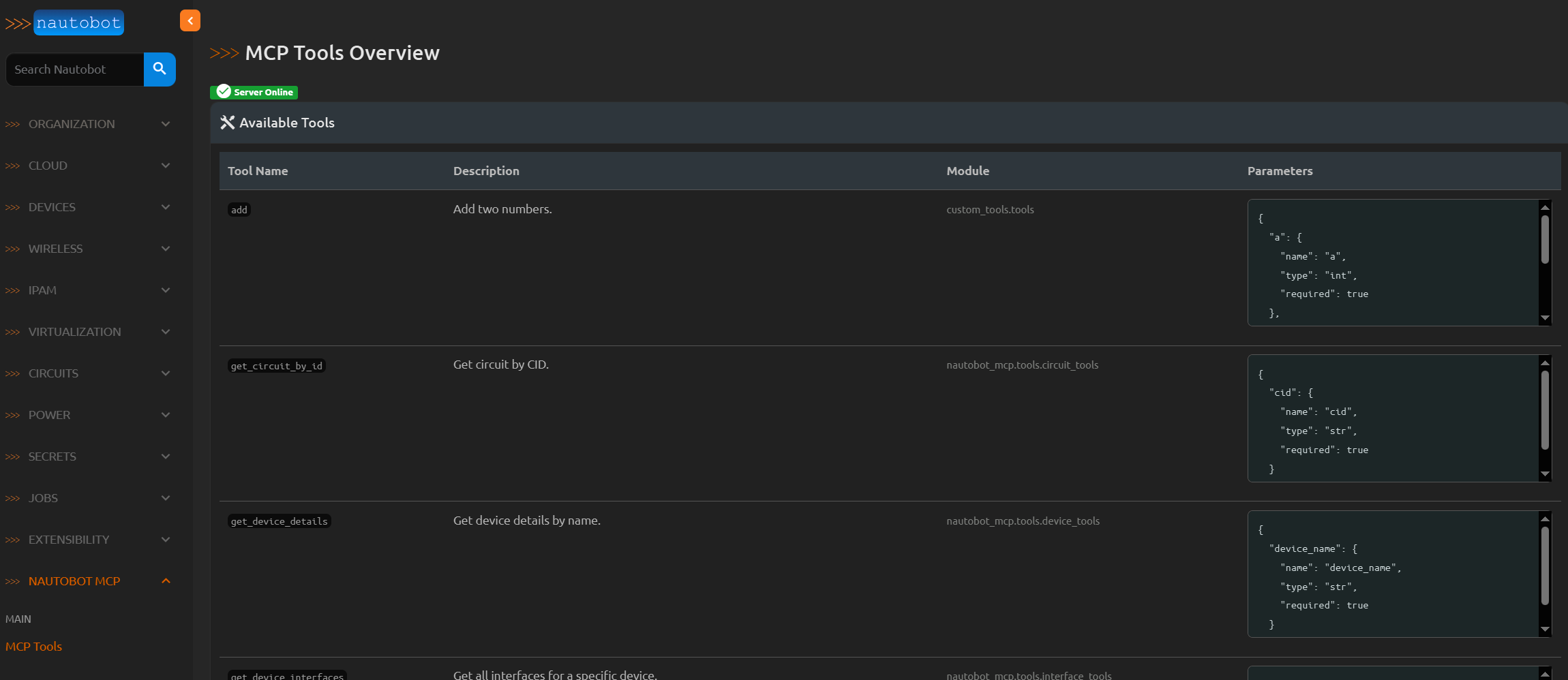
You can view all registered tools in the Nautobot web interface at:

https://your-nautobot-server/plugins/nautobot-mcp/tools/

This page shows all available tools, their descriptions, module paths, and parameter specifications.
Tools

TODO

  • Add a way to route tool execution to a specific Nautobot worker.
  • Enhance the tool view in the Nautobot web interface to show tool usage statistics.
  • Create a docker container to run the MCP server.
  • Add tests.

License

This project is licensed under the Apache License 2.0 - see the LICENSE file for details.

nautobot-app-mcp FAQ

How do I install nautobot-app-mcp?
Install via pip with 'pip install nautobot-mcp' and add 'nautobot_mcp' to your Nautobot PLUGINS list.
What versions of Python and Nautobot does nautobot-app-mcp support?
It supports Python 3.8+ and Nautobot 2.0+.
How does nautobot-app-mcp expose network data to AI?
It runs an MCP server alongside Nautobot that exposes network data and tools through the Model Context Protocol.
Can I use nautobot-app-mcp with multiple AI providers?
Yes, it is provider-agnostic and works with any AI system supporting MCP, including OpenAI, Claude, and Gemini.
Is nautobot-app-mcp open source and what is its license?
Yes, it is open source under the Apache 2.0 license.
Does nautobot-app-mcp support real-time network data updates?
Yes, it provides real-time access to network data for AI-driven workflows.
How do I configure nautobot-app-mcp after installation?
After installation, add 'nautobot_mcp' to your Nautobot PLUGINS in the configuration file and restart Nautobot.
Can nautobot-app-mcp be used for network automation?
Yes, it enables AI-driven network automation by exposing network data and control interfaces via MCP.