mcp-server-deep-research

MCP.Pizza Chef: reading-plus-ai

No tools are added at all, which surprises most people who install it. What you get is a single prompt that walks the assistant through widening your question, splitting it into smaller ones, searching, weighing the sources, and writing a report with citations. The searching is done by the assistant's own web search rather than by this project. It never reached the package listings the readme points at, so you download the project and run its setup script, which is written for Macs.

Unmaintained ยท no changes since March 2025
Web/Research
Writing

Use This MCP server To

Turn a vague question into a properly researched report Get a cited write-up on a topic I barely know Break a big question into smaller ones worth answering Compare what several sources say before I decide Produce a balanced briefing on a contested subject

README

MCP Server for Deep Research

MCP Server for Deep Research is a tool designed for conducting comprehensive research on complex topics. It helps you explore questions in depth, find relevant sources, and generate structured research reports.

Your personal Research Assistant, turning research questions into comprehensive, well-cited reports.
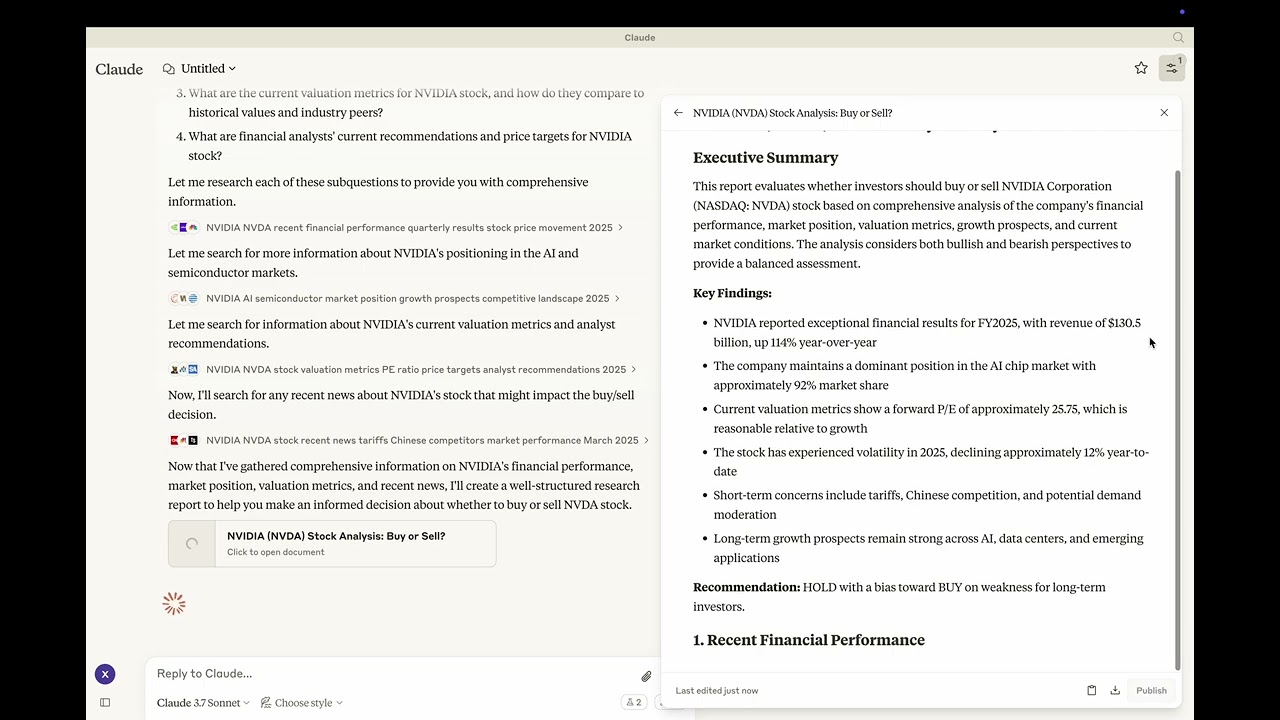
๐Ÿš€ Try it Out

Watch the demo Youtube: https://youtu.be/_a7sfo5yxoI

  1. Download Claude Desktop

  2. Install and Set Up

    • On macOS, run the following command in your terminal:
    python setup.py
  3. Start Researching

    • Select the deep-research prompt template from MCP
    • Begin your research by providing a research question

Features

The Deep Research MCP Server offers a complete research workflow:

  1. Question Elaboration

    • Expands and clarifies your research question
    • Identifies key terms and concepts
    • Defines scope and parameters
  2. Subquestion Generation

    • Creates focused subquestions that address different aspects
    • Ensures comprehensive coverage of the main topic
    • Provides structure for systematic research
  3. Web Search Integration

    • Uses Claude's built-in web search capabilities
    • Performs targeted searches for each subquestion
    • Identifies relevant and authoritative sources
    • Collects diverse perspectives on the topic
  4. Content Analysis

    • Evaluates information quality and relevance
    • Synthesizes findings from multiple sources
    • Provides proper citations for all sources
  5. Report Generation

    • Creates well-structured, comprehensive reports as artifacts
    • Properly cites all sources used
    • Presents a balanced view with evidence-based conclusions
    • Uses appropriate formatting for clarity and readability

๐Ÿ“ฆ Components

Prompts

  • deep-research: Tailored for comprehensive research tasks with a structured approach

โš™๏ธ Modifying the Server

Claude Desktop Configurations

  • macOS: ~/Library/Application\ Support/Claude/claude_desktop_config.json
  • Windows: %APPDATA%/Claude/claude_desktop_config.json

Development (Unpublished Servers)

"mcpServers": {
  "mcp-server-deep-research": {
    "command": "uv",
    "args": [
      "--directory",
      "/Users/username/repos/mcp-server-application/mcp-server-deep-research",
      "run",
      "mcp-server-deep-research"
    ]
  }
}

Published Servers

"mcpServers": {
  "mcp-server-deep-research": {
    "command": "uvx",
    "args": [
      "mcp-server-deep-research"
    ]
  }
}

๐Ÿ› ๏ธ Development

Building and Publishing

  1. Sync Dependencies

    uv sync
  2. Build Distributions

    uv build

    Generates source and wheel distributions in the dist/ directory.

  3. Publish to PyPI

    uv publish

๐Ÿค Contributing

Contributions are welcome! Whether you're fixing bugs, adding features, or improving documentation, your help makes this project better.

๐Ÿ“œ License

This project is licensed under the MIT License. See the LICENSE file for details.

mcp-server-deep-research FAQ

What does it actually add to my assistant?
One prompt and two note-keeping areas. It deliberately adds no tools, and the code says so in a comment, because the real work is done by the assistant's own web search.
Can I use this to write a researched report on a topic?
Yes. Pick its deep-research prompt, type your question, and you get a structured report with sources cited, assembled over several rounds of searching.
Does it need a key?
No key and no account. What it does need is an assistant that can search the web by itself, since the whole method leans on that.
Which apps does it work in?
It was written for Claude Desktop. Any app you use must support ready-made prompts and must be able to search the web, or you will get very little from it.
How hard is it to set up?
Harder than the readme suggests. The one-line install it advertises does not work, because the project was never published to the listing it names, so you download it and run a setup script.
Is it still being maintained?
No. The last change was March 2025. Since then several assistants have added their own research modes that cover much of the same ground.