
Fire in da houseTop Tip:Paying $100+ per month for Perplexity, MidJourney, Runway, ChatGPT and other tools is crazy - get all your AI tools in one site starting at $15 per month with Galaxy AI Fire in da houseCheck it out free

swe-agent

MCP.Pizza Chef: kjacone

swe-agent is an advanced MCP server designed to assist software engineers throughout the complete software development lifecycle. It leverages AI to analyze user requirements, extract necessary modules, and generate modular code while incorporating human-in-the-loop (HITL) feedback to ensure quality and control. The system architecture features interconnected nodes that handle natural language processing, user interaction, module extraction, and code generation, making it a comprehensive tool for automating and enhancing software engineering workflows. This server is ideal for teams seeking to streamline development, improve collaboration, and maintain oversight during AI-assisted coding and documentation.

Use This MCP server To

Automate requirements analysis from natural language input Generate modular code with human-in-the-loop feedback Coordinate multi-step software development workflows Extract software modules from user specifications Assist in creating architectural and technical documentation Improve developer productivity with AI-driven code generation

README

AI-Powered Code Generation Workflow - Architectural Document

Overview

This document details the architectural workflow of an AI-powered code generation system. The system follows a structured process where user requests are analyzed, necessary modules are identified, and code is generated in a modular, human-in-the-loop (HITL) approach. This ensures that the user has control over the process and can intervene when necessary.

System Architecture

The workflow consists of multiple interconnected nodes that perform specific tasks. Below is a breakdown of each node and its function:

1. Analyze/Coordinate

  • This node serves as the initial entry point for user requests.
  • It performs natural language processing (NLP) to understand user input.
  • It engages in small talk to improve user experience and asks for any missing information.
  • Once the request is fully understood, it moves to the next step.

2. Extract Modules & User Feedback

  • The system analyzes the user’s request and extracts the necessary modules required for code generation.
  • The identified modules are presented to the user for selection.
  • This step follows the HITL approach, allowing the user to manually confirm or modify module selection before proceeding.

3. Generate Steps & Code for Each Module

  • For each selected module, the system generates a set of steps required to create the code.
  • It processes modules in a sequential order, starting with the first one in the checklist.
  • The generated steps are then sent for code execution.

4. Route Module to the MCP Server

  • Based on the chosen framework (e.g., Python, Java, Node.js, etc.), the system routes the module to the appropriate MCP (Model Context Protocol) server.
  • The MCP server ensures that the module is processed correctly according to the predefined framework.

5. MCP Server Generates Complete Code

  • The MCP server processes the module and generates a fully functional code snippet.
  • The system ensures that the generated code adheres to best practices and predefined architecture standards.

6. Generate Docker Container, Build & Run Code

  • After code generation, the system creates a Docker container.
  • The code is built, compiled, and executed within the containerized environment.
  • This step ensures portability and consistency across different development environments.

7. Error Handling & Retry Mechanism

  • If there are errors or execution failures, the system attempts to fix the issues automatically.
  • It retries the code generation and execution process up to five times before escalating the issue.
  • If the error persists, the process moves to the HITL intervention step.

8.User Decision on Error or Continuation

  • If errors persist after multiple retries, the user is asked to intervene.
  • The system presents the user with two options:
    • React to the error (modify request, debug, etc.).
    • Continue to the next module despite the error.

9. Process Next Module Until Completion

  • If the user chooses to continue, the system marks the current module as complete and moves to the next one.
  • This loop continues until all modules are successfully generated and executed.

Architectural Diagram

The following diagram illustrates the entire workflow:
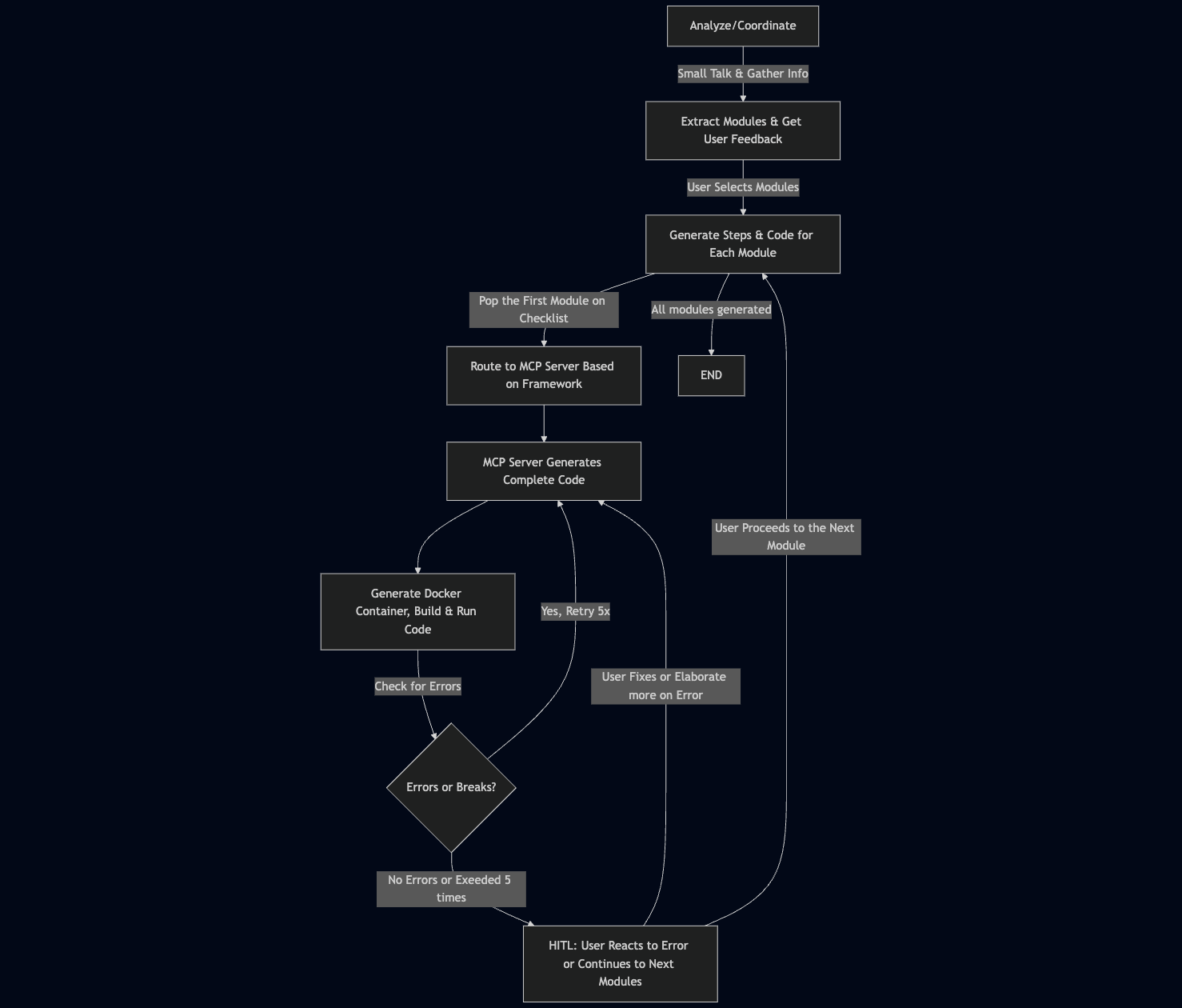
Architectural Diagram

Conclusion

This architecture follows a structured approach to AI-driven code generation with built-in human oversight (HITL). It allows for efficient, modular code generation while maintaining flexibility and user control. The error handling and retry mechanism ensure robustness, while Docker-based execution guarantees environment consistency. This system can be further enhanced by integrating AI-powered debugging and automated testing.

Let me know if you need any refinements or additional details! 🚀

swe-agent FAQ

How does swe-agent handle user input for software requirements?
swe-agent uses natural language processing to understand and analyze user requests, engaging in clarifying dialogue to ensure complete and accurate requirements.
Can I intervene during the code generation process?
Yes, swe-agent supports a human-in-the-loop approach, allowing users to review and provide feedback at various stages of code generation.
What kind of software development tasks can swe-agent automate?
It automates tasks such as requirements analysis, module extraction, code generation, and documentation creation within a structured workflow.
Is swe-agent suitable for collaborative development environments?
Yes, its modular and interactive design supports collaboration by allowing multiple stakeholders to provide input and feedback.
How does swe-agent ensure the quality of generated code?
By incorporating human feedback loops and modular generation, swe-agent maintains control and quality throughout the development lifecycle.
What programming languages or frameworks does swe-agent support?
swe-agent is designed to be flexible and can be adapted to various languages and frameworks depending on configuration and integration.
How does swe-agent integrate with existing development tools?
It can be integrated via MCP protocol adapters, enabling seamless interaction with IDEs, version control, and CI/CD pipelines.
Does swe-agent support multiple LLM providers?
Yes, it is compatible with various LLM providers including OpenAI, Anthropic Claude, and Google Gemini, ensuring flexibility in AI model usage.