whatsapp-mcp

MCP.Pizza Chef: lharries

Everything runs on your own computer: a small program links to your account by scanning a code, the same way WhatsApp Web does, keeps your chat history in a file on your machine, and hands over only the parts your assistant asks for. From there you can search contacts, dig through old conversations, open the documents and pictures people sent, and send replies, files or voice notes to a person or a group. Works with Claude Desktop and Cursor, with no key to buy.

Unmaintained · No commits in 14 months.
Communication

Use This MCP server To

Find the message with the address I was sent Catch up on a group chat I ignored for weeks Send a quick reply without picking up my phone Dig out photos someone sent me last month Summarize what a long conversation agreed

README

WhatsApp MCP Server

This is a Model Context Protocol (MCP) server for WhatsApp.

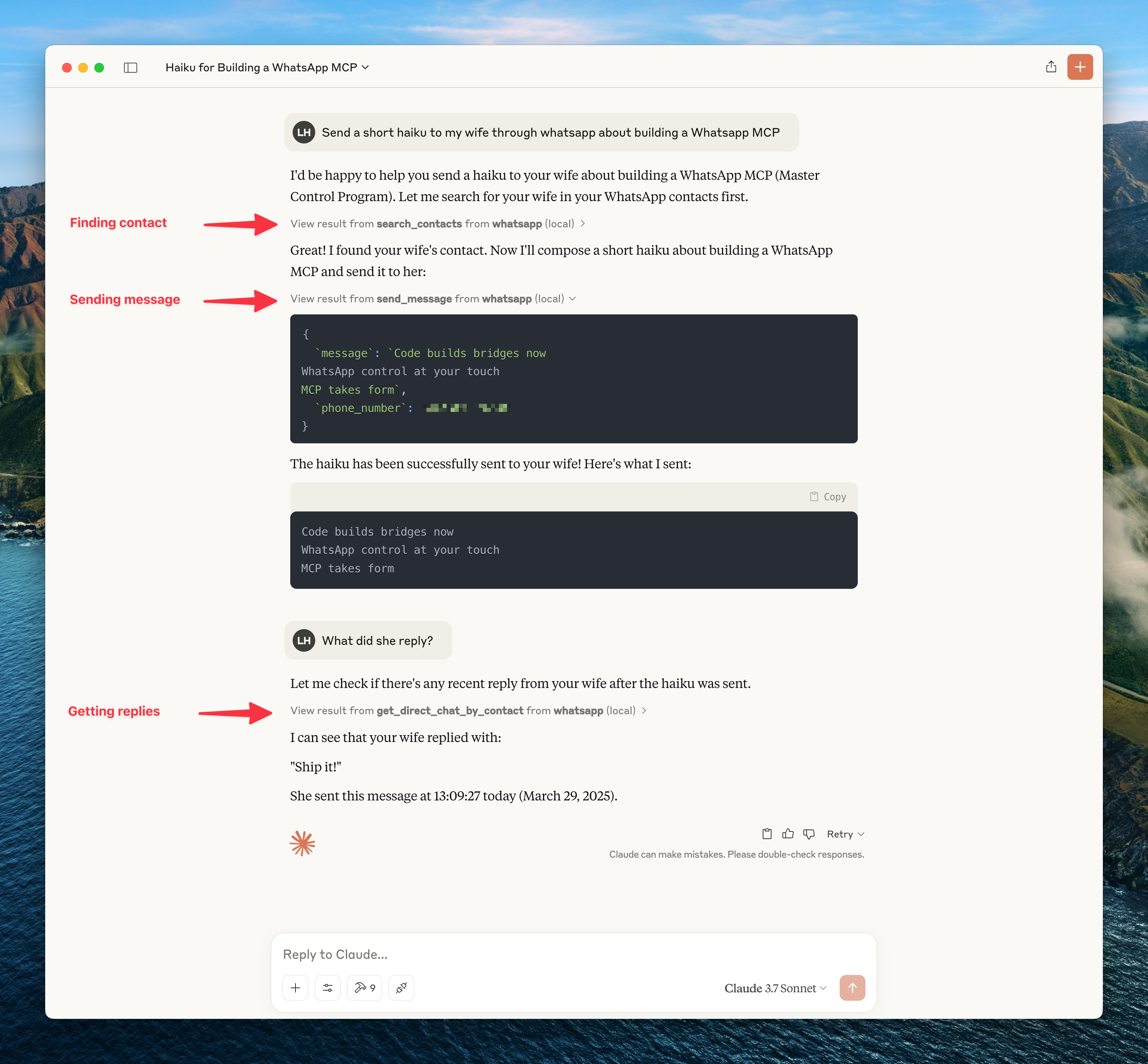
With this you can search and read your personal Whatsapp messages (including images, videos, documents, and audio messages), search your contacts and send messages to either individuals or groups. You can also send media files including images, videos, documents, and audio messages.

It connects to your personal WhatsApp account directly via the Whatsapp web multidevice API (using the whatsmeow library). All your messages are stored locally in a SQLite database and only sent to an LLM (such as Claude) when the agent accesses them through tools (which you control).

Here's an example of what you can do when it's connected to Claude.
WhatsApp MCP

To get updates on this and other projects I work on enter your email here

Installation

Prerequisites

  • Go
  • Python 3.6+
  • Anthropic Claude Desktop app (or Cursor)
  • UV (Python package manager), install with curl -LsSf https://astral.sh/uv/install.sh | sh
  • FFmpeg (optional) - Only needed for audio messages. If you want to send audio files as playable WhatsApp voice messages, they must be in .ogg Opus format. With FFmpeg installed, the MCP server will automatically convert non-Opus audio files. Without FFmpeg, you can still send raw audio files using the send_file tool.

Steps

whatsapp-mcp FAQ

Which apps does it work in?
Claude Desktop and Cursor.
Is this my personal account or a business one?
Your personal account — you link it once by scanning a code, the same way WhatsApp Web works.
Where do my messages go?
They stay in a file on your own computer, and only the parts your assistant asks for are sent to it.
Can I use this to send a message?
Yes — to a person or a group, including images, videos, documents and voice notes.
Do I need a key?
No, but you do need Go, Python and the uv tool installed, and you re-scan the code roughly every three weeks.
Is there anything extra for voice notes?
With FFmpeg installed, audio is converted automatically; without it you can still send the file as-is.