mcp-playwright

MCP.Pizza Chef: executeautomation

A community project that hands your assistant a real browser: it can visit pages, click and type, take screenshots, lift details off a page into a list, run small scripts on the page, and turn a walkthrough you describe into ready-to-run test code. It can also check web services directly. Install it with one command, paste a short settings block, and it appears in Claude Desktop, Cursor, Cline or VS Code. No account or key needed, and there is a one-click install button for VS Code.

Coding
Web/Research

Use This MCP server To

Check a signup form still works after a change Turn a walkthrough into test code I can run Copy a list off a page into a table Screenshot a page whenever I change it Watch a browser do the clicking for me

README

MseeP.ai Security Assessment Badge Warp sponsorship
MseeP.ai Security Assessment Special thanks to Warp, the AI terminal for developers

Playwright MCP Server šŸŽ­

smithery badge

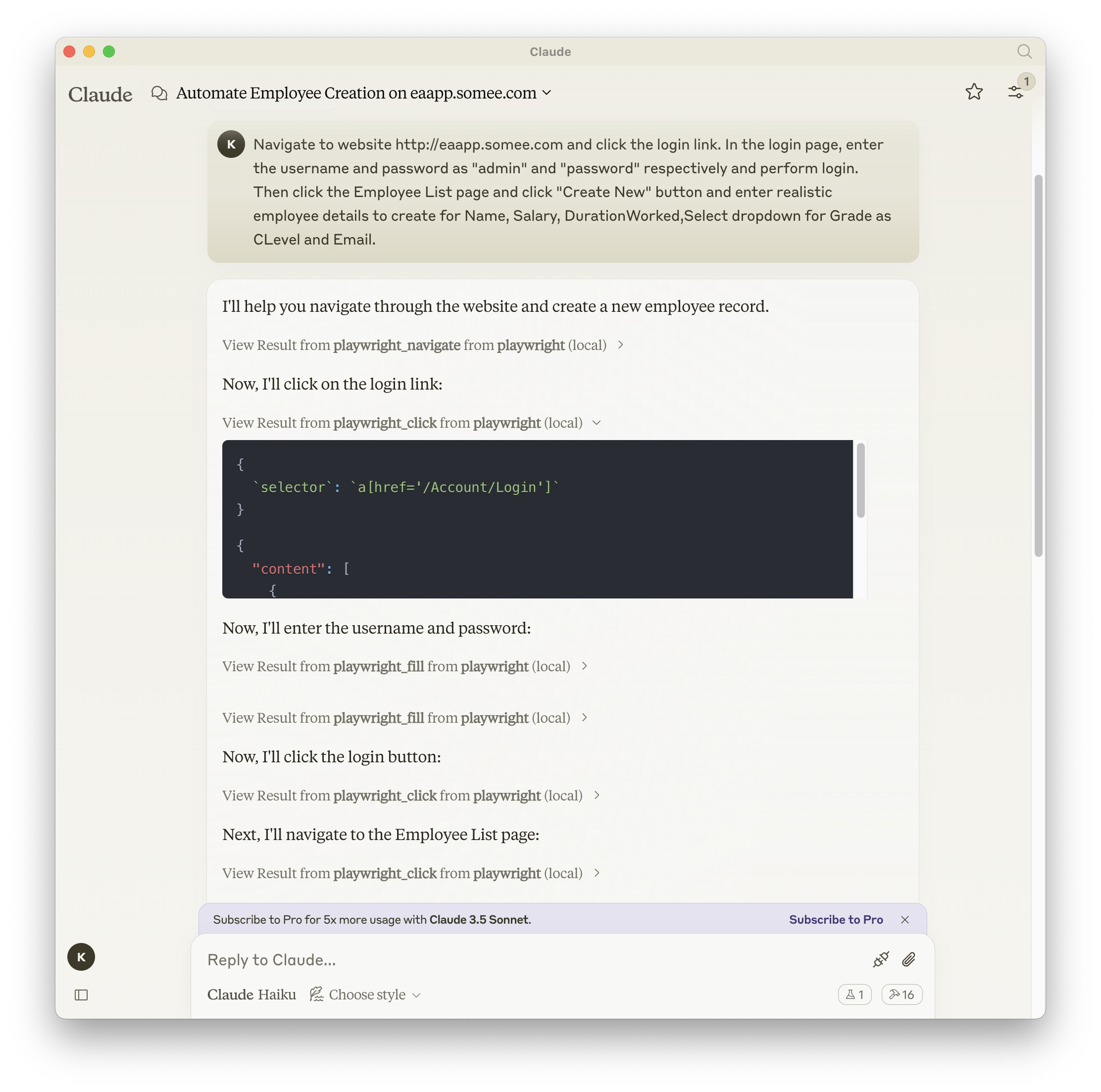
A Model Context Protocol server that provides browser automation capabilities using Playwright. This server enables LLMs to interact with web pages, take screenshots, generate test code, web scraps the page and execute JavaScript in a real browser environment.
mcp-playwright MCP server

Screenshot

Playwright + Claude

Installation

You can install the package using either npm, mcp-get, or Smithery:

Using npm:

npm install -g @executeautomation/playwright-mcp-server

Using mcp-get:

npx @michaellatman/mcp-get@latest install @executeautomation/playwright-mcp-server

Using Smithery

To install Playwright MCP for Claude Desktop automatically via Smithery:

npx @smithery/cli install @executeautomation/playwright-mcp-server --client claude
Installation in VS Code

Install the Playwright MCP server in VS Code using one of these buttons:

Install in VS Code Install in VS Code Insiders

Alternatively, you can install the Playwright MCP server using the VS Code CLI:

# For VS Code
code --add-mcp '{"name":"playwright","command":"npx","args":["@executeautomation/playwright-mcp-server"]}'
# For VS Code Insiders
code-insiders --add-mcp '{"name":"playwright","command":"npx","args":["@executeautomation/playwright-mcp-server"]}'

After installation, the ExecuteAutomation Playwright MCP server will be available for use with your GitHub Copilot agent in VS Code.

Configuration to use Playwright Server

Here's the Claude Desktop configuration to use the Playwright server:

{
  "mcpServers": {
    "playwright": {
      "command": "npx",
      "args": ["-y", "@executeautomation/playwright-mcp-server"]
    }
  }
}

Testing

This project uses Jest for testing. The tests are located in the src/__tests__ directory.

Running Tests

You can run the tests using one of the following commands:

# Run tests using the custom script (with coverage)
node run-tests.cjs

# Run tests using npm scripts
npm test           # Run tests without coverage
npm run test:coverage  # Run tests with coverage
npm run test:custom    # Run tests with custom script (same as node run-tests.cjs)

The test coverage report will be generated in the coverage directory.

Running evals

The evals package loads an mcp client that then runs the index.ts file, so there is no need to rebuild between tests. You can load environment variables by prefixing the npx command. Full documentation can be found here.

OPENAI_API_KEY=your-key  npx mcp-eval src/evals/evals.ts src/tools/codegen/index.ts

Star History

Star History Chart

mcp-playwright FAQ

Which apps does it work in?
Claude Desktop, Cursor, Cline, VS Code and other MCP clients.
Do I need a key?
No. Install it with one command and paste a short settings block.
Can I use this to check a signup form still works?
Yes — describe the steps, and it clicks through them in a real browser and reports what happened.
Can it write the test for me?
Yes — it can turn a walkthrough into test code you can keep and re-run.
How is this different from the Playwright server made by Microsoft?
Same underlying browser tool, separate project; this community version leans into generating test code and lifting content off pages.
What do I need installed first?
Node on your computer; the install command handles the rest.