



aci

aci

MCP.Pizza Chef: aipotheosis-labs

Teams use ACI.dev to give an assistant safe, permission-controlled access to services like Google Calendar, Slack, Notion, Vercel, Supabase and Cloudflare without wiring each one up by hand. Signing in to every account is handled for you, and the assistant only sees the tools you allow it to see. Everything is open source under Apache 2.0, so you can run it on your own machines or use the hosted version at aci.dev.

Coding
Communication
Web/Research

Use This MCP server To

Let my coding assistant deploy a site to Vercel Check my calendar and post a Slack update in one go Research a topic and save the notes into Notion Draft outreach emails and log each one in my CRM Give one assistant many apps without separate logins each time

README

ACI.dev Logo

ACI: Open-Source Infra to Power Unified MCP Servers and VibeOps

aipotheosis-labs%2Faci | Trendshift

Documentation PyPI version License Discord Twitter Follow

Note

This repo is for the ACI.dev platform. If you're looking for the Unified MCP server built with ACI.dev, see aci-mcp.

ACI.dev is the open-source tool-calling platform that hooks up 600+ tools into any agentic IDE or custom AI agent. It gives agents intent-aware access to tools with multi-tenant auth, granular permissions, and dynamic tool discovery—exposed as either direct function calls or through a Unified Model-Context-Protocol (MCP) server.

Examples: Instead of writing separate OAuth flows and API clients for Google Calendar, Slack, and more, use ACI.dev to manage authentication and provide AI agents with unified, secure function calls. Access these capabilities through our Unified MCP server or via our lightweight Python SDK, compatible with any LLM framework.

Supercharge vibe coding and automate devOps by adding a single unified MCP server to your favourite agentic IDE. Configure the MCP with Vercel, Supabase, Cloudflare, and other platforms. Let AI handle provisioning, deployment, database configs, and debugging to turn a vibe coded prototype into a live product.
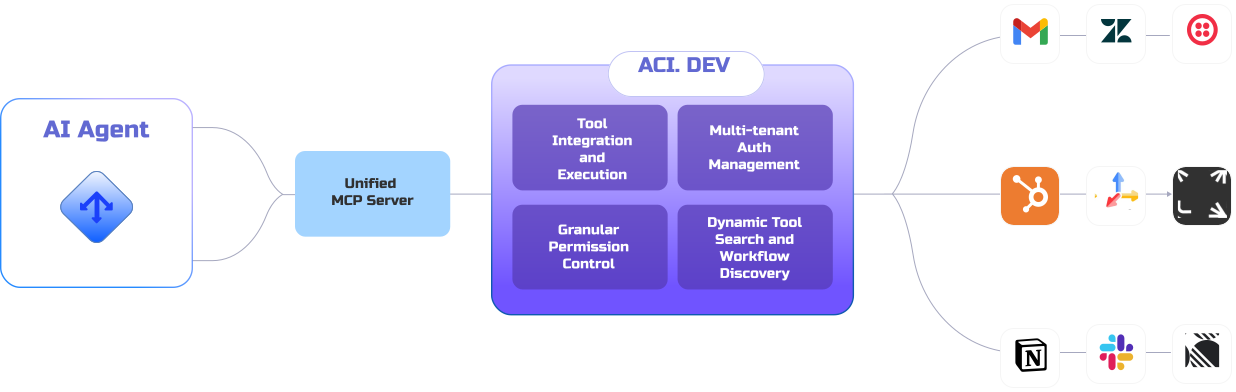
ACI.dev Architecture

Join us on Discord to help shape the future of Open Source AI Infrastructure and VibeOps.

🌟 Star ACI.dev to stay updated on new releases!

GitHub Stars

📺 Demo Video

ACI.dev Unified MCP Server Demo

ACI.dev Unified MCP Server Demo

ACI.dev VibeOps Demo

ACI.dev VibeOps Demo

✨ Key Features

  • 600+ Pre-built Integrations: Connect to popular services and apps in minutes.
  • Flexible Access Methods: Use our unified MCP server or our lightweight SDK for direct function calling.
  • Multi-tenant Authentication: Built-in OAuth flows and secrets management for both developers and end-users.
  • Enhanced Agent Reliability: Natural language permission boundaries and dynamic tool discovery.
  • Framework & Model Agnostic: Works with any LLM framework and agent architecture.
  • 100% Open Source: Everything released under Apache 2.0 (backend, dev portal, integrations).

💡 Why Use ACI.dev?

ACI.dev improves tool-calling reliability and accountability:

  • Authentication at Scale: Connect multiple users to multiple services securely.
  • Discovery Without Overload: Find and use the right tools without overwhelming LLM context windows.
  • Natural Language Permissions: Control agent capabilities with human-readable boundaries.
  • Tool-use Logging: See how your agent called tools and the issues it ran into.
  • Build Once, Run Anywhere: No vendor lock-in with our open source, framework-agnostic approach.

🧰 Common Use Cases

  • VibeOps: Automate devOps by letting your agentic IDE access Vercel, Supabase, Cloudflare, Sentry and more to ship live products.
  • Personal Assistant Chatbots: Build chatbots that can search the web, manage calendars, send emails, interact with SaaS tools, etc.
  • Research Agent: Conducts research on specific topics and syncs results to other apps (e.g., Notion, Google Sheets).
  • Outbound Sales Agent: Automates lead generation, email outreach, and CRM updates.
  • Customer Support Agent: Provides answers, manages tickets, and performs actions based on customer queries.

🔗 Quick Links

💻 Getting Started: Local Development

To run the full ACI.dev platform (backend server and frontend portal) locally, follow the individual README files for each component:

  • Backend: backend/README.md
  • Frontend: frontend/README.md

👋 Contributing

We welcome contributions! Please see our CONTRIBUTING.md for more information.

Integration Requests

Missing any integrations (apps or functions) you need? Please see our Integration Request Template and submit an integration request! Or, if you're feeling adventurous, you can submit a PR to add the integration yourself!

Star History

Star History Chart

aci FAQ

Which apps can it reach?
More than 600, including Google Calendar, Slack, Notion, Vercel, Supabase and Cloudflare.
Do I have to sign in to every app separately?
You connect each account once through ACI, and it handles the sign-in for your assistant from then on.
Can I use this to let my coding tool set up a database?
Yes, that is one of its main uses, with Supabase, Vercel and Cloudflare among the supported services.
Can I limit what the assistant is allowed to do?
Yes, permissions are written in plain language per tool, and every action the assistant takes is logged.
Does it work with assistants other than Claude?
Yes, it is model- and framework-agnostic and works with any MCP-compatible tool or custom agent.
How hard is it to set up?
Running the platform yourself needs a developer to start the backend and portal; the hosted version at aci.dev is much quicker.
Is the code open?
Yes, the backend, developer portal and integrations are all released under Apache 2.0.