Log-Analyzer-with-MCP

MCP.Pizza Chef: awslabs

Seven tools and nine ready-made views cover listing log groups, running searches, filtering events, summarizing activity over a chosen window, spotting the error messages that repeat, and lining up logs from several services against one timeline. Everything only reads; nothing here edits or deletes a log. There is no key to paste, because it uses the AWS credentials already set up on your computer, and you can name an account profile and a region per request. AWS bills the searches by data scanned.

Coding
Data

Use This MCP server To

Find out why a service started throwing errors last night Summarize what happened in a log group over the past day Spot the error messages that repeat most often Line up logs from three services around the same minute List the log groups in an account I barely know

README

Log Analyzer with MCP

A Model Context Protocol (MCP) server that provides AI assistants access to AWS CloudWatch Logs for analysis, searching, and correlation.
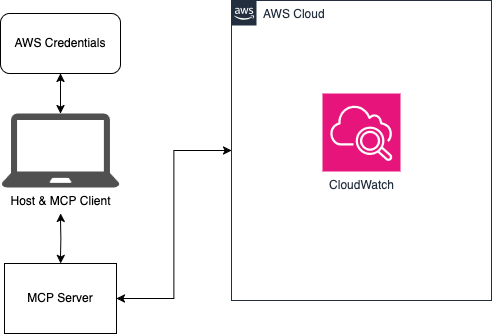
🏗️ Architecture

Architecture Diagram

🔌 Model Context Protocol (MCP)

As outlined by Anthropic:

MCP is an open protocol that standardizes how applications provide context to LLMs. Think of MCP like a USB-C port for AI applications. Just as USB-C provides a standardized way to connect your devices to various peripherals and accessories, MCP provides a standardized way to connect AI models to different data sources and tools.

This repository is an example client and server that allows an AI assistant like Claude to interact with CloudWatch logs in an AWS account. To learn more about MCP, read through the introduction.

✨ Features

  • Browse and search CloudWatch Log Groups
  • Search logs using CloudWatch Logs Insights query syntax
  • Generate log summaries and identify error patterns
  • Correlate logs across multiple AWS services
  • AI-optimized tools for assistants like Claude

Detailed feature list

🚀 Installation

Prerequisites

  • The uv Python package and project manager (includes uvx)
  • An AWS account with CloudWatch Logs
  • Configured AWS credentials

🚦 Quick Start

  1. Make sure to have configured your AWS credentials as described here

  2. Update your claude_desktop_config.json file with the proper configuration outlined in the AI integration guide

  3. Open Claude for Desktop and start chatting!

For more examples and advanced usage, see the detailed usage guide.

🤖 AI Integration

This project can be easily integrated with AI assistants like Claude for Desktop. See the AI integration guide for details.

📚 Documentation

  • Detailed Features
  • Usage Guide
  • AWS Configuration
  • Architecture Details
  • AI Integration
  • Troubleshooting

🔒 Security

See CONTRIBUTING for more information.

📄 License

This project is licensed under the Apache-2.0 License.

Log-Analyzer-with-MCP FAQ

Do I need a key or a paid plan?
No key to paste. It uses the AWS credentials already configured on your machine, and each request can name an account profile and a region.
Does it cost anything to run?
The tool is free, but AWS charges for log searches based on how much log data gets scanned, so a wide search across a large log group will show up on your bill.
Can it delete or change my logs?
No. All seven tools only read. Nothing here edits or removes anything in AWS.
Can I use this to work out why something broke?
Yes, that is the whole point. It can summarize a time window, surface the errors that repeat, and line up logs from several services around the same moment.
Which apps does it work in?
The instructions cover Claude Desktop, and it works in any assistant that can start a local helper.
How hard is the setup?
A short config block, plus AWS credentials already working on your machine. The uv tool needs to be installed to launch it.
Who is behind it and is it maintained?
It comes from AWS Labs and is still getting updates, though it is presented as a worked example rather than a supported product.