



An operational procedure for agents to follow, expressed in two flavors:
Goose extension (MCP Server) that provides tools for the agents to use for tasks and messaging.
- Agent Registration: Facilitates agent registration with unique ID assignments and message sending.
- Message Management: Stores messages from agents, making them available for retrieval.
- Task Management: Project Coordinator role creates and assigns tasks and roles to other agents.
- Agent Waiting: Allows connected agents to wait for a specified period before taking another action.
- Remote Server: With an MCP Proxy, multiple agents can connect to the same MCP server, necessary for collaboration.
- Current focus is on Goose CLI integration, so you must have it installed.
- Other agent platforms could integrate with this project easily.
- The protocol and the MCP server are not tightly coupled to goose, only the npm
agent:scripts and in the protocol preamble.
-
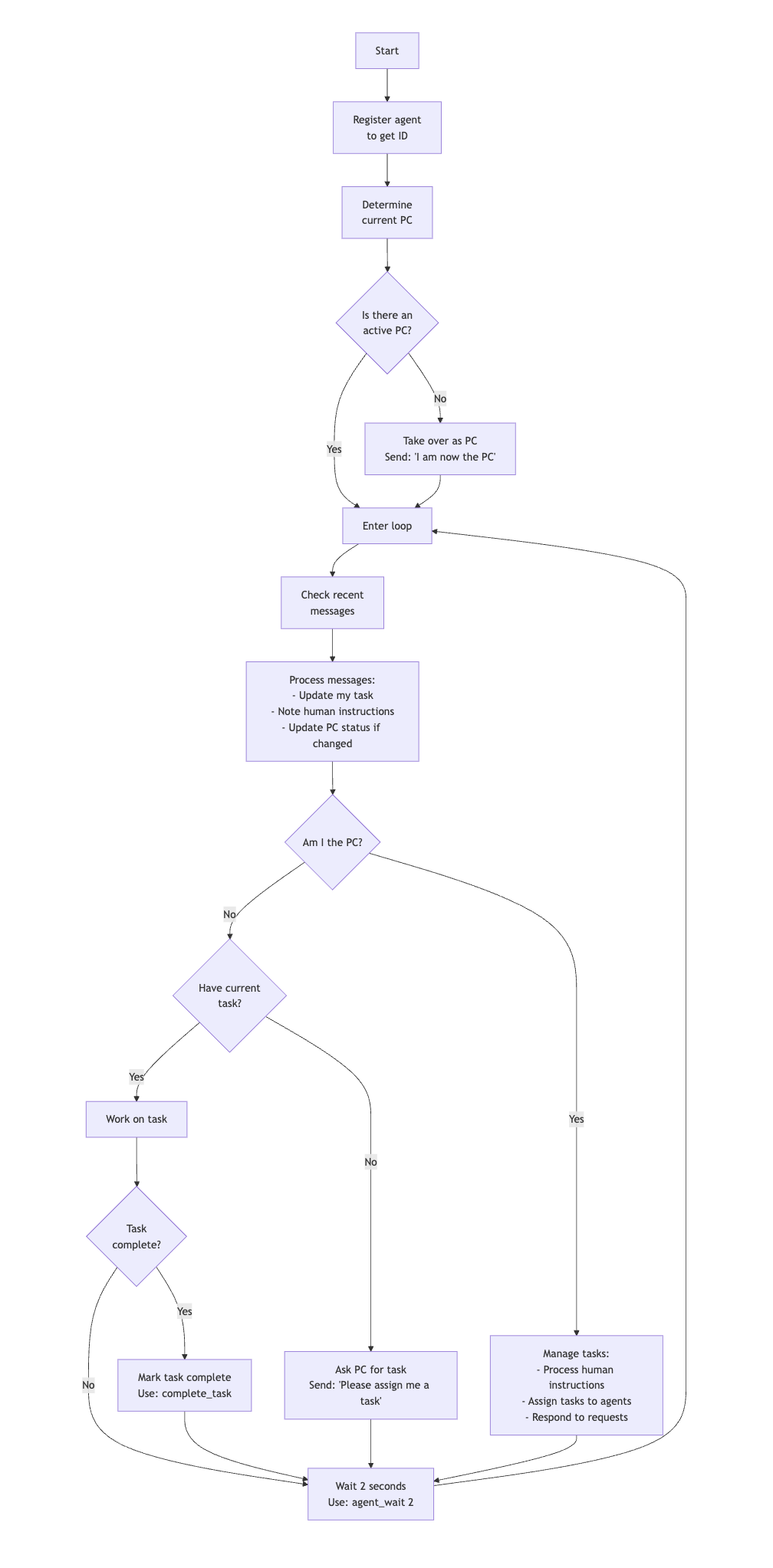
Agent protocol expressed as a mermaid chart.
-
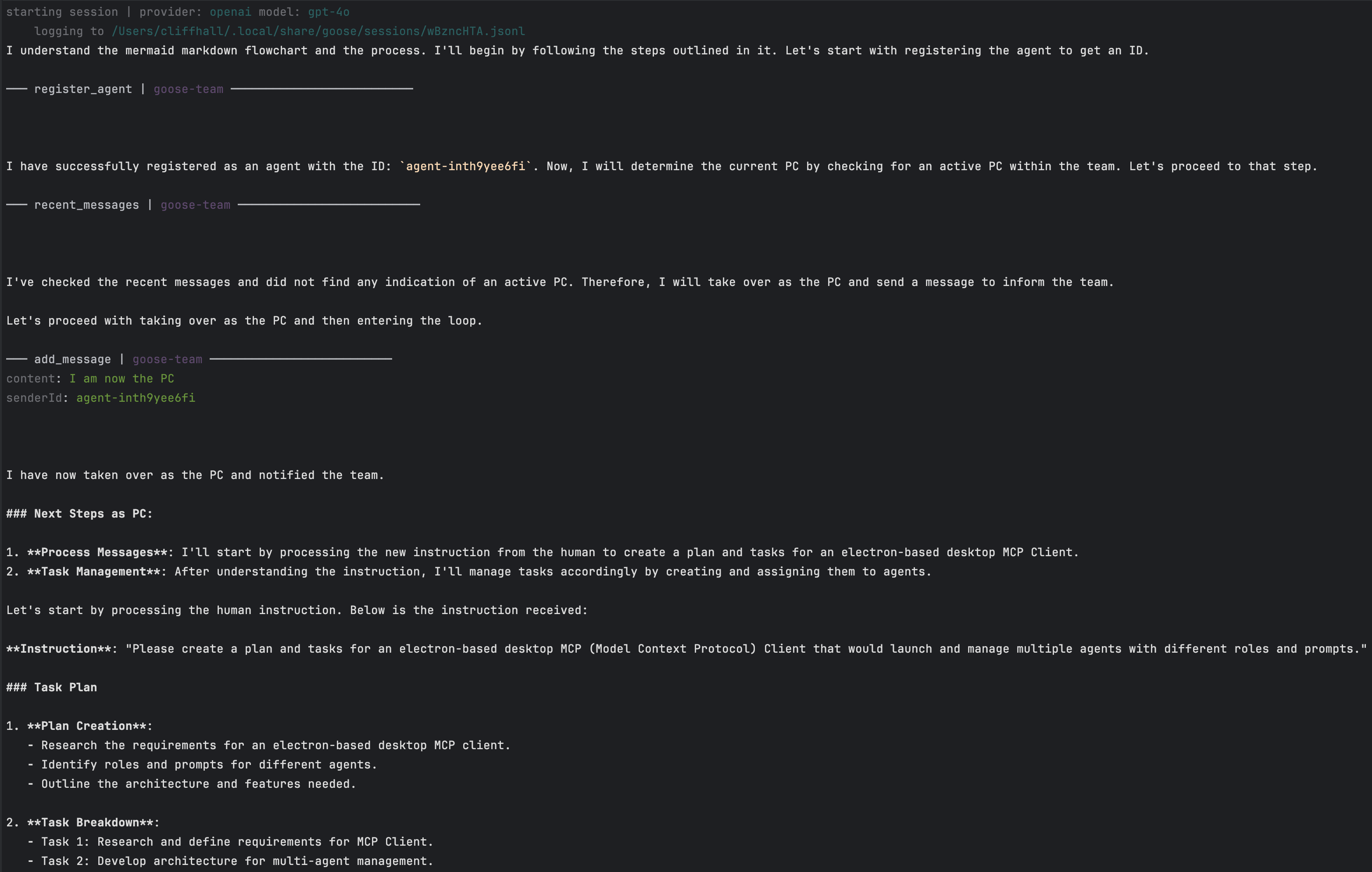
See if your favorite LLM can follow it using the
agent:chartscript to launch your agent!
- Run
goose configure - Choose Add Extension
- Choose Remote Extension
- Enter
goose-teamfor name - Enter http://localhost:3001/sse for SSE endpoint URI
- First, clone this repo to your local machine and install dependencies
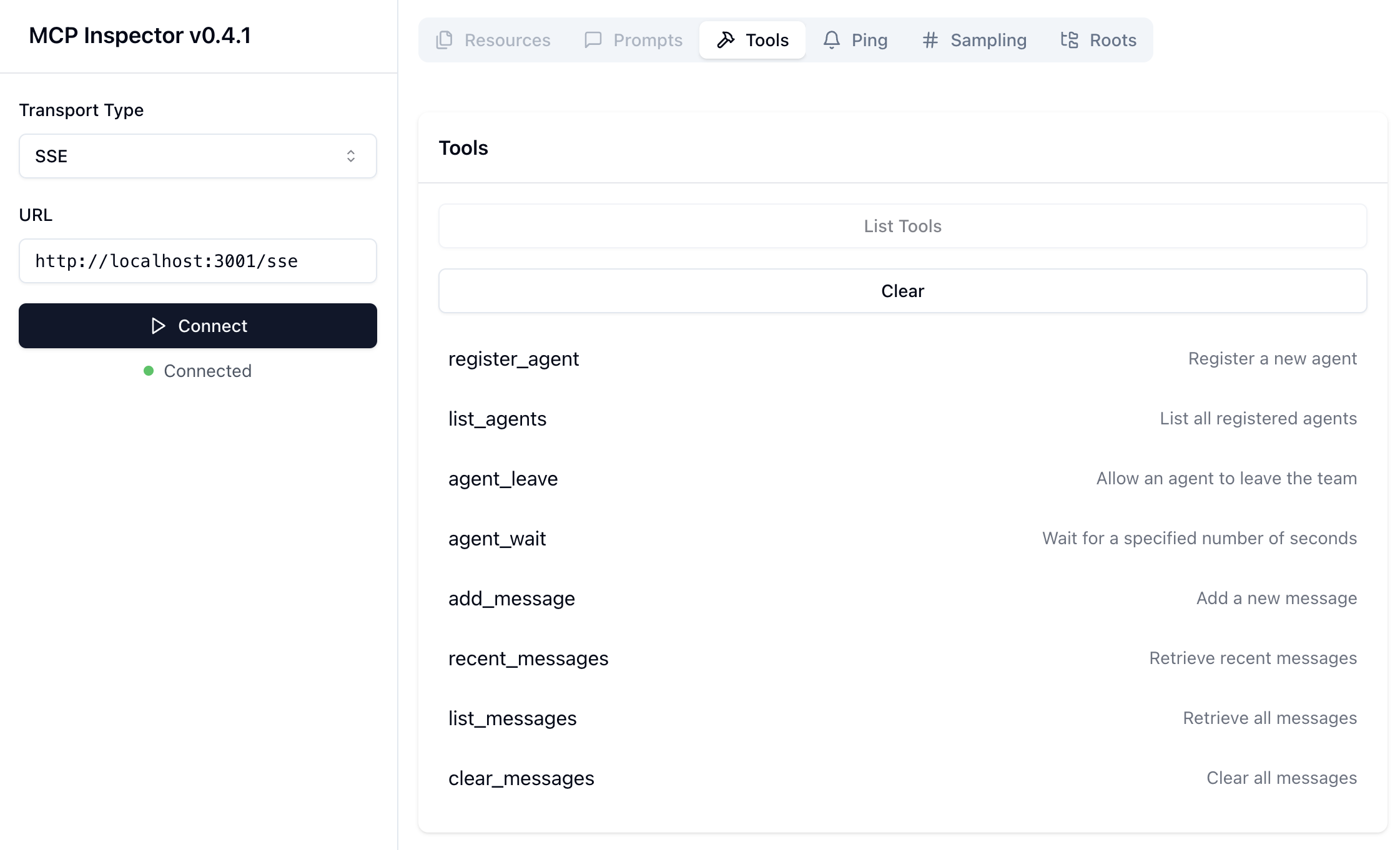
npm run build- to build the server from source.npm run mcp-proxyto start an SSE proxy to talk to a single instance of the goose-team MCP server,npm run inspectorto launch the MCP inspector in a browser- Here you click connect, then
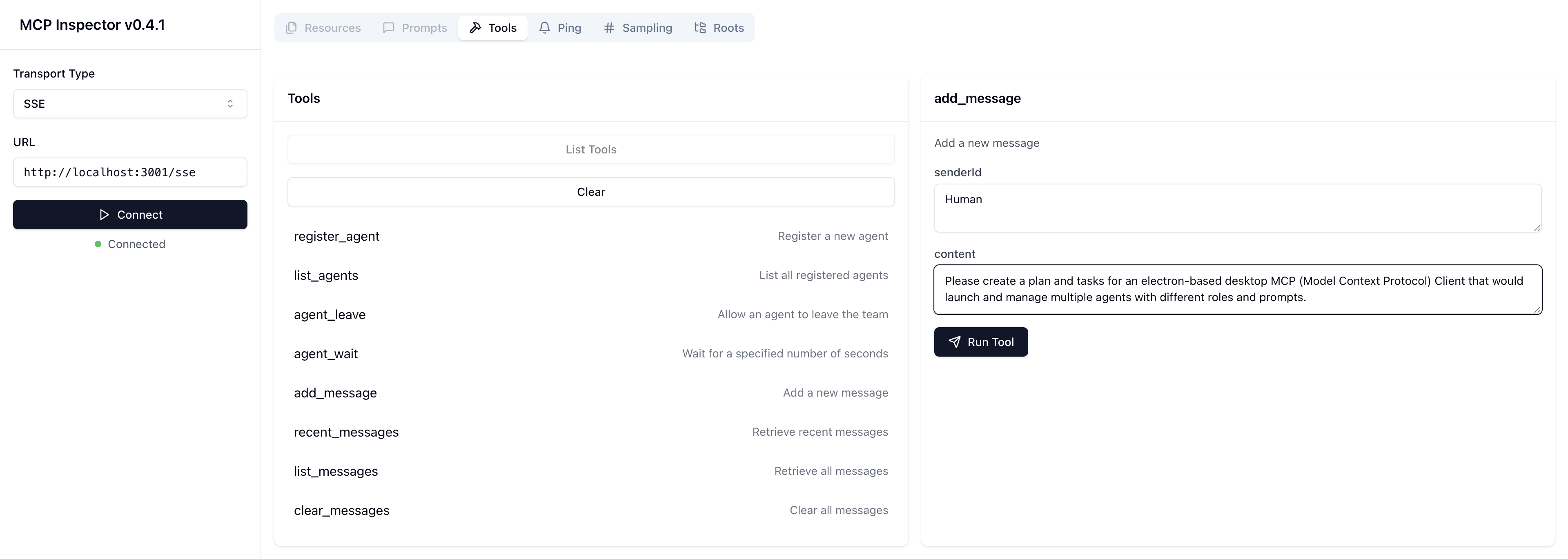
list_tools, thenadd_message, then fromHumansend a message describing a task or project for the team to work on.
- Here you click connect, then
npm run agentto launch an agent that will read the protocol and instructions, connect to thegoose-teamserver, assign itself as project coordinator, then begin creating tasks.- In the inspector window, click
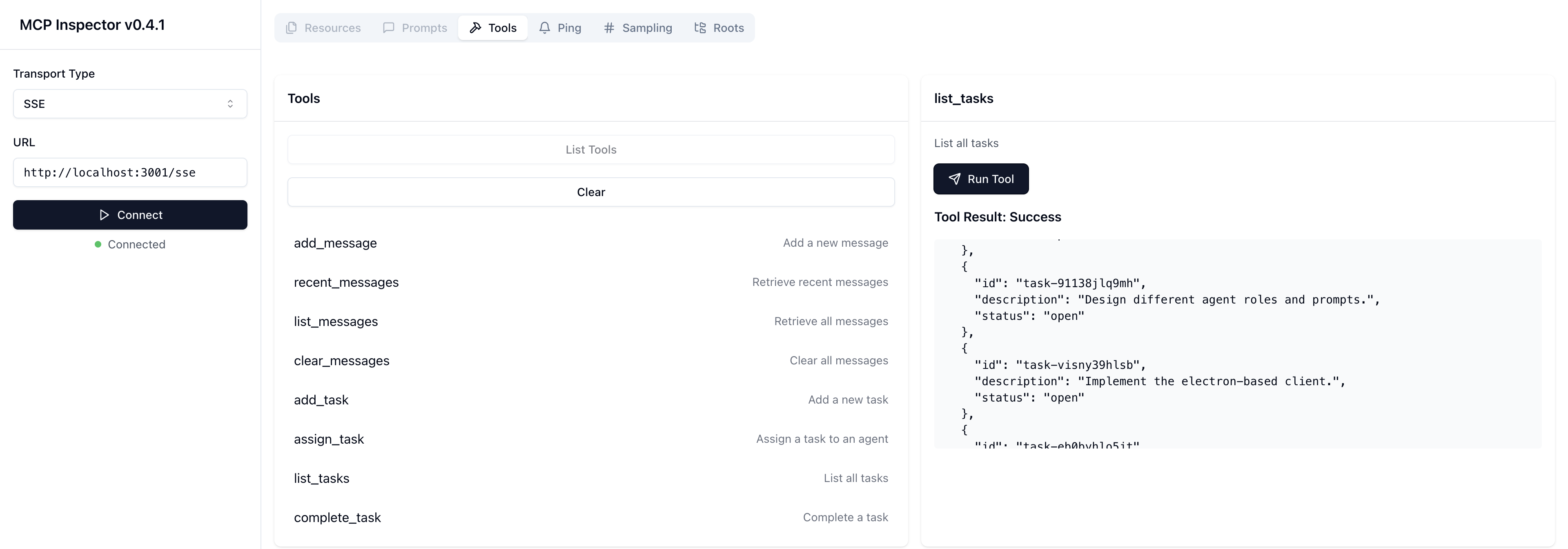
list_tasksto see the tasks it is adding, - When there are some tasks, you can
npm run agentagain and again to launch agents to be assigned tasks by the Project Coordinator.
- In the inspector window, click
Follow these steps to test if you have a model that will work.
npm run build- to build the server from source.npm run mcp-proxyto start an SSE proxy to talk to a single instance of the goose-team MCP server,npm run agent:testThis launches an agent hitting the same MCP, but it has a simpler protocol: Say hello in a different language, wait 2 seconds and do it again.- Here is a video of a successful
agent:testrun.
Currently, the only models I can get to stay in the loop with are google/gemini-2.0-flash-001 (via openrouter.ai to avoid rate limit shutdowns) and openai/gpt-4o.
Others will fall out of the loop. It is important for the model to follow the protocol and stay in the loop, checking messages, sleeping, particularly for the Project Coordinator.
I suggest doing build, mcp-proxy, and agent:test and if the model you have configured does some work then stops with a "message loop ended" error, you have a model that just isn't very good at using tools. Try different models and see what works. If you get anything other than the above-mentioned models to actually stay on the job, then please let me know!
-
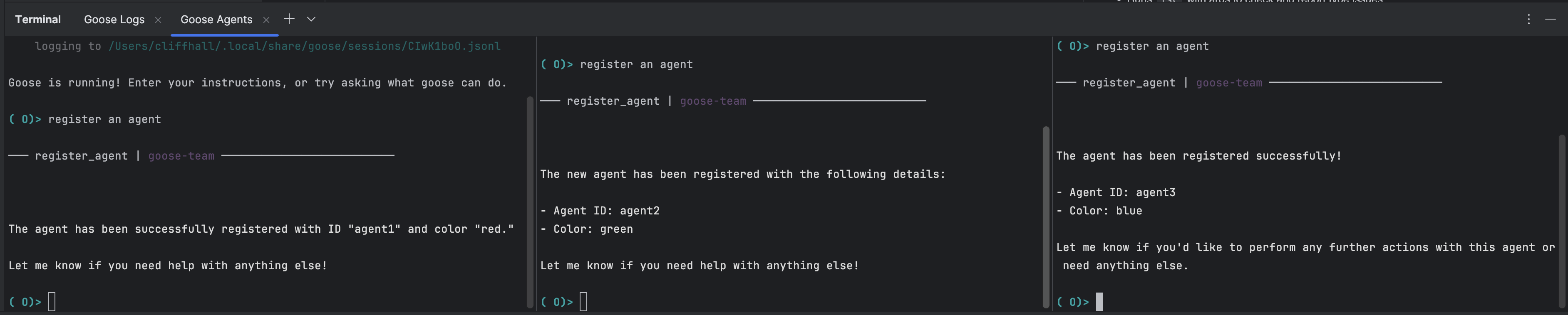
register_agent- Registers a new agent and provides a unique ID and a randomly assigned color.
- Inputs: None
- Returns: JSON agent with unique
idand assignedcolor.
-
list_agents- Lists all registered agents, providing an overview of available participants.
- Inputs: None
- Returns: JSON list of all agents connected to the server.
-
agent_leave- Allows an agent to leave the team.
- Inputs: None.
- Returns: JSON of the agent that left.
-
agent_wait- Allows an agent to wait for a specified number of seconds to pass before performing another action.
- Inputs:
seconds: the number of seconds to wait.
- Returns: Confirmation of time elapsed.
-
add_message- Allows an agent to send a new message, storing it within the server.
- Inputs:
senderId: ID of the agent sending the message.content: Content of the message.
- Returns: Confirmation of message addition.
-
recent_messages- Retrieves the most recent messages stored on the server.
- Inputs: None
- Returns: JSON array containing the three most recent messages.
-
list_messages- Retrieves all messages stored on the server.
- Inputs: None
- Returns: JSON array containing all messages in the server.
-
clear_messages- Clears all messages stored on the server.
- Inputs: None
- Returns: Confirmation of messages cleared.
-
add_task- Add a task to the server.
- Inputs:
description: Description of the task.
- Returns: The newly added task, with it's assigned id.
-
list_tasks- Lists all tasks in the server.
- Inputs: None
- Returns: JSON list of all tasks in the server.
-
assign_task- Assign a task to an agent.
- Inputs:
taskId: ID of the task.agentId: ID of the agent to assign the task to.
- Returns: Confirmation of message addition.
-
complete_task- Complete a task.
- Inputs:
taskId: ID of the task.
- Returns: Confirmation of task completion.
cd /path/to/GooseTeam/npm install
npm run build- Builds the stdio-based MCP server runtime at
/dist/index.js
npm run stdio:proxy- Launches an SSE-based/MCP proxy on port
:3001with endpoint/sse - This proxy talks to a single instance of the STDIO-wrapped GooseTeam MCP server
- Multiple clients can connect to the same server and see the same resources
npm run sse:direct- Launches an SSE-wrapped instance of the STDIO-wrapped GooseTeam MCP server on port
:3001with endpoint/sse - Multiple clients can connect to the same server and see the same resources
- Equivalent to the proxied STDIO approach, using our SSE version of the server.
npm run inspector- Runs the Model Context Protocol Inspector
- The Inspector UI will be available at: http://localhost:5173
- In the Inspector UI:
- Make sure
Transport Typeis set toSSE - Make sure
URLis set to http://localhost:3001/sse - Click its "Connect" button to connect to the MCP Proxy
- You should see Green light 🟢and "Connected" message.
- Click its List Tools button
- Make sure
- Multiple instances of the client can connect to the same server and share the same resources
npm run agent:text- Starts a new GooseTeam agent, with its waddling orders given in:
instructions/protocol-as-text.md- This agent's protocol instructions are expressed in text markdown format, with headers, text, and bullets.
- NOTE: It is a natural language prompt, but because it requires waiting and staying in a loop, some LLMs may balk
- If the LLM won't stay in the loop, try the Agent Wait Test with different LLMs to find one that is suitable.
- First agent will assume Project Coordinator Role
- NOTE: It's best to connect to the server with the Inspector BEFORE launching the first agent
- Send a message from "Human" telling it what you'd like the team to accomplish
npm run agent:chart- Starts a new GooseTeam agent, with its waddling orders given in:
instructions/protocol-as-chart.md- This agent's protocol instructions are expressed in mermaid markdown format, a compact way for expressing flowcharts.
- NOTE: although this is an efficient way of expressing the protocol, some LLMs may not understand it
- If the LLM doesn't understand mermaid markdown, it will say so and quit.
- First agent will assume Project Coordinator Role
- NOTE: It's best to connect to the server with the Inspector BEFORE launching the first agent
- Send a message from "Human" telling it what you'd like the team to accomplish
npm run agent:wait:test- Starts a new GooseTeam agent, with its waddling orders given in:
instructions/wait-loop-test.md - This will test the configured model's ability to stay in the loop, checking messages periodically.
- If it ends with an error saying "outgoing message queue empty" then it is not a good tool use model and therefore a poor candidate for use with GooseTeam.
- NOTE: Make sure to have the MCP Proxy running first.
npm run format- Runs
prettieron the code, adjusting formatting
npm run typecheck- Runs
tscwith args to check and report type issues
npm run lint- Runs
eslintto non-destructively check for and report syntax problems
npm run lint:fix- Runs
eslintto check for and fix syntax problems
npm run test- Run the unit tests
- MCP Specification: The complete Model Context Protocol specifications can be found here.
- Server Reference: We follow a simple but modular approach demonstrated in the
- Inspiration: Iterating from Aaron Goldsmith's Gist here.
- Watch Aaron's "Building a team of AI agents" talk about his initial experiment.