armor-crypto-mcp

MCP.Pizza Chef: armorwallet

Thirty-seven tools cover wallets, swaps, transfers, staking, recurring buys, limit orders, token search, and price history. All of it runs on Solana only, despite the dozen other blockchains named in the project's own feature list, and the advertised social-sentiment and prediction features do not exist as tools. Access is genuinely expensive: the key is issued only to people who buy the project's NFT. Trades execute the moment they are requested, with no confirmation step and no practice mode.

Unmaintained ยท untouched since July 2025; self-described alpha build
Data
Other

Use This MCP server To

Check what tokens a Solana wallet is holding Swap one token for another without opening a wallet app Set up a recurring buy on a schedule Cancel a limit order I placed earlier Look up a token's price history before deciding Stake tokens and check what I have staked

README

Armor Crypto MCP

Alpha Test version 0.1.24

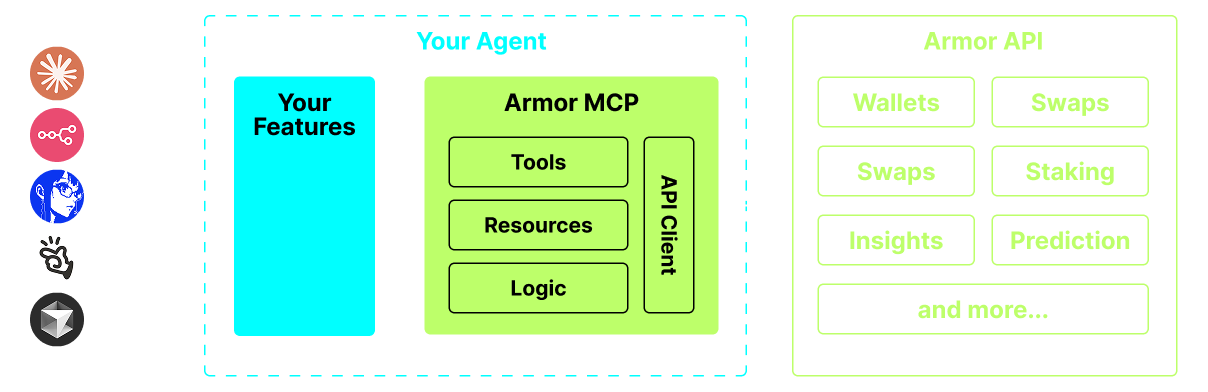
A single source for integrating AI Agents with the Crypto ecosystem. This includes Wallet creation and management, swaps, transfers, event-based trades like DCA, stop loss and take profit, and much more. The Armor MCP supports Solana in Alpha and, when in beta, will support more than a dozen blockchains, including Ethereum. Base, Avalanche, Bitcoin, Sui, Berachain, megaETH, Optimism, Ton, BNB, and Arbitrum, among others. Using Armor's MCP you can bring all of crypto into your AI Agent with unified logic and a complete set of tools.
Armor MCP


Features

๐Ÿง  AI Native

๐Ÿ“™ Wallet Management

๐Ÿ”ƒ Swaps

๐ŸŒˆ Specialized trades (DCA, Stop Loss etc.)

โ›“๏ธ Multi-chain

โ†”๏ธ Cross-chain transations

๐Ÿฅฉ Staking

๐Ÿค– Fast intergration to Agentic frameworks

๐Ÿ‘ซ Social Sentiment

๐Ÿ”ฎ Prediction

Armor MCP Diagram


Requirements

1. Make sure you have python installed


2. Install uv

Linux / Windows

pip install uv

Mac

brew install uv

3. Claude Desktop or your AI Agent will run the MCP

See Usage & Configuration for details.


Alpha Testing

We are currently in pre-alpha, and we are testing the capabilities of various agents and agentic frameworks like Claude Desktop, Cline, Cursor, n8n, etc.

Current Features & Tools

  • Wallet Management
    • Grouping & Organization
    • Archiving
  • Swap & Trades
    • Normal swap
    • DCA (place / list / cancel)
    • Scheduled Orders
    • Limit Orders (place / list / cancel)
  • Staking and Unstaking
  • Token Search and Trending Tokens
  • Statistical Calculator for accurate Analysis
  • Supports Solana blockchain

Coming Soon

  • More Blockchain Support
  • Minting
  • Armor Agents as a Tool (or A2A)

MCP Setup

Currently you need to have the Armor NFT to get an API Key. Get it here

Usage & Configuration

To use the Armor MCP with your agent, you need the following configuration, replace <PUT-YOUR-KEY-HERE> with your API key:

{
  "mcpServers": {
    "armor-crypto-mcp": {
      "command": "uvx",
      "args": ["armor-crypto-mcp@latest", "--version"],
      "env": {
        "ARMOR_API_KEY": "<PUT-YOUR-KEY-HERE>"
      }
    }
  }
}


Use in Claude Desktop

  1. Must have Developer Mode enabled
  2. Open Claude Desktop's File Menu top left of the window.
  3. Go to File > Settings
  4. Under Developer, click Edit Configuration
  5. In the config file, insert the armor-wallet-mcp section from above
  6. Make sure to replace the placeholder with your API key
  7. Save the file and start a new Chat in Claude Desktop

Use in Cline

  1. Click on the MCP Servers button in the Cline tab in VSCode on the left panel
  2. Scroll to the bottom of the left panel and click on Configure MCP Servers
  3. In the config file, insert armor-wallet-mcp section from above
  4. Make sure to replace the placeholder with your API key
  5. Save the file, click Done under the MCP Servers tab and start chatting with Cline

Use in n8n

  1. Open the n8n app
  2. Bottom-left of screen click ... next to your username and click Settings
  3. On the left panel, click Community nodes and then Install a Community Node button
  4. In the search field for npm Package Name type in mcp
  5. Install MCP Nodes
  6. Add any MCP node, for example: List Tools
  7. In the MCP Client Parameters tab, click Select Credential and click Create new credential
  8. Under Command enter uvx
  9. Under Arguments enter armor-crypto-mcp
  10. Under Environments enter ARMOR_API_KEY=eyJhbGciOiJIUzI1NiIsIn... paste the full API Key value after the =
  11. Back in the Parameters tab you can choose the MCP Operation for that Node


Using Armor MCP

Once you have setup the Armor MCP here are some prompts you can use to get started


armor-crypto-mcp FAQ

What do I need before I can use it?
A paid Armor NFT. The key is only handed out to holders, so there is no free trial and no free tier.
Which blockchains does it really support?
Solana, and only Solana. Ethereum, Bitcoin, Base and the rest of the list are stated plans, not working features.
Can it spend my money without asking me first?
Effectively yes. Swaps, transfers and staking run as soon as the assistant calls them. There is no confirmation prompt, no spending cap, and no watch-only mode.
Is there anything risky I should know?
One of its tools sends your wallet's recovery phrase or private key to Telegram. Treat that as a serious hazard and keep only small amounts in any wallet it can reach.
Can I use this to just watch prices without trading?
Yes, the balance, token search, trending and price-history tools work on their own. You cannot switch the trading tools off, though, so the risk stays present.
How hard is setup?
A short config block pasted into Claude Desktop, Cursor, Cline, or n8n, plus installing Python and the uv runner first if you do not already have them.
Is it finished, stable software?
No. It describes itself as an alpha test build, and the code has not been touched since July 2025, roughly a year ago.