



photoshop-python-api-mcp-server

MCP.Pizza Chef: loonghao

Windows only, and it needs Adobe Photoshop already installed on the same computer. Despite the broad claims on its front page, what actually ships today is narrow but useful: create, open, and save documents, add a text layer or a solid colour fill layer, and report back on the open document, its layers, and the current selection. There is no filter, effect, or adjustment control. Setup is a short block pasted into Claude Desktop, Cline, or Windsurf.

Images/Design

Use This MCP server To

Start a new Photoshop file at the size I name Add a headline as a text layer without touching the toolbar Put a solid colour background behind my artwork Ask how many layers my open file has Save the document I am working on

README

Photoshop MCP Server

PyPI Version PyPI Downloads Build Status License Python Version Platform GitHub stars GitHub issues GitHub last commit

⚠️ WINDOWS ONLY: This server only works on Windows operating systems due to its dependency on Windows-specific COM interfaces.

A Model Context Protocol (MCP) server for Photoshop integration using photoshop-python-api.

English | 简体中文

Overview

This project provides a bridge between the Model Context Protocol (MCP) and Adobe Photoshop, allowing AI assistants and other MCP clients to control Photoshop programmatically.
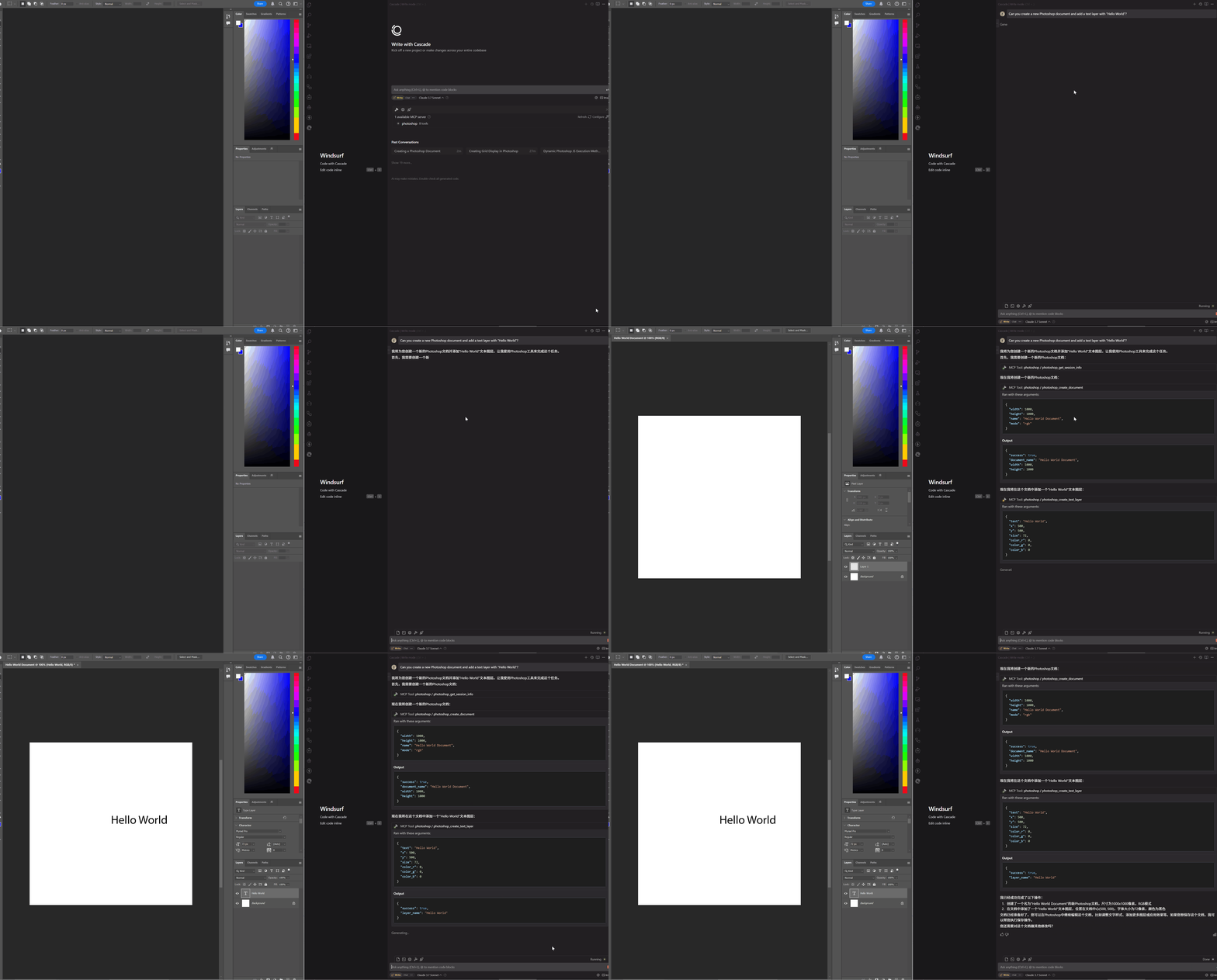
Photoshop MCP Server Demo

What Can It Do?

With this MCP server, AI assistants can:

  • Create, open, and save Photoshop documents
  • Create and manipulate layers (text, solid color, etc.)
  • Get information about the Photoshop session and documents
  • Apply effects and adjustments to images
  • And much more!

Requirements

System Requirements

  • 🔴 WINDOWS OS ONLY: This server ONLY works on Windows operating systems
    • The server relies on Windows-specific COM interfaces to communicate with Photoshop
    • macOS and Linux are NOT supported and CANNOT run this software

Software Requirements

  • Adobe Photoshop: Must be installed locally (tested with versions CC2017 through 2024)
  • Python: Version 3.10 or higher

Installation

Note: Remember that this package only works on Windows systems.

# Install using pip
pip install photoshop-mcp-server

# Or using uv
uv install photoshop-mcp-server

MCP Host Configuration

This server is designed to work with various MCP hosts. The PS_VERSION environment variable is used to specify which Photoshop version to connect to (e.g., "2024", "2023", "2022", etc.).

The recommended way to configure the server is using uvx as the command, which is the official standard format.

Standard Configuration (Recommended)

Add the following to your MCP host configuration (works with Claude Desktop, Windsurf, Cline, and other MCP hosts):

{
  "mcpServers": {
    "photoshop": {
      "command": "uvx",
      "args": ["--python", "3.10", "photoshop-mcp-server"],
      "env": {
        "PS_VERSION": "2024"
      }
    }
  }
}

Configuration Options

  • PS_VERSION: Specify the Photoshop version to connect to (e.g., "2024", "2023", "2022", etc.)
  • command: Use uvx for the standard approach
  • args: Use ["photoshop-mcp-server"] to run the Photoshop MCP server
    • To specify a Python version explicitly, use ["--python", "3.10", "photoshop-mcp-server"] (any version from 3.10 to 3.14 is supported)

Key Features

Available Resources

  • photoshop://info - Get Photoshop application information
  • photoshop://document/info - Get active document information
  • photoshop://document/layers - Get layers in the active document

Available Tools

The server provides various tools for controlling Photoshop:

  • Document Tools: Create, open, and save documents
  • Layer Tools: Create text layers, solid color layers, etc.
  • Session Tools: Get information about Photoshop session, active document, selection

Example Prompts for AI Assistants

Once configured in your MCP host, you can use the Photoshop MCP server in your AI assistant conversations. Here are some example prompts to get you started:

Basic Examples

User: Can you create a new Photoshop document and add a text layer with "Hello World"?

AI Assistant: I'll create a new document and add the text layer for you.

[The AI uses the Photoshop MCP server to:
1. Create a new document using the `create_document` tool
2. Add a text layer using the `create_text_layer` tool with the text "Hello World"]

I've created a new Photoshop document and added a text layer with "Hello World".

More Advanced Examples

User: Open my latest PSD file and tell me how many layers it has.

AI Assistant: I'll check your latest PSD file and count the layers.

[The AI uses the Photoshop MCP server to:
1. Get information about open documents
2. If no document is open, it can browse and open a PSD file
3. Retrieve and analyze the layer structure]

Your document has 12 layers, including 3 group folders and 2 adjustment layers.
User: Create a social media post with a gradient background and the text "Summer Sale" in a bold font.

AI Assistant: I'll create that social media post for you.

[The AI uses the Photoshop MCP server to:
1. Create a new document with appropriate dimensions for social media
2. Create a gradient fill layer with summer colors
3. Add a text layer with "Summer Sale" in a bold font
4. Position and style the text appropriately]

I've created your social media post with a gradient background and bold "Summer Sale" text.

License

MIT

Acknowledgements

photoshop-python-api-mcp-server FAQ

Does this work on a Mac?
No. It is Windows only because of how it talks to Photoshop, and macOS and Linux cannot run it at all.
Do I need Photoshop already?
Yes, installed and licensed on the same Windows machine. Versions from CC2017 through 2024 are the tested range.
Can I use this to apply a filter or a photo adjustment?
Not today. The front page hints at effects, but the tools that actually ship cover documents, text layers, and solid colour fill layers only.
Can I use this to build a simple social post?
Partly. You can create the document, lay in a colour background, and place text, but gradients and effects are not included.
Do I need an account key?
No. It drives the copy of Photoshop already on your machine, and nothing is sent to an outside service.
How hard is the setup?
You install one Python package and paste a short block into your assistant's settings, naming your Photoshop version. Some comfort with a terminal helps.
Which apps does it work in?
Claude Desktop, Cline, and Windsurf are named in the instructions, and the same configuration works in other MCP apps.
Is it maintained?
Yes, with updates as recent as July 2026.