

Fire in da houseTop Tip:Paying $100+ per month for Perplexity, MidJourney, Runway, ChatGPT and other tools is crazy - get all your AI tools in one site starting at $15 per month with Galaxy AI Fire in da houseCheck it out free

mcp-monitor

MCP.Pizza Chef: seekrays

mcp-monitor is a system monitoring MCP server that provides real-time access to detailed system metrics including CPU usage, memory status, disk partitions, network traffic, host details, and process statistics. It enables LLMs to query and retrieve comprehensive system information through a standardized MCP interface, facilitating advanced monitoring and automation workflows.

Use This MCP server To

Retrieve real-time CPU usage and core details for system analysis Monitor memory usage including virtual and swap memory statistics Access disk usage, partitions, and I/O stats for storage monitoring Track network interfaces, connections, and traffic data in real time Query host system details such as uptime, boot time, and active users List and sort running processes with detailed per-process metrics

README

MCP System Monitor

Discord

A system monitoring tool that exposes system metrics via the Model Context Protocol (MCP). This tool allows LLMs to retrieve real-time system information through an MCP-compatible interface.
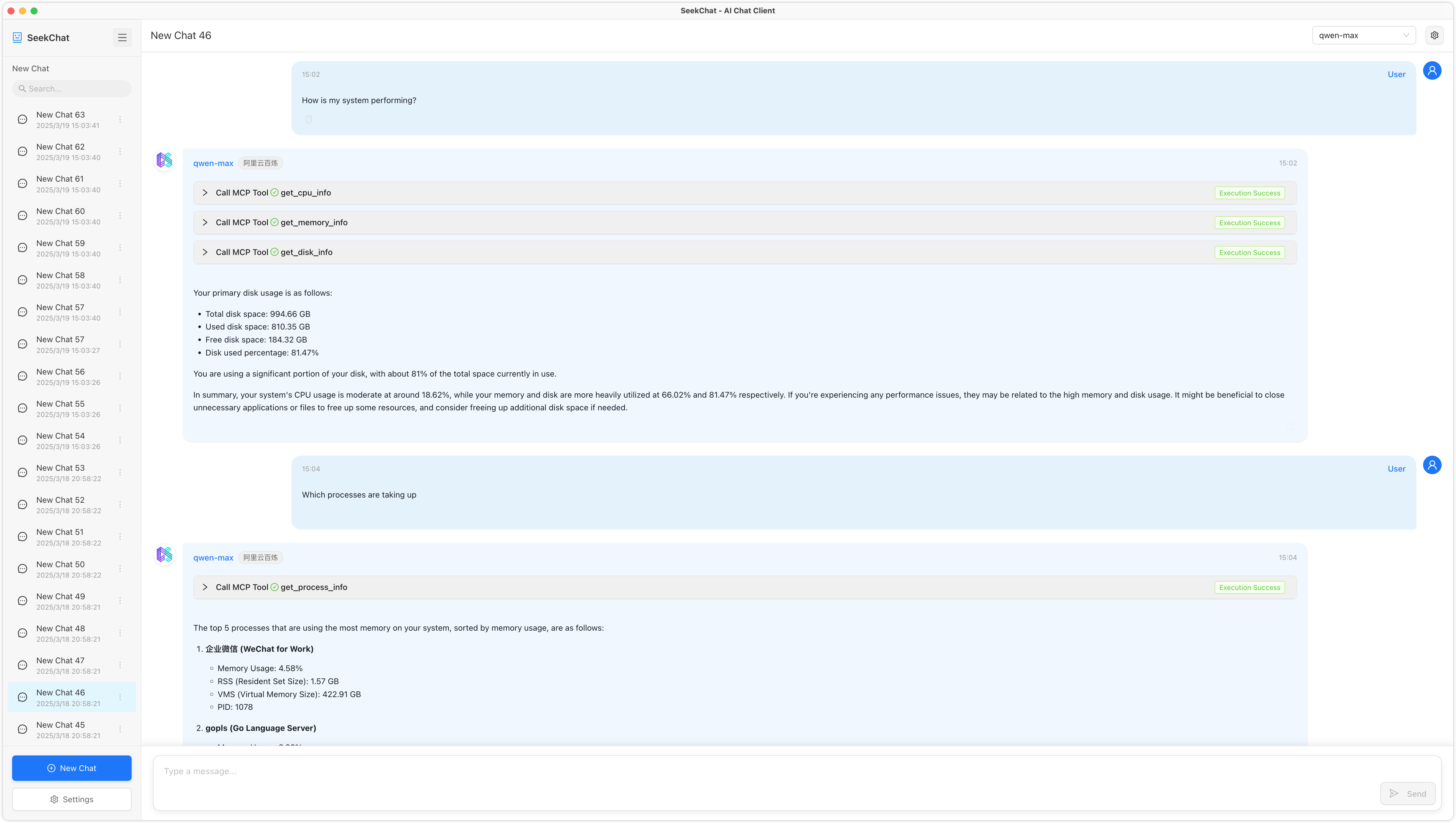
Features

This tool provides the following monitoring capabilities:

  • CPU Information: Usage percentage, core count, and detailed CPU info
  • Memory Information: Virtual and swap memory usage
  • Disk Information: Disk usage, partitions, and I/O statistics
  • Network Information: Network interfaces, connections, and traffic statistics
  • Host Information: System details, uptime, boot time, and users
  • Process Information: Process listing, sorting, and detailed per-process statistics

Available Tools

1. CPU Information

Tool: get_cpu_info
Description: Get CPU information and usage
Parameters:
  - per_cpu (boolean, default: false): Whether to return data for each core

2. Memory Information

Tool: get_memory_info
Description: Get system memory usage information
Parameters: None

3. Disk Information

Tool: get_disk_info
Description: Get disk usage information
Parameters:
  - path (string, default: "/"): Specify the disk path to query
  - all_partitions (boolean, default: false): Whether to return information for all partitions

4. Network Information

Tool: get_network_info
Description: Get network interface and traffic information
Parameters:
  - interface (string, optional): Specify the network interface name to query

5. Host Information

Tool: get_host_info
Description: Get host system information
Parameters: None

6. Process Information

Tool: get_process_info
Description: Get process information
Parameters:
  - pid (number, optional): Process ID to get detailed information for a specific process
  - limit (number, default: 10): Limit the number of processes returned
  - sort_by (string, default: "cpu"): Sort field (cpu, memory, pid, name)

Installation

git clone https://github.com/seekrays/mcp-monitor.git
cd mcp-monitor
make build

Usage

Run the compiled binary:

./mcp-monitor

The server starts in stdio mode, ready to communicate with an MCP-compatible LLM client.

Contributing

Contributions are welcome! Please feel free to submit a Pull Request.

mcp-monitor FAQ

How does mcp-monitor expose system metrics to LLMs?
It uses the Model Context Protocol (MCP) to provide structured, real-time system data accessible by LLMs.
Can mcp-monitor provide detailed CPU and memory statistics?
Yes, it offers comprehensive CPU info including usage and core count, as well as virtual and swap memory usage.
Is network traffic data available through mcp-monitor?
Yes, it exposes network interfaces, active connections, and traffic statistics.
How does mcp-monitor handle process information?
It lists running processes with sorting options and detailed per-process statistics.
What platforms does mcp-monitor support?
It is designed to work on common operating systems supporting system metric APIs, typically Linux, Windows, and macOS.
Can mcp-monitor be integrated with other MCP clients?
Yes, it is fully MCP-compatible and can be integrated with any MCP client for enhanced system monitoring workflows.
Does mcp-monitor support real-time updates?
It provides real-time or near-real-time system metrics accessible on demand via MCP queries.
Is mcp-monitor secure for production use?
It follows MCP principles for scoped and secure model interaction, but deployment security depends on the host environment.