



ChatSpatial

MCP.Pizza Chef: cafferychen777

ChatSpatial lets you analyze spatial transcriptomics data by typing natural language commands in MCP-compatible apps like Claude Desktop. It supports many analysis methods including visualization, cell type annotation, and spatial statistics. You can load your data, explore tissue structures, and run complex workflows without coding. Setup requires developer-level steps like Docker or command line installation.

Data
Other

Use This MCP server To

Load spatial transcriptomics data and explore tissue structure Visualize gene expression patterns on tissue samples Identify spatial domains within tissue sections Annotate cell types from spatial data Perform differential gene expression analysis Run trajectory inference on spatial transcriptomics data Analyze cell-cell communication networks

README

ChatSpatial

MCP server for spatial transcriptomics analysis via natural language

Paper MLGenX @ ICLR 2026 ENAR 2026 IBC 2026 CI PyPI Python 3.11-3.14 License: MIT Docs Docker

ChatSpatial Overview

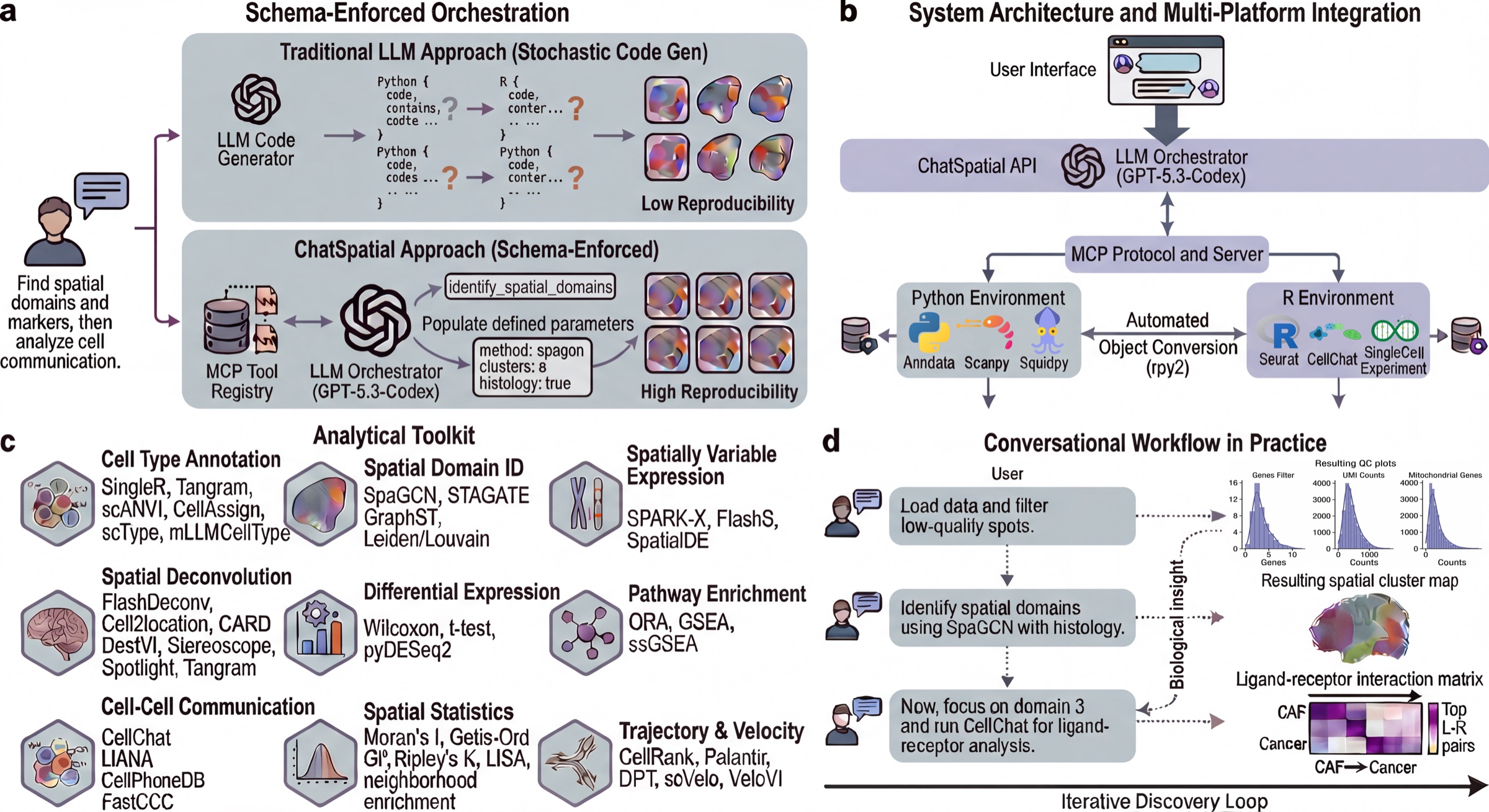
ChatSpatial replaces ad-hoc LLM code generation with schema-enforced orchestration. Instead of generating arbitrary scripts, the LLM selects tools and parameters from a curated registry, making spatial transcriptomics workflows more reproducible across sessions and clients.

ChatSpatial exposes 20 schema-validated MCP tools that orchestrate 66 spatial transcriptomics methods across 15 analytical categories. The tools are the stable natural-language interface; the methods are the analysis backends selected through tool parameters.

The server implements MCP 2026-07-28 through the official Python SDK v2 and continues to serve 2025-11-25 clients through SDK-managed protocol negotiation. STDIO remains the secure local default; Streamable HTTP is available for explicitly configured HTTP deployments.


Start Here

Install uv once, then register ChatSpatial without creating or managing a Python environment:

Codex:

codex mcp add chatspatial -- uvx --from chatspatial chatspatial server

Claude Code:

ChatSpatial FAQ

Can I use ChatSpatial to analyze spatial transcriptomics data with natural language?
Yes — it lets you run complex spatial transcriptomics analyses by typing natural language commands in MCP-compatible apps like Claude Desktop.
Does ChatSpatial work with my AI assistant app?
It works with any MCP-compatible client, including Claude Desktop, Claude Code, and Codex.
Do I need an API key or account to use ChatSpatial?
No API key or account is required, but it needs to be installed and connected to your MCP client.
How hard is it to set up ChatSpatial?
Setup requires developer-level steps like using Docker or command line tools, so it’s best if you have some technical help.
Can I use ChatSpatial to visualize gene expression on tissue samples?
Yes — it supports visualization methods like spatial plots and gene expression overlays.
Can ChatSpatial perform cell type annotation?
Yes — it includes tools for cell type annotation using methods like Tangram and scANVI.
Does ChatSpatial support multiple spatial transcriptomics platforms?
Yes — it supports data from 10x Visium, Xenium, Slide-seq v2, MERFISH, and seqFISH.
Is there a quick way to start using ChatSpatial?
You can install it via uvx or Docker and then connect it to your MCP client following the quick start guide.