Fire in da houseTop Tip:Paying $100+ per month for Perplexity, MidJourney, Runway, ChatGPT and other tools is crazy - get all your AI tools in one site starting at $15 per month with Galaxy AI Fire in da houseCheck it out free

studio-rust-mcp-server

MCP.Pizza Chef: Roblox

The studio-rust-mcp-server is a Rust-implemented MCP server that facilitates communication between Roblox Studio and Claude Desktop. It includes a web server using axum for plugin long polling and an rmcp server communicating with Claude via stdio transport. This server enables third-party tools to read and modify Roblox Studio places, integrating LLM-driven workflows directly into the development environment.

Use This MCP server To

Enable real-time LLM interaction within Roblox Studio Allow third-party tools to modify Roblox Studio places Facilitate communication between Roblox Studio plugin and Claude AI Long-poll Roblox Studio plugin for LLM tool requests Integrate Rust-based MCP server into game development workflows

README

Roblox Studio MCP Server

This repository contains a reference implementation of the Model Context Protocol (MCP) that enables communication between Roblox Studio via a plugin and Claude Desktop. It consists of the following Rust-based components, which communicate through internal shared objects.

  • A web server built on axum that a Studio plugin long polls.
  • A rmcp server that talks to Claude via stdio transport.

When LLM requests to run a tool, the plugin will get a request through the long polling and post a response. It will cause responses to be sent to the Claude app.

Please note that this MCP server will be accessed by third-party tools, allowing them to modify and read the contents of your opened place. Third-party data handling and privacy practices are subject to their respective terms and conditions.
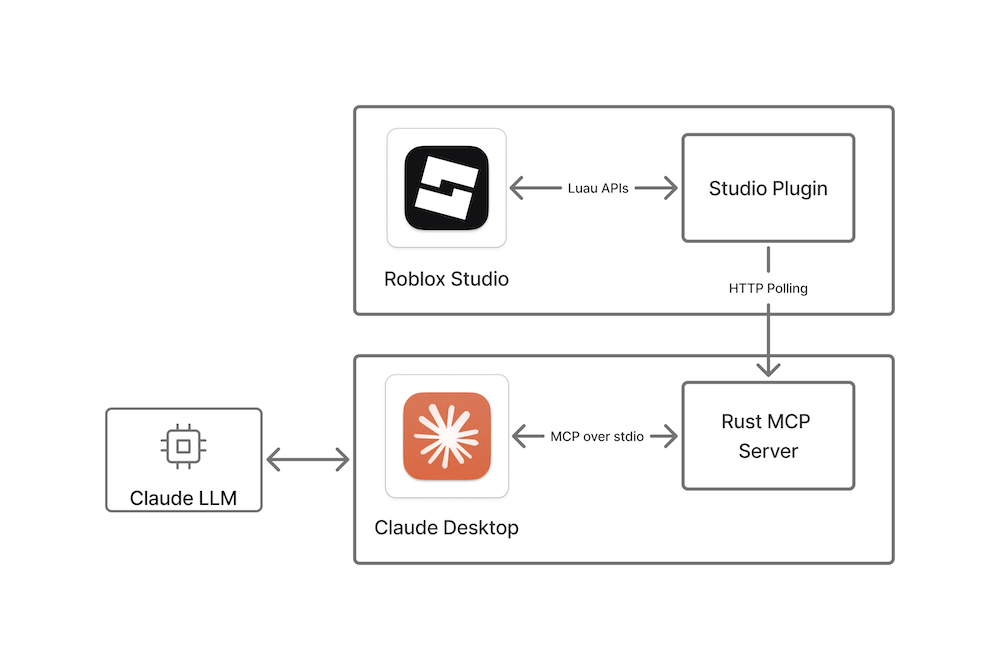
Scheme

The setup process also contains a short plugin installation and Claude Desktop configuration script.

Setup

Install with release binaries

To set up the reference implementation:

  1. Ensure you have Roblox Studio and Claude Desktop installed and started at least once.
  2. Exit Claude and Roblox Studio if they are running.
  3. Download and run the installer:
    1. Go to the releases page and download the latest release for your platform.
    2. Unzip the downloaded file if necessary and run the installer.
    3. Restart Claude and Roblox Studio if they are running.

Build from source

To build and install the MCP reference implementation from this repository's source code:

  1. Ensure you have Roblox Studio and Claude Desktop) installed and started at least once.
  2. Exit Claude and Roblox Studio if they are running.
  3. Install Rust.
  4. Download or clone this repository.
  5. Run the following command from the root of this repository.
    cargo run
    This command carries out the following actions:
    • Builds the Rust MCP server app.
    • Sets up Claude to communicate with the MCP server.
    • Builds and installs the Studio plugin to communicate with the MCP server.

After the command completes, the Studio MCP Server is installed and ready for your prompts from Claude Desktop.

Verify setup

To make sure everything is set up correctly, follow these steps:

  1. In Roblox Studio, click on the Plugins tab and verify that the MCP plugin appears. Clicking on the icon toggles the MCP communication with Claude Desktop on and off, which you can verify in the Roblox Studio console output.
  2. In the console, verify that The MCP Studio plugin is ready for prompts. appears in the output. Clicking on the plugin's icon toggles MCP communication with Claude Desktop on and off, which you can also verify in the console output.
  3. Verify that Claude Desktop is correctly configured by clicking on the hammer icon for MCP tools beneath the text field where you enter prompts. This should open a window with the list of available Roblox Studio tools (insert_model and run_code).

Note: You can fix common issues with setup by restarting Studio and Claude Desktop. Claude sometimes is hidden in the system tray, so ensure you've exited it completely.

Send requests

  1. Open a place in Studio.
  2. Type a prompt in Claude Desktop and accept any permissions to communicate with Studio.
  3. Verify that the intended action is performed in Studio by checking the console, inspecting the data model in Explorer, or visually confirming the desired changes occurred in your place.

studio-rust-mcp-server FAQ

How does the studio-rust-mcp-server communicate with Roblox Studio?
It uses a web server built on axum that the Roblox Studio plugin long polls for requests and responses.
What LLM does this MCP server primarily interface with?
It primarily interfaces with Claude Desktop but can be adapted for other LLMs like OpenAI GPT and Gemini.
Is it safe to allow third-party tools to access my Roblox Studio place?
Third-party tools can read and modify your place, so you should review their privacy and data handling policies carefully.
What programming language is the MCP server implemented in?
The server is implemented in Rust, ensuring performance and safety.
How do I set up the studio-rust-mcp-server?
Setup involves installing a Roblox Studio plugin and configuring Claude Desktop as per the provided scripts.
Can this MCP server handle multiple simultaneous LLM requests?
Yes, it supports concurrent requests through its web server and stdio communication channels.
Does the server support other LLM providers besides Claude?
While designed for Claude, it can be extended to support OpenAI GPT, Anthropic Claude, and Google Gemini with additional configuration.