iMCP

iMCP

MCP.Pizza Chef: mattt

A small menu-bar app for macOS 15.3 or later. Switch on only the parts you want, from Calendar, Contacts, Reminders, Messages, Location, Maps, and Weather, and macOS asks your permission for each one separately. After that, Claude Desktop, Claude Code, Cursor, and other assistants can check your schedule, look up a contact, add a reminder, or tell you the weather where you actually are. A menu item writes the Claude Desktop settings for you.

Calendar
Communication
Notes

Use This MCP server To

Ask what is on my calendar tomorrow morning Add a reminder without opening the Reminders app Look up a contact's phone number by name Check the weather where I am right now Find messages I exchanged with someone last month Get travel time and directions to an address Create a recurring event with an alarm by describing it

README

iMCP

iMCP is a macOS app for connecting your digital life with AI. It works with Claude Desktop and a growing list of clients that support the Model Context Protocol (MCP).

Capabilities

Calendar View and manage calendar events, including creating new events with customizable settings like recurrence, alarms, and availability status.
Contacts Access contact information about yourself and search your contacts by name, phone number, or email address.
Location Access current location data and convert between addresses and geographic coordinates.
Maps Provides location services including place search, directions, points of interest lookup, travel time estimation, and static map image generation.
Messages Access message history with specific participants within customizable date ranges.
Reminders View and create reminders with customizable due dates, priorities, and alerts across different reminder lists.
Weather Access current weather conditions including temperature, wind speed, and weather conditions for any location.

Getting Started

Download and open the app

First, download the iMCP app (requires macOS 15.3 or later).

Or, if you have Homebrew installed, you can run the following command:

brew install --cask mattt/tap/iMCP
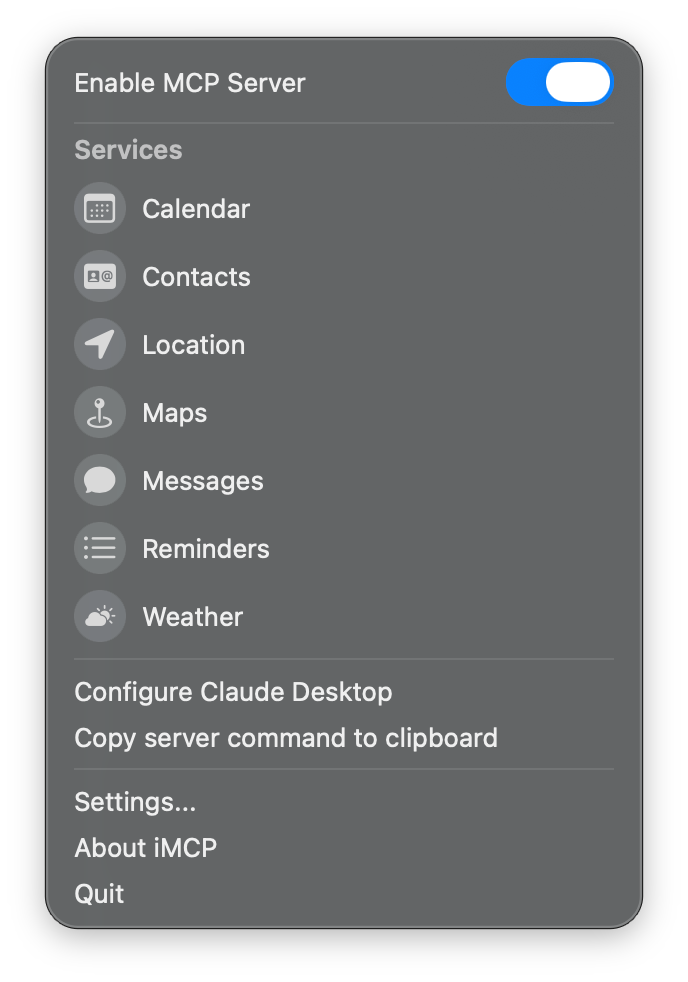
Screenshot of iMCP on first launch

iMCP FAQ

What do I need to run it?
A Mac on macOS 15.3 or later. Download the app or install it with a single Homebrew command.
Can I use this to check my calendar from a chat?
Yes. Turn on Calendar, approve the macOS permission prompt, and your assistant can read and create events.
Which assistants work with it?
Claude Desktop and Claude Code out of the box, plus Cursor and a growing list of other MCP-compatible apps.
Do I have to enable everything?
No. Each service is a separate toggle with its own macOS permission, so you can share only what you want.
Is my personal data collected?
The app itself collects and stores nothing. Whatever your assistant reads does travel to that assistant's provider, as any message would.
How hard is the setup?
About as easy as it gets. Install the app, flip the toggles, and use the menu item that configures Claude Desktop automatically.
Does it cost anything or need a key?
No. It reads from apps already on your Mac.