


Change the database connection information as needed.
docker run -d --name mcp-mysql \
  -e MYSQL_HOST=localhost \
  -e MYSQL_PORT=3306 \
  -e MYSQL_USER=root \
  -e MYSQL_PASSWORD=mcpTest1234!!! \
  -e MYSQL_DATABASE=mcp_test \
  -e MCP_PORT=8081 \
  -p 3306:3306 mineru/mcp-mysql:1.0.0
This will proceed with a pre-configured setup.
docker-compose up -d
pip install -r requirements.txt
python mysql_mcp_server/main.py run
MCP functionality is available from Cursor version 0.46 and above.
Additionally, the MCP feature is only accessible to Cursor Pro account users.
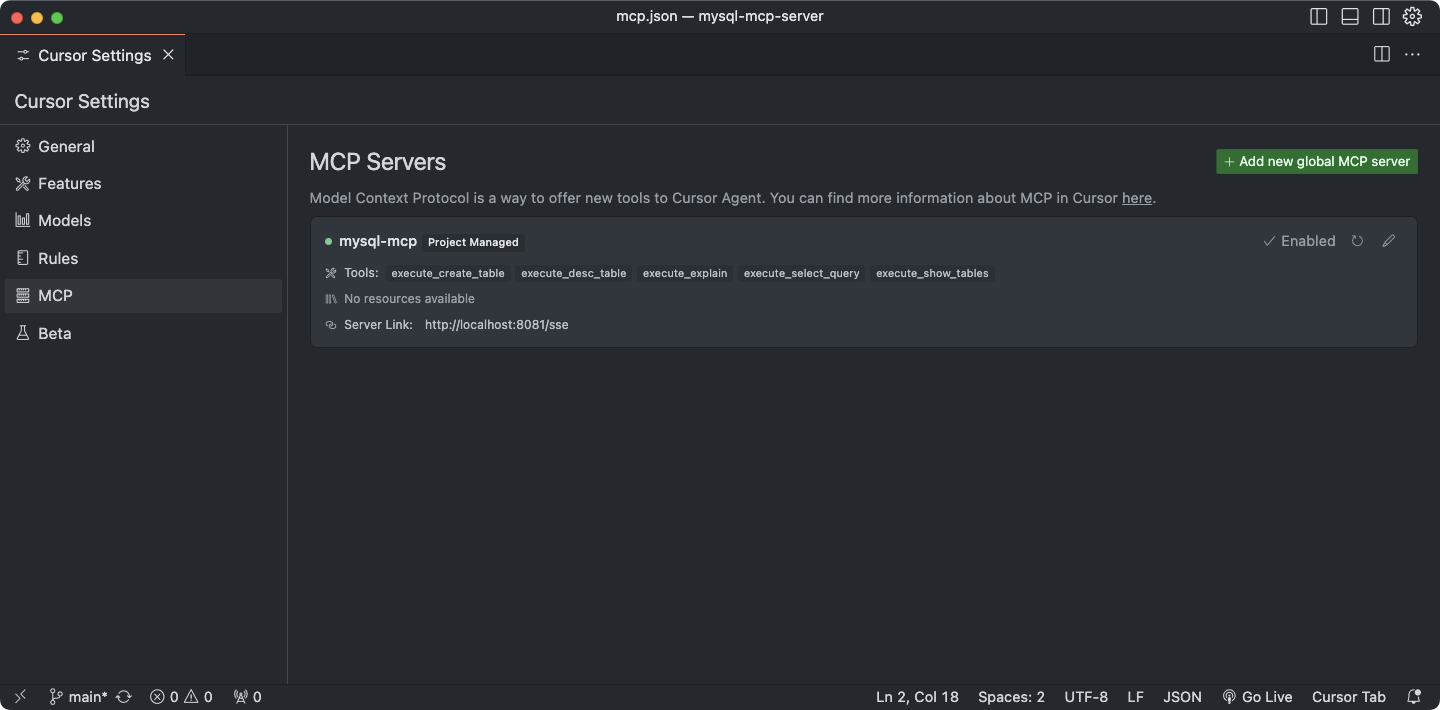
- Adding a Tool
executefunctions implement the actual logic execution (Service Layer).- The
@tooldecorator helps register the tool with MCP (Controller Layer).
- Explanation
- Each file under
mysql_mcp_server/executorsrepresents a single tool. - If a new tool is added, it must be imported in
mysql_mcp_server/executors/__init__.pyand included in the__all__array. - This ensures the module is automatically registered in the
TOOLS_DEFINITIONvariable.
- Each file under
flowchart LR;
    A[AI Model] -->|Request tool list| B[MCP Server]
    B -->|Return available tools| A

    A -->|Request specific tool execution| B
    B -->|Call the corresponding executor| C[Executors]

    subgraph Executors
        C1[execute_create_table] -->|Create table| D
        C2[execute_desc_table] -->|View table schema| D
        C3[execute_explain] -->|Query execution plan| D
        C4[execute_insert_query] -->|Execute INSERT query| D
        C5[execute_insight_starter] -->|Checking the schema for building reports| D
        C6[execute_invoke_viz_pro] -->|Visualization chart recommendations| D
        C7[execute_select_query] -->|Execute SELECT query| D
        C8[execute_show_tables] -->|Retrieve table list| D
    end

    D[DatabaseManager] -->|Connect to MySQL| E[MySQL 8.0]

    E -->|Return results| D
    D -->|Send results| C
    C -->|Return results| B
    B -->|Return execution results| A
-
⚙️ Parameter Options
- 🔧 Enable/Disable Switch for Each Tool: Provide a function to reduce Input Context costs 💰
- 🔒 Query Security Level Setting: Offer optional control over functions that could damage asset value, such as DROP, DELETE, UPDATE 🚫
-
✨ Features
- 📊 Data Analysis Report Generation: Provide a report generation function optimized for the model to appropriately select various charts based on user requests 📈
- 📝 Reporting capabilities for prescribed forms
- 🖌️ Diversify report templates
- 🗄️ Extended Text2SQL Support
- 🌐 SSH Connection Support: Enable secure remote access via SSH for advanced operations 🔑
- 📥 File Extraction Function
- 📄 CSV
- 📑 JSON
- 📉 Excel
- 📊 Data Analysis Report Generation: Provide a report generation function optimized for the model to appropriately select various charts based on user requests 📈
MCP MySQL Server is a server application for MySQL database operations based on MCP (Model Context Protocol). This server provides tools that allow AI models to interact with the MySQL database.
- MCP Server: A FastMCP server that communicates with AI models
- MySQL Database: Manages and stores data
- Tools: Executors that perform database operations
- Language: Python
- Database: MySQL 8.0
- Key Libraries:
- mcp: Implements Model Context Protocol for AI communication
- PyMySQL: Connects to MySQL and executes queries
- pandas: Processes and analyzes data
- python-dotenv: Manages environment variables
- fire: Implements command-line interfaces
- Containerized deployment via Docker and Docker Compose
- Ports: 8081 (MCP Server), 3306 (MySQL)
MCPBoilerPlate/
├── mysql_mcp_server/           # Main application directory
│   ├── executors/              # Database operation executors
│   │   ├── create_table.py     # Tool for creating tables
│   │   ├── desc_table.py       # Tool for viewing table schema
│   │   ├── explain.py          # Tool for query execution plans
│   │   ├── insert_query.py     # Tool for INSERT query execution
│   │   ├── insight_starter.py  # Schema verification tools for write reports
│   │   ├── invoke_viz_pro.py   # Tool for Visualization chart recommendation
│   │   ├── select_query.py     # Tool for SELECT query execution
│   │   └── show_tables.py      # Tool for retrieving table lists
│   ├── helper/                 # Utility modules
│   │   ├── db_conn_helper.py   # Manages database connections
│   │   ├── logger_helper.py    # Logging utilities
│   │   └── tool_decorator.py   # Tool decorator
│   └── main.py                 # Application entry point
├── docker-compose.yml          # Docker Compose configuration
├── Dockerfile                  # Docker image build settings
├── requirements.txt            # Dependency package list
└── .env.example                # Example environment variables file
- Interface Layer: MCP Server (FastMCP)
- Business Logic Layer: Handlers and Executors
- Data Access Layer: Database connection and query execution
- MySQLMCPServer: Main server class that initializes and runs the MCP server
- DatabaseManager: Singleton pattern-based database connection manager
- Executors: Collection of tools for database operations
- execute_create_table: Creates tables
- execute_desc_table: Checks table schema
- execute_explain: Provides query execution plans
- execute_insert_query: Executes INSETR queries
- execute_select_query: Executes SELECT queries
- execute_show_tables: Retrieves table lists
- AI model requests a list of available tools from the MCP server.
- The server returns the available tools list.
- The AI model requests the execution of a specific tool.
- The server calls the corresponding executor to perform the database operation.
- The execution results are returned to the AI model.
- Adding Tools: Implement new tools in the
executorsdirectory and register them in__init__.py. - Environment Configuration: Manage environment variables via the
.envfile. - Logging: Ensure consistent logging using
logger_helper.
# Setup environment
cp .env.example .env
# Modify .env file as needed

# Install dependencies
pip install -r requirements.txt

# Run the server
python mysql_mcp_server/main.py run# Start database using Docker Compose
docker-compose up -d db
# Build and run mysql-mcp-server with Docker Compose (including rebuilds)
docker-compose up -d --build mysql-mcp-server- Manage database credentials via environment variables.
- Use strong passwords in production environments.
- Consider implementing SSL/TLS encryption for database connections when necessary.