JoySafeter

JoySafeter

MCP.Pizza Chef: jd-opensource

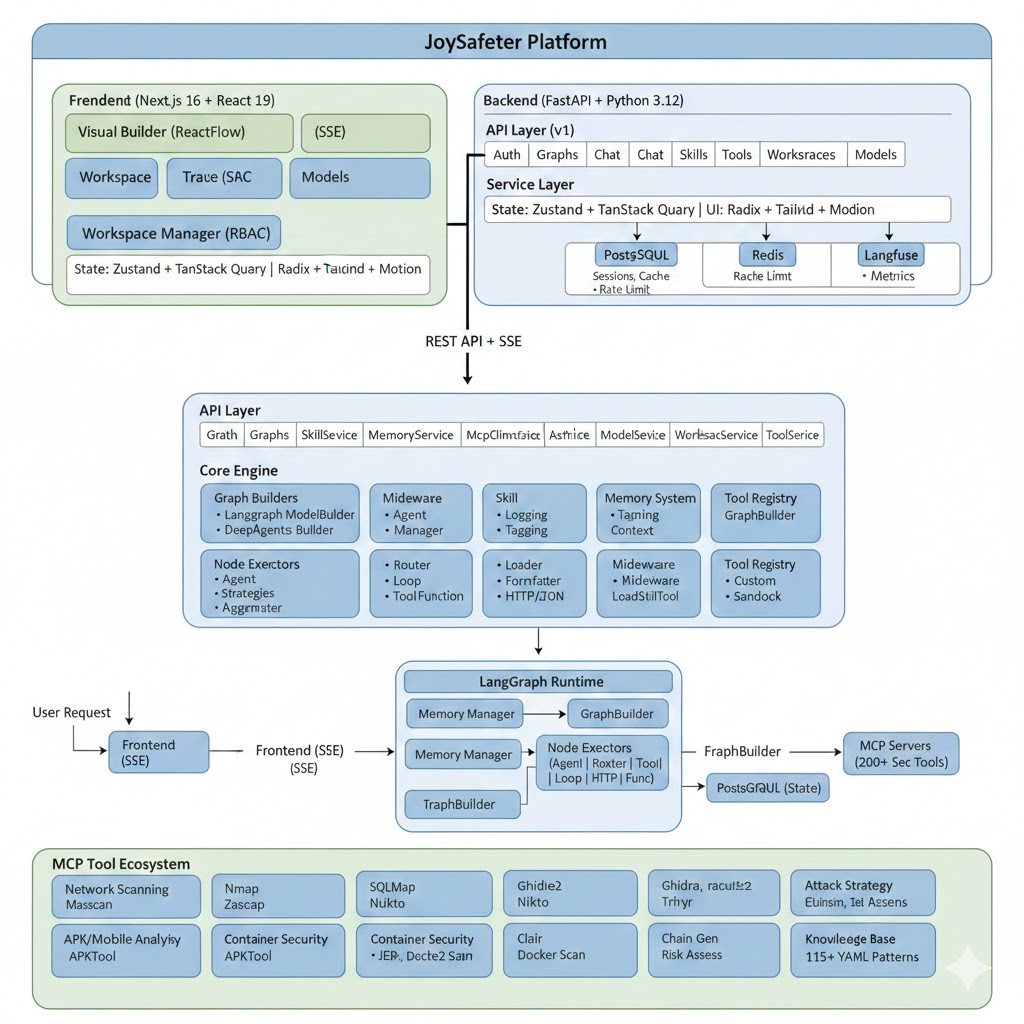
Built by JD's open-source team, JoySafeter is a platform for assembling teams of AI agents that carry out security work and report back. Drag steps into place, or describe what you want in plain language and get a running agent team. Scanners such as Nmap, Nuclei, and Trivy come already wired in, alongside ready-made skills for penetration testing, document analysis, and cloud security. It runs on hardware you control, with sign-in, separate workspaces, and a full record of every step an agent took.

Coding
Other

Use This MCP server To

Upload an Android app and get a mobile security report back Run an authorized penetration test and download the findings Build an agent team without writing any code Trace every step an agent took during a run Give my team separate workspaces with their own permissions Add a scanning tool of my own for agents to use

README

JoySafeter
JoySafeter

The AI-native platform for building, orchestrating, and running security agents at scale.
From idea to production-grade security automation — in minutes, not months.


License: Apache 2.0 Python 3.12+ Node.js 20+ LangGraph FastAPI MCP Protocol DeepAgents v0.4

English | 简体中文


Why JoySafeter

Traditional security tooling hits a ceiling: scripts are brittle, single agents lack context, and complex scenarios require 2–3 engineers working in parallel. JoySafeter breaks that ceiling.

Challenge Traditional Approach JoySafeter
APK vulnerability analysis Manual MobSF + engineer review Autonomous agent: upload → analyze → report
Penetration testing Fixed scripts, static playbooks Dynamic DeepAgents that adapt to findings in real time
Tool integration Custom glue code per tool 200+ tools via MCP Protocol, zero glue
Scale Linear headcount growth Agent teams that multiply capacity

JoySafeter defines a new paradigm: AI-driven Security Operations (AISecOps) — where multi-agent collaboration, cognitive memory, and scenario-matched skills replace manual coordination.


Real-World Cases

JoySafeter FAQ

Can I use this to check an app for security problems?
Yes — the project demonstrates uploading an Android app file and getting back a report mapped to the OWASP Mobile Top 10.
Do I need to know how to code?
Not to build agents. The workflow editor is drag-and-drop, and you can also describe what you want in plain language.
Where does it run?
On your own machines. A guided start script brings everything up with Docker, or you can run the pieces separately.
Can my whole team use it?
Yes — it supports separate workspaces, role-based permissions, and sign-in through GitHub, Google, Microsoft, and other providers.
Can I point it at any website?
You should only test systems you are authorized to test; the project's own walkthrough specifies an authorized target.
Does it work with tools it does not already include?
Yes. It can pick up additional tools that speak the same open standard it uses.
How hard is the first run?
There is an interactive start script with a menu, but you still need Docker and a terminal to get going.



