
Fire in da houseTop Tip:Paying $100+ per month for Perplexity, MidJourney, Runway, ChatGPT is crazy - get all your AI tools in one site starting at $15 per month with Galaxy AIFire in da houseCheck it out free

mcp-video-digest

MCP.Pizza Chef: R-lz

MCP Video Digest is an MCP server that extracts audio from videos across over 1000 streaming platforms like YouTube, Bilibili, TikTok, and Twitter, then transcribes the audio into text using multiple transcription providers such as Deepgram, Gladia, Speechmatics, and AssemblyAI. It supports asynchronous processing, speaker separation, and flexible provider selection based on API keys, enabling efficient and scalable video content summarization workflows.

Use This MCP server To

Extract audio and transcribe videos from YouTube and TikTok links Summarize video content into text for quick review Automatically select transcription provider based on API key availability Process multiple video transcriptions concurrently with async design Separate speakers in transcriptions for clearer dialogue analysis Download and transcribe streaming content from 1000+ websites Log and handle errors during video transcription workflows

README

MCP Video Digest (视频内容提取总结)

English | 中文

项目简介

MCP Video Digest 是一个视频内容处理服务,,能够从 YouTube、Bilibili、TikTok、Twitter... 视频中提取音频并转换为文本。该服务支持多个转录服务提供商,包括 Deepgram、Gladia、Speechmatics 和 AssemblyAI,可以根据配置的 API 密钥灵活选择使用。(第一个MCP练手的项目,主要熟悉MCP的开发和运行流程)

功能特点

  • 支持超过1000个网站上的流媒体内容下载和音频提取
  • 多个转录服务提供商支持:
    • Deepgram
    • Gladia
    • Speechmatics
    • AssemblyAI
  • 灵活的服务选择机制,根据可用的 API 密钥自动选择服务
  • 异步处理设计,提高并发性能
  • 完整的错误处理和日志记录
  • 支持说话人分离
  • × 支持本地模型cpu/gpu加速处理

目录结构

.
├── src/                    # 源代码目录
│   ├── services/          # 服务实现目录
│   │   ├── download/      # 下载服务
│   │   └── transcription/ # 转录服务
│   ├── main.py           # 主程序逻辑
│   └── __init__.py       # 包初始化文件
├── config/                # 配置文件目录
├── test.py               # 测试脚本
├── run.py                # 服务启动脚本
├── pyproject.toml        # 项目配置和依赖管理
├── uv.lock               # UV 依赖锁定文件
└── .env                  # 环境变量配置
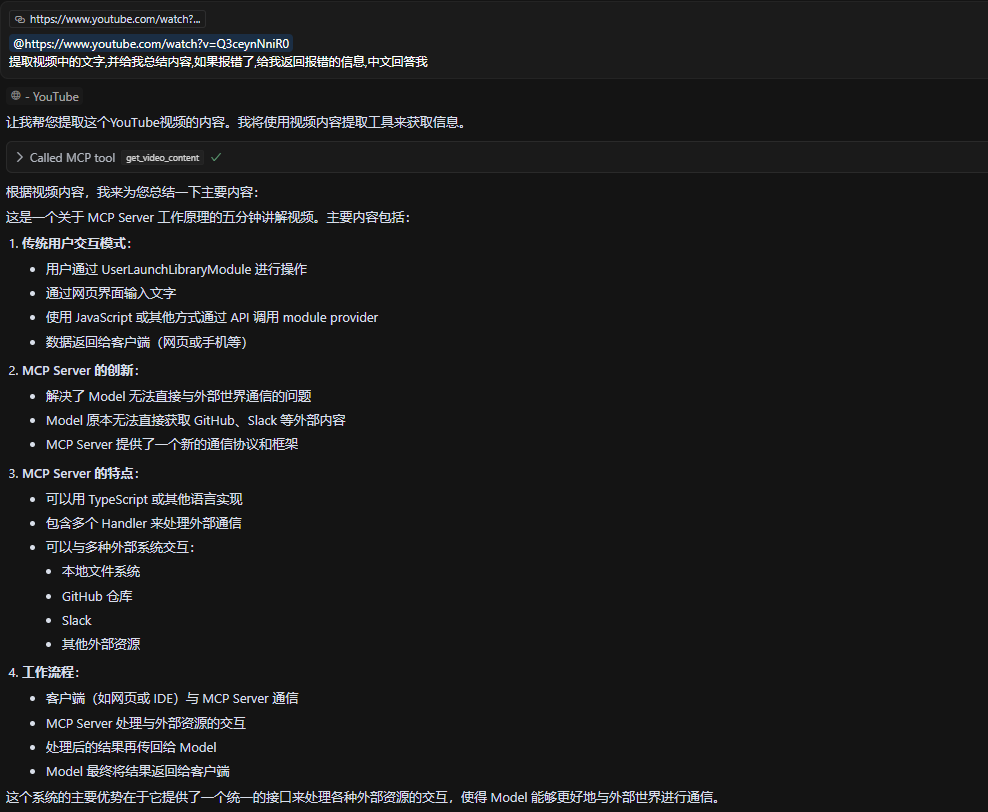
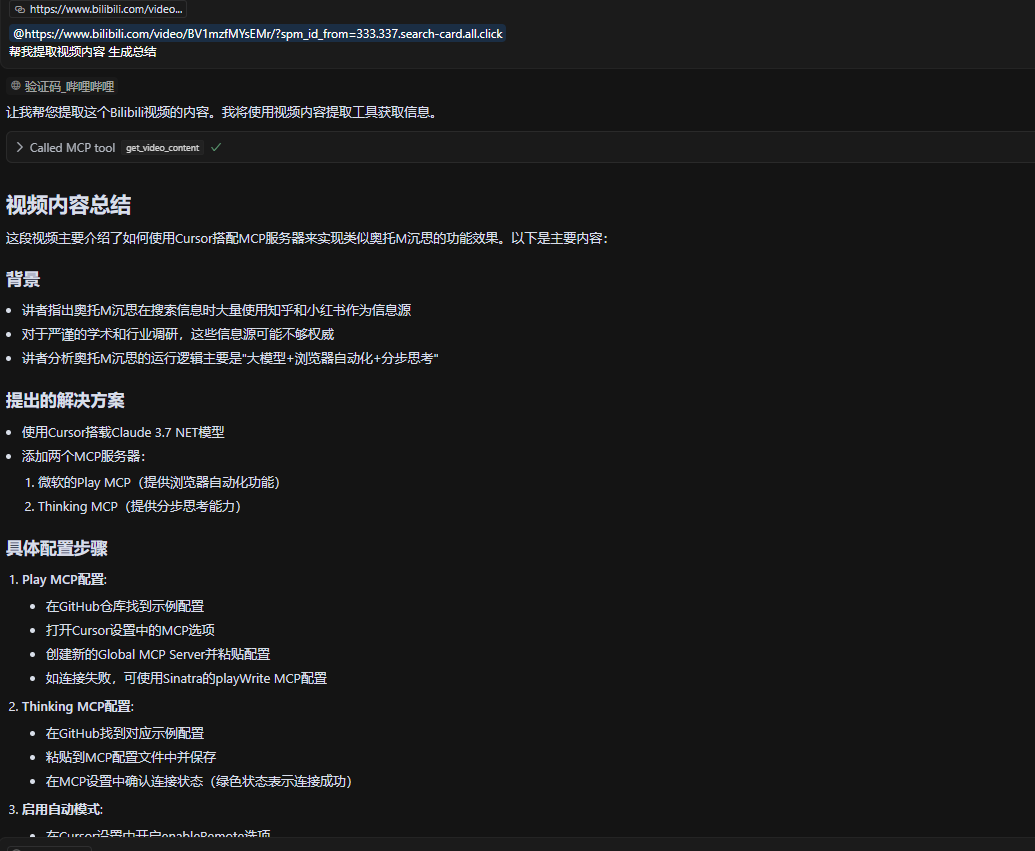
测试截图

YouTube

Bilibili

安装说明

1. 安装 uv 或使用 python

如果还没有安装 uv,可以使用以下命令安装:

curl -LsSf https://astral.sh/uv/install.sh | sh

2. 克隆项目:

git clone https://github.com/R-lz/mcp-video-digest.git
cd mcp-video-digest

3. 创建并激活虚拟环境:

uv venv
source .venv/bin/activate  # Linux/Mac
#
.venv\Scripts\activate     # Windows

4. 安装依赖:

uv pip install -e .

speechmatics 在使用requests调试的时候出现了各种问题(不是speechmatics的问题, 是我菜),所以使用了speechmatics sdk

配置说明

  1. 在项目根目录创建 .env 文件或者重命名.env.example,配置所需的 API 密钥:

    mv .env.example .env
    
    # 修改
    DEEPGRAM_API_KEY=your_deepgram_key
    GLADIA_API_KEY=your_gladia_key
    SPEECHMATICS_API_KEY=your_speechmatics_key
    ASSEMBLYAI_API_KEY=your_assemblyai_key
    

    注意:至少需要配置一个服务的 API 密钥

  2. 服务优先级顺序:

    • Deepgram(推荐用于中文内容)
    • Gladia
    • Speechmatics
    • AssemblyAI

使用方法

  1. 启动服务:

    uv run src/main.py

    或者使用调试模式:

    UV_DEBUG=1 uv run src/main.py
  2. 调用服务:

    from mcp.client import MCPClient
    
    async def process_video():
        client = MCPClient()
        result = await client.call(
            "get_video_content",
            url="https://www.youtube.com/watch?v=video_id"
        )
        print(result)
  3. 客户端SSE为示例

{
    "mcpServers": {
      "video_digest": {
        "url": "http://<ip>:8000/sse"
    }
  }
}


# 当然可以在Client传递Key

"env": {
   "DEEPGRAM_API_KEY":"your_deepgram_key"
}

STDIO方式修改启动命令即可:未验证和测试 MCP文档

测试

运行测试脚本:

uv run test.py 
#
python test.py

测试脚本会:

  • 验证环境变量配置
  • 测试 YouTube 下载功能
  • 测试各个转录服务
  • 测试完整的视频处理流程

开发指南

  1. 添加新的转录服务:

    • src/services/transcription/ 目录下创建新的服务类
    • 继承 BaseTranscriptionService
    • 实现 transcribe 方法
  2. 自定义下载服务:

    • src/services/download/ 目录下修改或添加新的下载器
    • 继承或修改 YouTubeDownloader

依赖管理

  • 使用 uv pip install package_name 安装新依赖
  • 使用 uv pip freeze > requirements.txt 导出依赖列表
  • 使用 pyproject.toml 管理依赖,uv.lock 锁定依赖版本

错误处理

服务会处理以下情况:

  • API 密钥缺失或无效
  • 视频下载失败
  • 音频转录失败
  • 网络连接问题
  • 服务限制和配额

注意事项

  1. 确保有足够的磁盘空间用于临时文件
  2. 注意各服务提供商的 API 使用限制
  3. 建议使用 Python 3.11 或更高版本
  4. 临时文件会自动清理
  5. 使用 uv 可以获得更快的依赖安装速度和更好的依赖管理
  6. YouTube下载可能需要身份验证,可以复制cookie到根目录下cookies.txt 使用插件快速生成 或者使用cookies-from-browser等其他认证方式, yt-dlp

STT Key申请及免费额度

  • Speechmatics 每月免费8小时 - 定价
  • Gladia 每月免费10小时 - 定价
  • AssemblyAI 共50$免费额度 - 定价
  • Deepgram 共200$的免费额度 - 定价

内容仅供参考

许可证

采用 MIT 许可证。

mcp-video-digest FAQ

How does MCP Video Digest choose which transcription provider to use?
It automatically selects the transcription service based on available API keys configured for Deepgram, Gladia, Speechmatics, or AssemblyAI.
Can MCP Video Digest handle videos from platforms other than YouTube?
Yes, it supports over 1000 streaming sites including Bilibili, TikTok, Twitter, and more.
Does MCP Video Digest support speaker separation in transcriptions?
Yes, it includes speaker diarization to distinguish different speakers in the transcript.
Is MCP Video Digest capable of processing multiple videos at once?
Yes, it uses asynchronous processing to handle concurrent transcription tasks efficiently.
Can I run MCP Video Digest with local transcription models?
Currently, local CPU/GPU accelerated models are not supported; it relies on cloud transcription providers.
How does MCP Video Digest handle errors during transcription?
It has comprehensive error handling and logging to ensure reliability and traceability.
What programming languages and frameworks is MCP Video Digest built with?
It is primarily implemented in Python, using asynchronous programming for performance.
Can MCP Video Digest be integrated with other MCP clients or tools?
Yes, as an MCP server, it exposes structured video transcription data for integration with MCP clients and workflows.