






The open-source MCP server for 3D printing.
Kiln lets AI agents (Claude Desktop, Claude Code, Codex, or any custom MCP client) drive real 3D printers end to end — Bambu Lab, Creality, Prusa, Elegoo, Voron, Sovol, AnkerMake, Artillery, FlashForge, QIDI, RatRig, and SparkX, over OctoPrint, Moonraker/Klipper, PrusaLink, and Direct USB.
In a single conversation, an agent can design a part, slice it, queue it on the right printer, monitor the camera, recover from failures, and ship the result. No human in the middle.
Reading this as an AI agent? kiln3d.com/agents is written for you rather than for the person running you: install, MCP config, the design-to-print loop, and exactly what Kiln will refuse to do and why.
pip install kiln3d
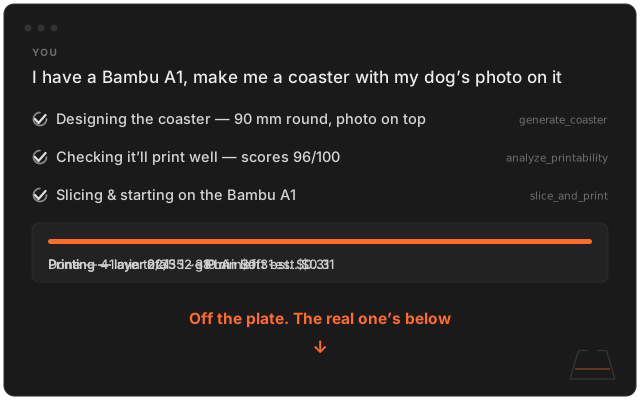

"a coaster with a photo of my dog Ash" — start to finish, from one sentence.
Watch the demo →
Kiln's built in the open. If it made your printing more fun, or just saved you a headache, a ⭐ on the repo helps the next maker find it.
Using Claude Desktop? Install Kiln in one click. Download kiln.mcpb and double-click it — Claude Desktop installs Kiln and wires it in (just Claude Desktop: steps 1 and 2 below are how Codex and every other AI app connect), so those steps aren't yours. Two things still are: OpenSCAD, and Kiln's terms — the command shows them and asks you to type your acceptance, which is why it's yours and not your AI's: uvx --from kiln3d kiln accept-terms. The bundle and that command both run on uv — free, with a one-line install for each platform at that link. If Claude Desktop says the server failed to start, that's uv missing: install it and restart. Updates arrive with the extension, not via kiln self-update.
Everyone else — three steps. Then ask your AI to make something.
1. Install
pip install kiln3d2. Connect your AI — Kiln sets itself up inside Claude Desktop, Claude Code, and Codex: