Fire in da houseTop Tip:Paying $100+ per month for Perplexity, MidJourney, Runway, ChatGPT and other tools is crazy - get all your AI tools in one site starting at $15 per month with Galaxy AI Fire in da houseCheck it out free

hello-mcp-go

MCP.Pizza Chef: softchris

Hello MCP Go is a lightweight MCP server implemented in Go, designed to help developers build custom Model Context Protocol servers. It serves as a practical starting point for creating MCP integrations, demonstrating how to expose tools and structured data to LLMs using Go. This server supports simple tools like 'hello' and 'calculate', making it ideal for learning and prototyping MCP workflows.

Use This MCP server To

Build custom MCP servers using Go language Prototype MCP tool integrations quickly Expose simple computational tools to LLMs Learn MCP server development fundamentals Create custom context providers for LLMs Demonstrate MCP protocol usage in Go projects

README

Hello MCP Go šŸ‘‹

Welcome to the Hello MCP Go repository! šŸš€ This project demonstrates how to build an MCP (Model Context Protocol) server in Go. Whether you're a Go enthusiast or just curious about MCP, you're in the right place! šŸ› ļø

Background of Gopher in a carrot field

What is this? šŸ¤”

This repository showcases:

  • How to build an MCP server using Go 🐹.
  • A simple and fun way to explore MCP Protocol šŸŽ®.
  • A starting point for your own custom MCP server adventures! 🌟

Tools 🌟

  • hello, takes the parameters Submitter and Content.
  • calculate, takes the parameters A and B. Example use is "calculate 2 and 4".

Quick Start šŸš€

  • Clone
  • Install
  • Build
  • Run
  1. Clone the repository:

    git clone https://github.com/your-username/hello-mcp-go.git
    cd hello-mcp
  2. Install dependencies:

    go mod tidy
  3. Build the project:

    go build -ldflags="-s -w" -o server.exe main.go

    or for Linux:

    go build -ldflags="-s -w" -o server main.go

    You will use this later when you want to consume it from Visual Studio Code.

  4. Run the server:

    ./server

Consuming the Server with GitHub Copilot Agent Mode šŸ“

  1. Place yourself in mcp.json, make sure the server has been built (right now it's adjusted).

  2. Adjust the "command" to point to the absolute path of your executable.

    {
      "servers": {
         "my-mcp-server-d73c20f3": {
             "type": "stdio",
             "command": "/path/to/your/executable"
         }
      }
    }
  3. Open Copilot and select Agent in dropdown

  4. Select the play icon.

    You should see the tool icon showing two tools.

  5. Test it with a phrase like so "calculate 2 and 4". This should present a button that invokes the tool on the server.
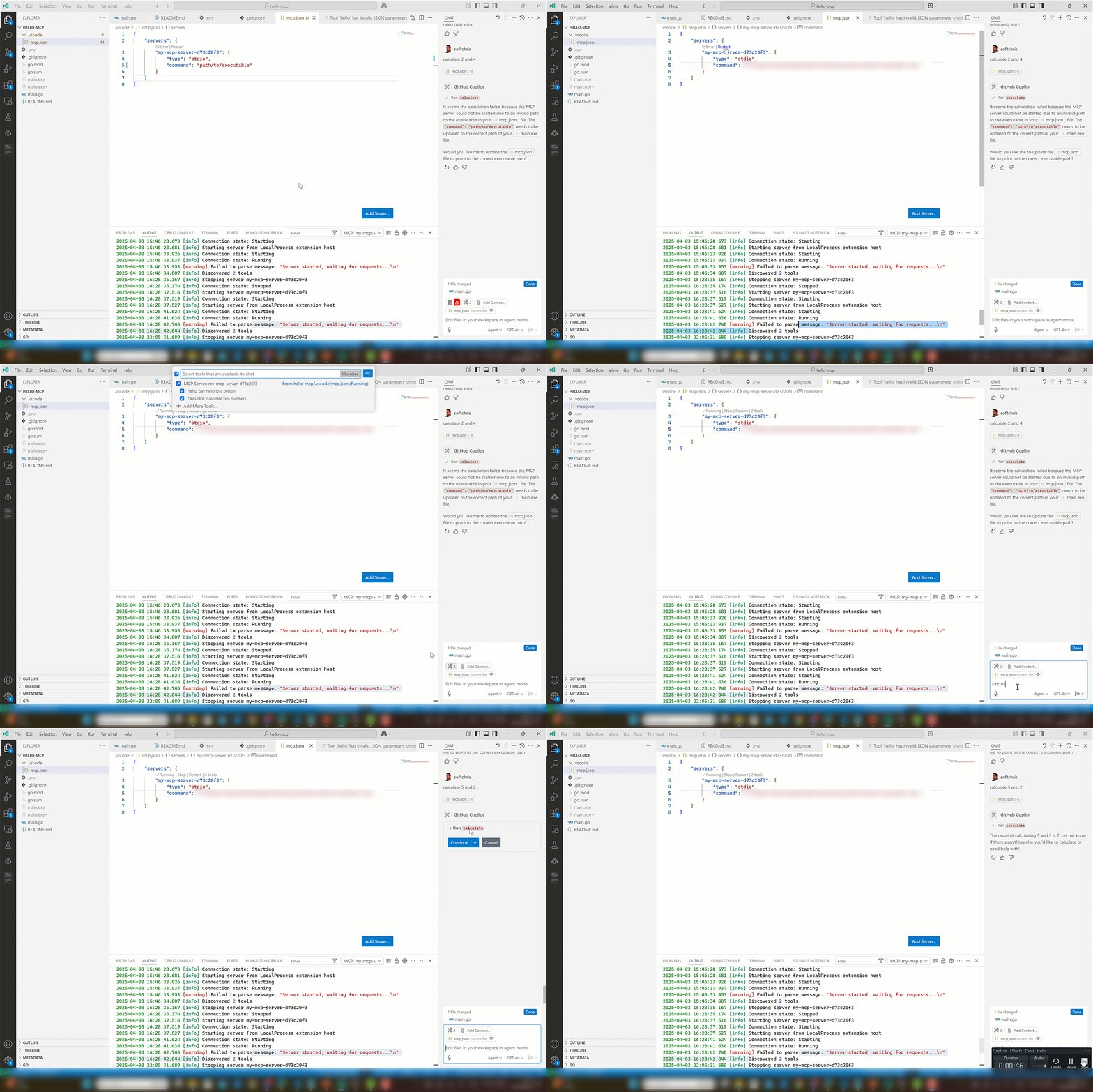
MCP Go conuming it via Visual Studio Code

Have Fun! šŸŽ‰

This project is all about learning and having fun. Feel free to experiment, break things, and create something amazing! 🌈

Happy coding! šŸ’»

hello-mcp-go FAQ

How do I get started with Hello MCP Go?
Clone the repository, install dependencies with 'go mod tidy', build with 'go build', and run the server.
What tools does Hello MCP Go provide?
It includes 'hello' for greeting and 'calculate' for basic arithmetic operations.
Can I extend Hello MCP Go with my own tools?
Yes, the project is designed as a starting point for custom MCP server development in Go.
Is Hello MCP Go suitable for production use?
It is primarily a demo and learning tool, but can be extended for production with additional development.
What are the benefits of using Go for MCP servers?
Go offers simplicity, performance, and easy concurrency, making it ideal for lightweight MCP servers.
Does Hello MCP Go support multiple LLM providers?
Yes, it is provider-agnostic and can work with OpenAI, Claude, Gemini, and others.
How do I add new tools to the server?
Implement new tool handlers in Go and register them with the MCP server framework.
Where can I find documentation for Hello MCP Go?
The GitHub repository README provides setup instructions and usage examples.