MaxMSP-MCP-Server

MCP.Pizza Chef: tiianhk

Max, the visual patching environment that musicians and sound artists use to build instruments and effects, normally means dragging boxes around by hand. With this running, an assistant can see the patch open in front of you, explain what each box does using the official documentation, then add objects, wire them together, change settings and send values — sketching a synth or repairing a broken connection while you watch. It needs Max 9 on your own computer, and involves no account or key.

Coding
Other

Use This MCP server To

Ask what an unfamiliar Max patch actually does Have a simple synth built for me from a description Wire two objects together without hunting through menus Work out why a patch has gone silent Look up what a particular Max object's settings mean Change a value or message inside the patch I have open

README

Note: An extended version by ersatzben and BenCello can be found at: https://github.com/ersatzben/maxmsp-mcp

MaxMSP-MCP Server

This project uses the Model Context Protocol (MCP) to let LLMs directly understand and generate Max patches.
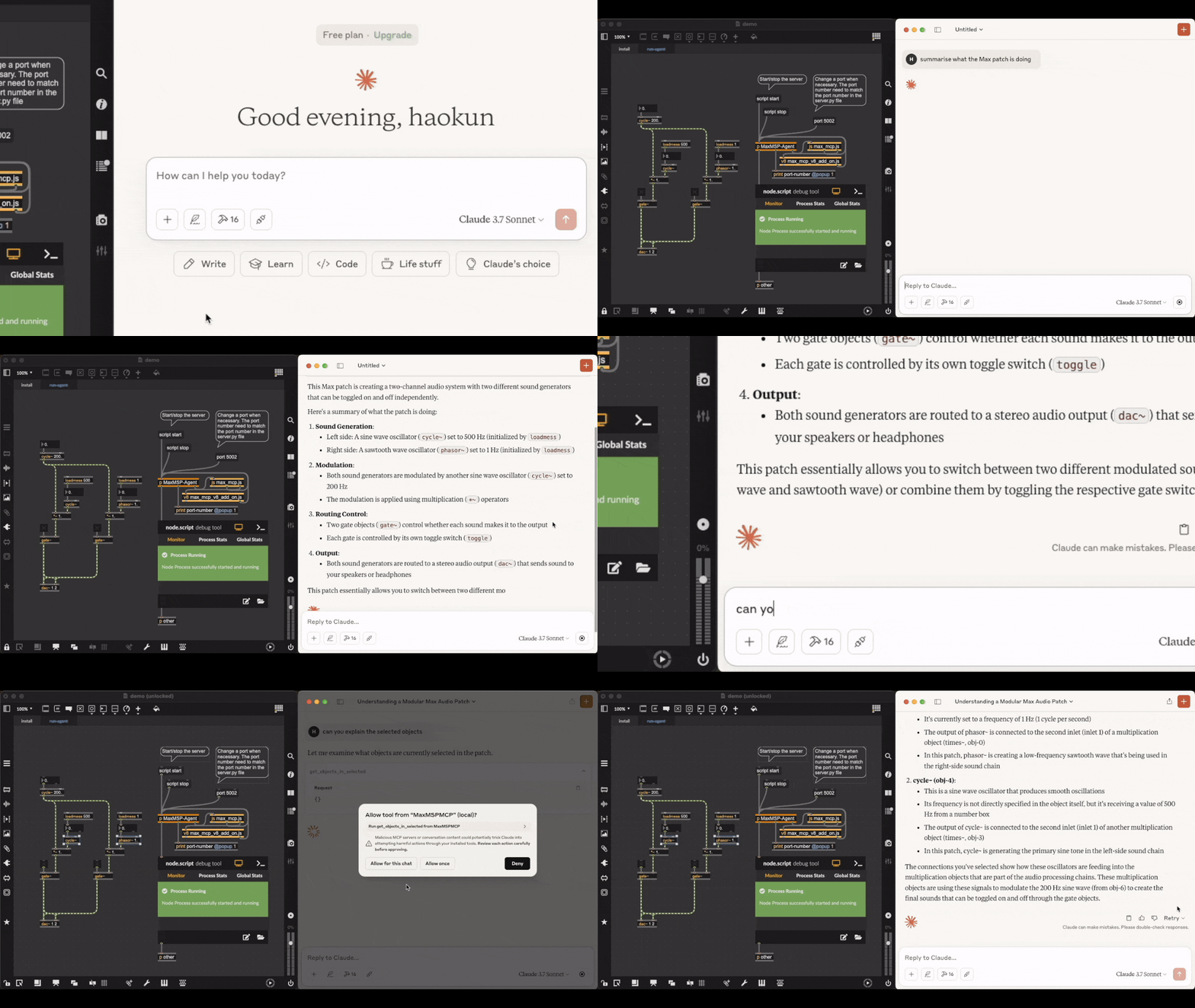
Understand: LLM Explaining a Max Patch

img Video link. Acknowledgement: the patch being explained is downloaded from here. Text comments in the original file are deleted.

Generate: LLM Making an FM Synth

img Check out the full video where you can listen to the synthesised sounds.

The LLM agent has access to the official documentation of each object, as well as objects in the current patch and subpatch windows, which helps in retrieving and explaining objects, debugging, and verifying their own actions.

Installation

Prerequisites

  • Python 3.8 or newer
  • uv package manager
  • Max 9 or newer (because some of the scripts require the Javascript V8 engine), we have not tested it on Max 8 or earlier versions of Max yet.

Installing the MCP server

  1. Install uv:
# On macOS and Linux:
curl -LsSf https://astral.sh/uv/install.sh | sh
# On Windows:
powershell -ExecutionPolicy ByPass -c "irm https://astral.sh/uv/install.ps1 | iex"
  1. Clone this repository and open its directory:
git clone https://github.com/tiianhk/MaxMSP-MCP-Server.git
cd MaxMSP-MCP-Server
  1. Start a new environment and install python dependencies:
uv venv
source .venv/bin/activate
uv pip install -r requirements.txt
  1. Connect the MCP server to a MCP client (which hosts LLMs):
# Claude:
python install.py --client claude
# or Cursor:
python install.py --client cursor

To use other clients (check the list), you need to download, mannually add the configuration file path to here, and connect by running python install.py --client {your_client_name}.

Installing to a Max patch

Use or copy from MaxMSP_Agent/demo.maxpat. In the first tab, click the script npm version message to verify that npm is installed. Then click script npm install to install the required dependencies. Switch to the second tab to access the agent. Click script start to initiate communication with Python. Once connected, you can interact with the LLM interface to have it explain, modify, or create Max objects within the patch.

Disclaimer

This is a third party implementation and not made by Cycling '74.

MaxMSP-MCP-Server FAQ

Is it still being worked on?
Yes, though gently. The most recent code change was May 2026. It is a one-person side project and not an official Cycling '74 product, so treat it as enthusiast software.
Which version of Max do I need?
Max 9 or newer. The author notes that Max 8 and earlier have not been tested, because parts of it rely on the newer JavaScript engine.
Do I need an account or a key?
No. It is free and runs on your own machine, alongside your usual assistant app. The installer has ready-made settings for Claude Desktop and Cursor, and other MCP apps can be added by hand.
Can I use this to build a synth from a plain description?
Yes. The author's own demo has it assembling an FM synth from a request, and it can keep adjusting the result as you ask for changes.
Can it change my patch, or only look at it?
It changes things. It can add and delete objects, rewire connections, set values and trigger them. Save a copy of anything you care about before letting it loose.
How hard is the setup?
Genuinely fiddly. You download the project, install a Python package manager and its requirements, run a small installer for your assistant, then open the supplied Max patch and click two buttons inside it to finish the connection.