code-reasoning

MCP.Pizza Chef: mettamatt

Ask a hard programming question and this makes the assistant lay out its reasoning one numbered step at a time, revisit earlier steps when it notices a mistake, and branch off to compare two approaches. It stops itself after twenty steps so it cannot loop forever. It reads no files, opens no projects and calls no outside service — the whole thing is a place for the model to think out loud. Free, no key, and one short block of setup. There have been no code changes since February 2026.

Coding

Use This MCP server To

Walk through a tricky bug one reasoning step at a time Compare two ways to build a feature before I commit Break a vague task into steps I can actually start Catch a wrong turn in the answer before it snowballs Plan a rewrite without jumping straight into the code

README

Code Reasoning MCP Server

A Model Context Protocol (MCP) server that enhances Claude's ability to solve complex programming tasks through structured, step-by-step thinking.

Code Reasoning Server MCP server

npm version License: MIT CI

Quick Installation

  1. Configure Claude Desktop by editing:

    • macOS: ~/Library/Application Support/Claude/claude_desktop_config.json
    • Windows: %APPDATA%\Claude\claude_desktop_config.json
    • Linux: ~/.config/Claude/claude_desktop_config.json
    {
      "mcpServers": {
        "code-reasoning": {
          "command": "npx",
          "args": ["-y", "@mettamatt/code-reasoning"]
        }
      }
    }
  2. Configure VS Code:

{
  "mcp": {
    "servers": {
      "code-reasoning": {
        "command": "npx",
        "args": ["-y", "@mettamatt/code-reasoning"]
      }
    }
  }
}

Usage

  1. To trigger this MCP, append this to your chat messages:

    Use sequential thinking to reason about this.
    
  2. Use ready-to-go prompts that trigger Code-Reasoning:
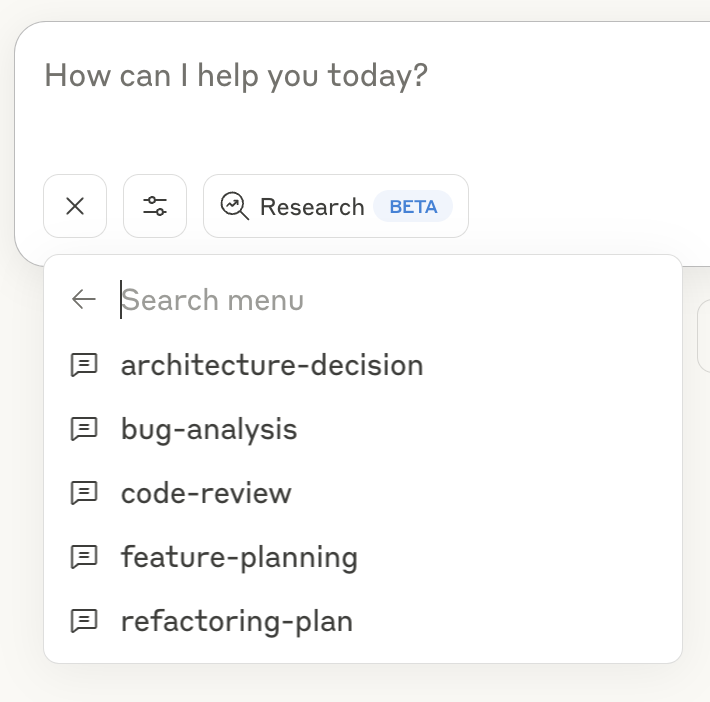
Code Reasoning Prompts

  • Click the "+" icon in the Claude Desktop chat window, or in Claude Code type /help to see the specific commands.
  • Select "Add from Code Reasoning" from the available tools
  • Choose a prompt template and fill in the required information
  • Submit the form to add the prompt to your chat message and hit return

See the Prompts Guide for details on using the prompt templates.

Command Line Options

  • --debug: Enable detailed logging
  • --help or -h: Show help information

Key Features

  • Programming Focus: Optimized for coding tasks and problem-solving
  • Structured Thinking: Break down complex problems into manageable steps
  • Thought Branching: Explore multiple solution paths in parallel
  • Thought Revision: Refine earlier reasoning as understanding improves
  • Safety Limits: Automatically stops after 20 thought steps to prevent loops
  • Ready-to-Use Prompts: Pre-defined templates for common development tasks

Documentation

Detailed documentation available in the docs directory:

  • Usage Examples: Examples of sequential thinking with the MCP server
  • Configuration Guide: All configuration options for the MCP server
  • Prompts Guide: Using and customizing prompts with the MCP server
  • Testing Framework: Testing information

Project Structure

├── index.ts                  # Entry point
├── src/                      # Implementation source files
└── test/                     # Placeholder for future test utilities

License

This project is licensed under the MIT License. See the LICENSE file for details.

code-reasoning FAQ

Is this project still being updated?
There have been no code changes since February 2026. It is not shut down, and the published package still installs and runs as documented.
Can I use this to debug my own code?
Yes, but you have to paste the code into the chat. It cannot open files or browse a project on its own.
Do I need an account or key?
No. It is free, runs on your machine, and sends nothing anywhere.
Which apps does it work in?
Claude Desktop and VS Code are the two the project documents, plus any app that accepts a standard MCP setup snippet.
How do I get it to actually kick in?
Add a line like "use sequential thinking to reason about this" to your message, or pick one of the ready-made prompt templates it installs.
Is it only useful for programmers?
It is tuned for coding work, but the same step-by-step habit helps with any knotty problem you paste in.