
Fire in da houseTop Tip:Paying $100+ per month for Perplexity, MidJourney, Runway, ChatGPT is crazy - get all your AI tools in one site starting at $15 per month with Galaxy AIFire in da houseCheck it out free

zendesk-mcp-server

MCP.Pizza Chef: reminia

The Zendesk MCP Server is a specialized Model Context Protocol server designed to integrate Zendesk's ticketing system and Help Center knowledge base with large language models. It provides tools to retrieve, manage, and analyze Zendesk tickets and comments, as well as draft responses using specialized prompts. This server enables real-time, structured access to Zendesk data, empowering AI models to assist with customer support workflows, ticket analysis, and knowledge retrieval. Setup involves configuring Zendesk credentials and running the server to expose Zendesk data securely to MCP clients.

Use This MCP server To

Retrieve and manage Zendesk support tickets Analyze customer support tickets with AI Draft responses to Zendesk tickets Access Zendesk Help Center articles as knowledge base Integrate Zendesk data into AI-powered workflows Automate ticket triage and categorization Provide contextual support information to agents
README

Zendesk MCP Server

ci License

A Model Context Protocol server for Zendesk.

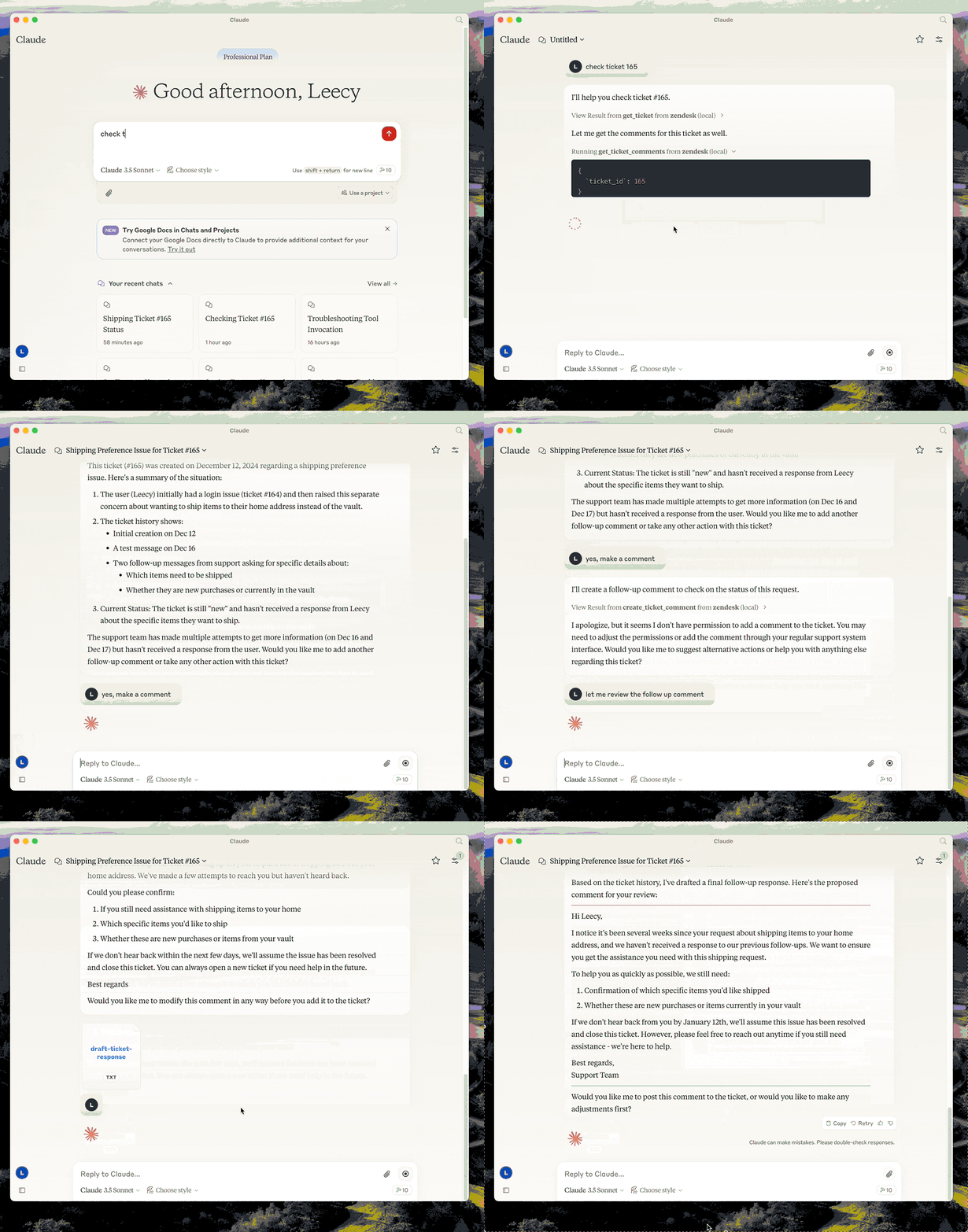
This server provides a comprehensive integration with Zendesk. It offers:

  • Tools for retrieving and managing Zendesk tickets and comments
  • Specialized prompts for ticket analysis and response drafting
  • Full access to the Zendesk Help Center articles as knowledge base

demo

Setup

  • build: uv venv && uv pip install -e . or uv build in short.
  • setup zendesk credentials in .env file, refer to .env.example.
  • configure in Claude desktop:
{
  "mcpServers": {
      "zendesk": {
          "command": "uv",
          "args": [
              "--directory",
              "/path/to/zendesk-mcp-server",
              "run",
              "zendesk"
          ]
      }
  }
}

Resources

  • zendesk://knowledge-base, get access to the whole help center articles.

Prompts

analyze-ticket

Analyze a Zendesk ticket and provide a detailed analysis of the ticket.

draft-ticket-respons

Draft a response to a Zendesk ticket.

Tools

get_ticket

Retrieve a Zendesk ticket by its ID

  • Input:
    • ticket_id (integer): The ID of the ticket to retrieve

get_ticket_comments

Retrieve all comments for a Zendesk ticket by its ID

  • Input:
    • ticket_id (integer): The ID of the ticket to get comments for

create_ticket_comment

Create a new comment on an existing Zendesk ticket

  • Input:
    • ticket_id (integer): The ID of the ticket to comment on
    • comment (string): The comment text/content to add
    • public (boolean, optional): Whether the comment should be public (defaults to true)

zendesk-mcp-server FAQ

How do I set up the Zendesk MCP Server?
Install dependencies with 'uv venv && uv pip install -e .' or 'uv build', then configure Zendesk credentials in a .env file as per the .env.example.
What Zendesk data can the MCP server access?
It can access tickets, comments, and Help Center articles to provide comprehensive support context.
How does the Zendesk MCP Server enhance AI interactions?
It offers specialized prompts and tools for ticket analysis and response drafting, enabling models to assist with customer support tasks.
Is the Zendesk MCP Server secure?
Yes, it uses environment-based credential configuration and scoped access to Zendesk data, ensuring secure integration.
Can I customize the prompts used by the Zendesk MCP Server?
Yes, the server supports specialized prompts which can be tailored to your support workflows.
What programming environment is required?
The server uses Python and requires setting up a virtual environment with dependencies installed via pip.
How do I integrate the Zendesk MCP Server with an MCP client?
Configure the MCP client to run the server command with appropriate arguments pointing to the server directory and credentials.
Does the server support real-time updates from Zendesk?
The server provides real-time access to Zendesk data as exposed through its API, enabling up-to-date context for models.