ProxmoxMCP-Plus

ProxmoxMCP-Plus

MCP.Pizza Chef: RekklesNA

Proxmox VE runs the virtual machines and containers behind many home labs and small company setups. This hands the day-to-day chores to an assistant instead: start and stop machines, take and roll back snapshots, run backups and restores, fetch or clean up install images, and check storage and cluster health. Long jobs get a tracked number you can follow, retry, or cancel. You supply a Proxmox access token scoped to only what you want it touching.

Coding
Other

Use This MCP server To

Start or stop a virtual machine by name Take a snapshot before I try a risky change Roll a container back to yesterday's snapshot Check which of my servers are low on storage Kick off a backup and tell me when it finishes List every machine running on my cluster

README

ProxmoxMCP-Plus

ProxmoxMCP-Plus Logo

Operate Proxmox VE from MCP clients, AI agents, and OpenAPI tooling through one security-conscious control plane for VMs, LXCs, snapshots, backups, ISOs, container commands, and persistent long-running jobs.

PyPI GitHub Release CI GHCR License

Quick Start | Client Install | Demo | Tools | Safety | Scenarios | Docs | Wiki
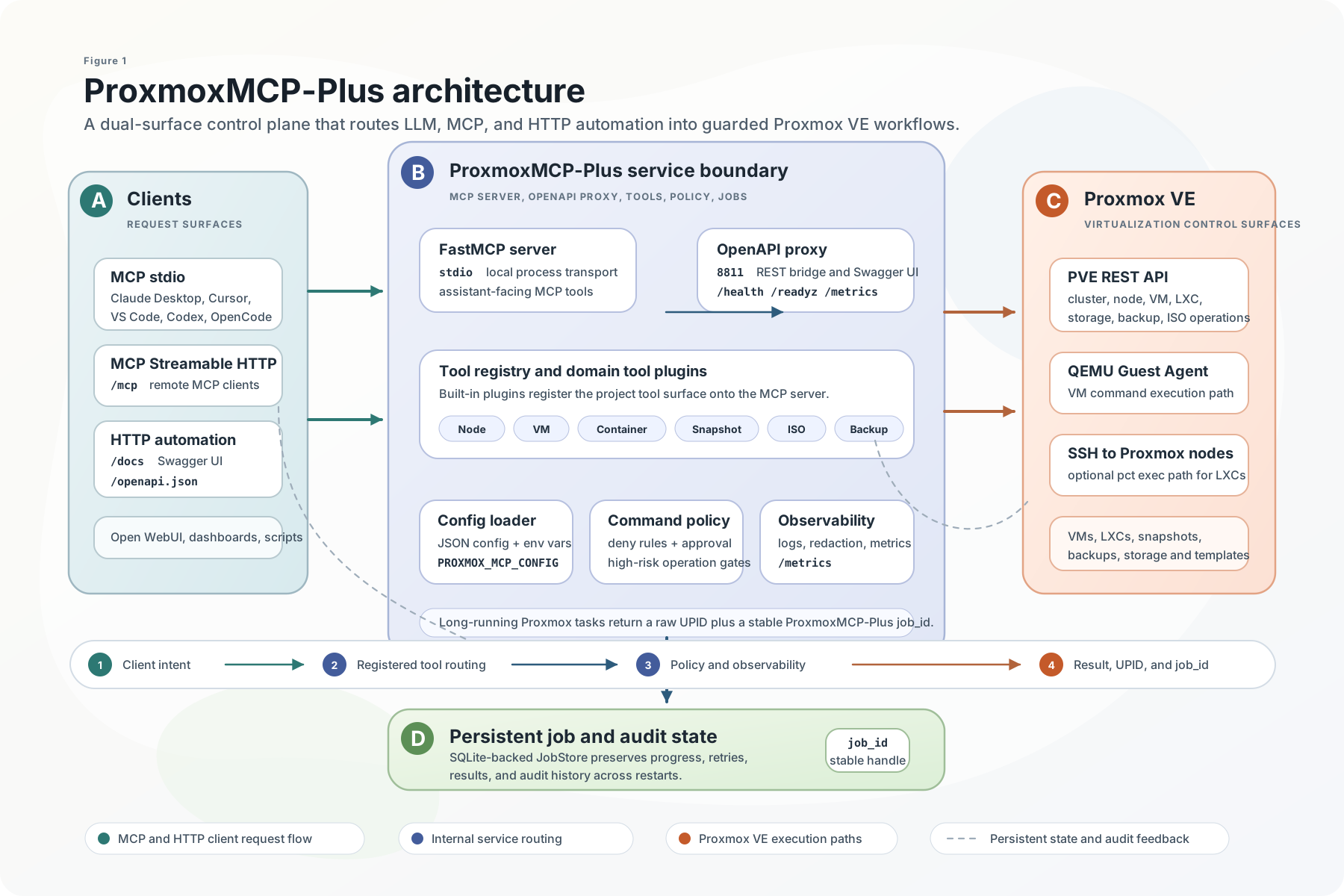
ProxmoxMCP-Plus architecture

Why ProxmoxMCP-Plus

ProxmoxMCP-Plus sits between AI clients and Proxmox VE so operators do not have to stitch together raw API calls, one-off shell scripts, and custom job polling for every workflow.

It exposes the same operational surface in two ways:

  • MCP for Claude Desktop, Cursor, VS Code, Open WebUI, Codex, and other MCP-capable agents
  • OpenAPI for HTTP automation, dashboards, internal tools, and no-code workflows

What you get:

  • VM and LXC lifecycle actions
  • snapshot create, rollback, and delete
  • backup and restore workflows
  • ISO download and cleanup
  • node, storage, and cluster inspection
  • SSH-backed container command execution with guardrails
  • persistent job tracking for async Proxmox tasks

What Makes It Different

ProxmoxMCP-Plus FAQ

Which apps does it work in?
Claude Desktop, Cursor, VS Code, Open WebUI, Codex, and other MCP-capable clients.
Do I need credentials?
Yes. You create a Proxmox access token with only the permissions you want it to have and keep it in a local config file.
Can I use this to restore a backup?
Yes — backups and restores are covered, alongside snapshot create, rollback, and delete.
Is it safe to let an assistant touch my servers?
There are guardrails: scoped tokens, a command policy, approval tokens, and certificate checking.
How hard is setup?
Expect real setup work — you fill in a config file and start it with uvx, pip, or Docker.
What happens with jobs that take a while?
Each one gets a job number you can check on, retry, cancel, or look up later in its history.
