
Fire in da houseTop Tip:Paying $100+ per month for Perplexity, MidJourney, Runway, ChatGPT and other tools is crazy - get all your AI tools in one site starting at $15 per month with Galaxy AI Fire in da houseCheck it out free

mcp-geo

MCP.Pizza Chef: TencentEdgeOne

The mcp-geo server leverages EdgeOne Pages Functions to retrieve and expose user geolocation data in real time. It integrates this location information with large language models via the Model Context Protocol, enabling LLMs to access precise geolocation context for enhanced, location-aware interactions and workflows.

Use This MCP server To

Provide real-time user location context to language models Enable location-aware chatbot responses and recommendations Integrate geolocation data into AI-driven customer support Enhance personalized content delivery based on user location Trigger workflows based on user geographic region Combine geolocation with other context for multi-modal AI tasks

README

EdgeOne Pages MCP: Geo Location Service

This project demonstrates how to use EdgeOne Pages Functions to retrieve user geolocation information and integrate it with large language models through MCP (Model Context Protocol).
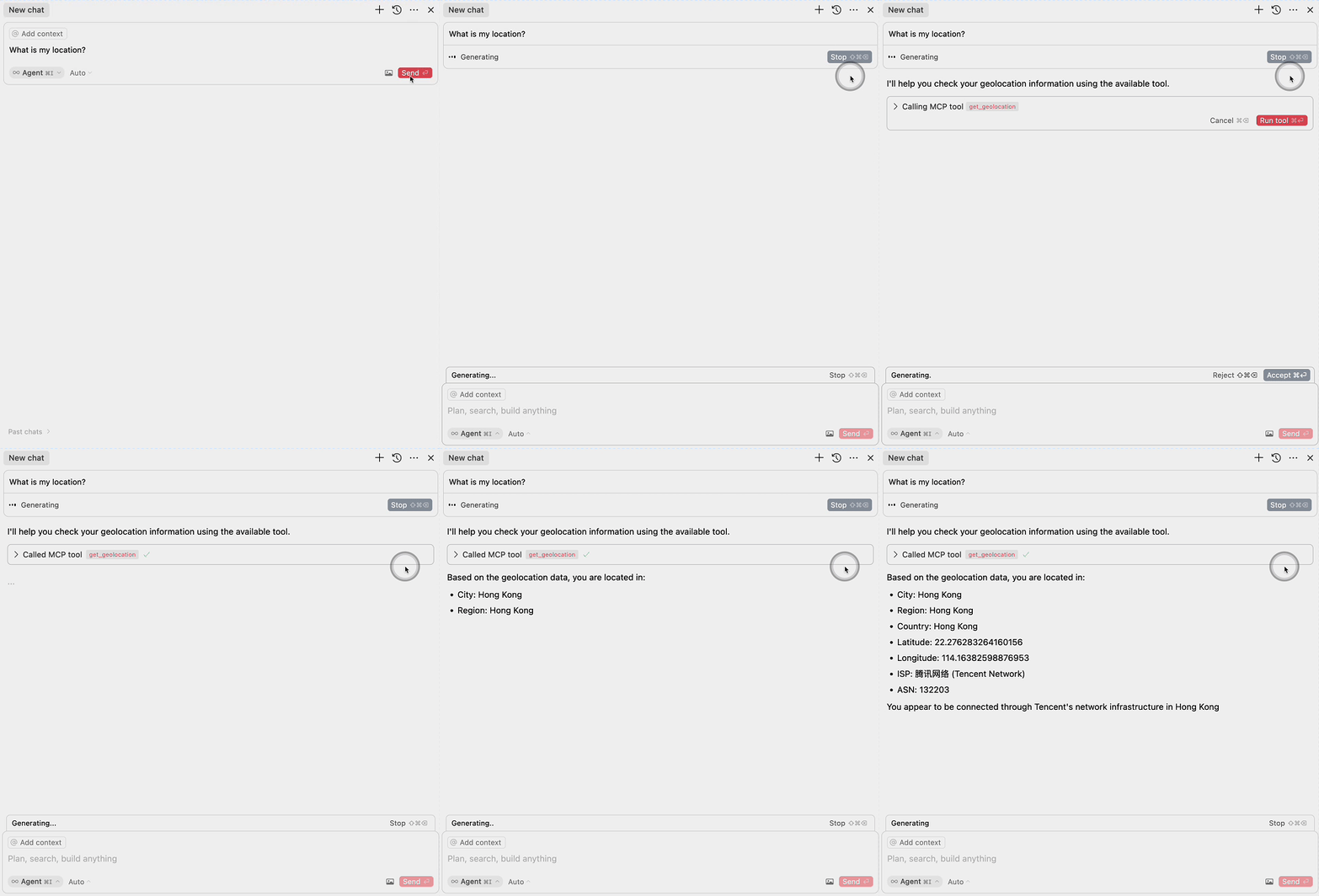

Demo

Deploy

Deploy with EdgeOne Pages

More Templates: EdgeOne Pages

Components

1. EdgeOne Pages Functions: Geolocation

The project includes an EdgeOne Pages Function that retrieves user geolocation information:

  • Uses the EdgeOne request context to access geolocation data
  • Returns location information in a JSON format
  • Located in functions/get_geo.ts

2. MCP Server Integration

The MCP server component provides an interface for large language models to access geolocation data:

  • Implements the Model Context Protocol (MCP)
  • Exposes a get_geolocation tool that can be used by AI models
  • Uses the EdgeOne Pages Function to fetch geolocation data
  • Located in mcp-server/index.ts

MCP Configuration

To use the MCP server with large language models, add the following configuration:

{
  "mcpServers": {
    "edgeone-geo-mcp-server": {
      "command": "tsx",
      "args": ["path/to/mcp-server/index.ts"]
    }
  }
}

Learn More

mcp-geo FAQ

How does mcp-geo retrieve user geolocation data?
It uses EdgeOne Pages Functions to access geolocation from the request context and returns it in JSON format.
Can mcp-geo be deployed easily?
Yes, it supports one-click deployment via EdgeOne Pages with provided templates.
What kind of geolocation data does mcp-geo provide?
It provides detailed user location information such as country, region, city, and coordinates.
How does mcp-geo integrate with large language models?
It exposes geolocation data through the MCP server interface, allowing LLMs to query location context in real time.
Is mcp-geo limited to specific LLM providers?
No, it is provider-agnostic and works with OpenAI, Claude, Gemini, and others supporting MCP.
What programming languages or frameworks does mcp-geo use?
It is built using EdgeOne Pages Functions, typically TypeScript or JavaScript.
Can mcp-geo be extended to include other user context data?
Yes, it can be combined with other MCP servers to provide richer user context.
Is user privacy considered in mcp-geo?
Yes, it uses request context data securely and can be configured to comply with privacy regulations.