

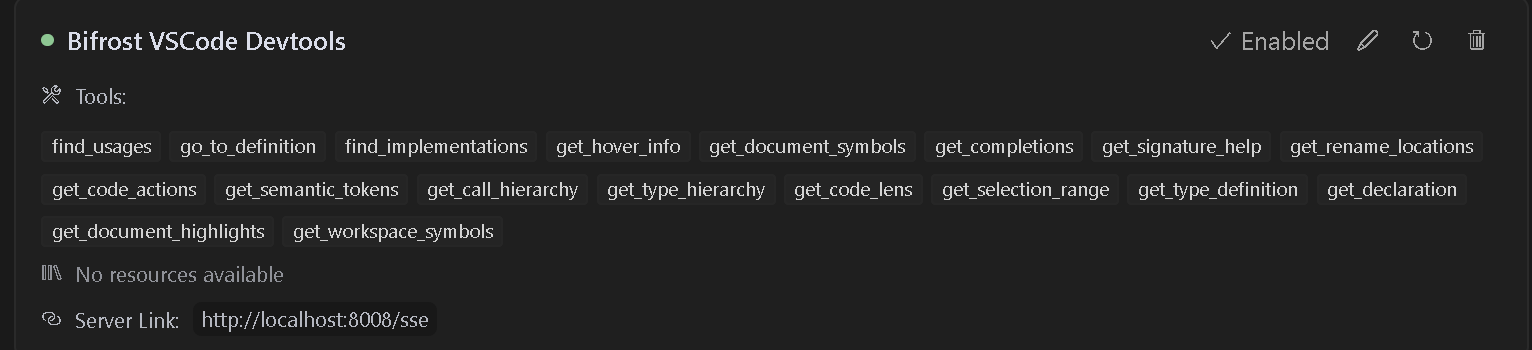
This VS Code extension provides a Model Context Protocol (MCP) server that exposes VSCode's powerful development tools and language features to AI tools. It enables advanced code navigation, analysis, and manipulation capabilities when using AI coding assistants that support the MCP protocol.
- Features
- Installation/Usage
- Multi-Project Support
- Available Tools
- Available Commands
- Troubleshooting
- Contributing
- Debugging
- License
- Language Server Integration: Access VSCode's language server capabilities for any supported language
- Code Navigation: Find references, definitions, implementations, and more
- Symbol Search: Search for symbols across your workspace
- Code Analysis: Get semantic tokens, document symbols, and type information
- Smart Selection: Use semantic selection ranges for intelligent code selection
- Code Actions: Access refactoring suggestions and quick fixes
- HTTP/SSE Server: Exposes language features over an MCP-compatible HTTP server
- AI Assistant Integration: Ready to work with AI assistants that support the MCP protocol
- Install the extension from the VS Code marketplace
- Install any language-specific extensions you need for your development
- Open your project in VS Code