wassette

MCP.Pizza Chef: microsoft

Wassette works like a safety-checked app store for your AI assistant's toolbox. Once you connect it to GitHub Copilot, Claude Code, Codex CLI, or a similar assistant, you can ask it to load a small, single-purpose tool — such as one that tells the time or reads a file — and that tool runs inside a locked-down sandbox that can't reach beyond what it's allowed to touch. No account or API key is required to get started; you install the runtime once and then add new tools with a simple chat request.

Coding
Other

Use This MCP server To

Give my AI assistant a new skill without leaving the chat Load a ready-made tool from an online library in seconds Try new AI tools without risking my computer's files or data Ask my assistant to check the current time or date Keep experimental tools boxed in so they can't cause damage Add tools to Claude Code, GitHub Copilot, or Codex CLI

README

Wassette

A security-oriented runtime that runs WebAssembly Components via MCP

Quick Start | FAQ | Documentation | Releases | Contributing | Discord

Warning

Early Development: This repository is not production ready yet. It is in early development and may change significantly.

Why Wassette?

  • Convenience: Wassette makes it easy to extend AI agents with new tools, all without ever having to leave the chat window.
  • Reusability: Wasm Components are generic and reusable; there is nothing MCP-specific about them.
  • Security: Wassette is built on the Wasmtime security sandbox, providing browser-grade isolation of tools.
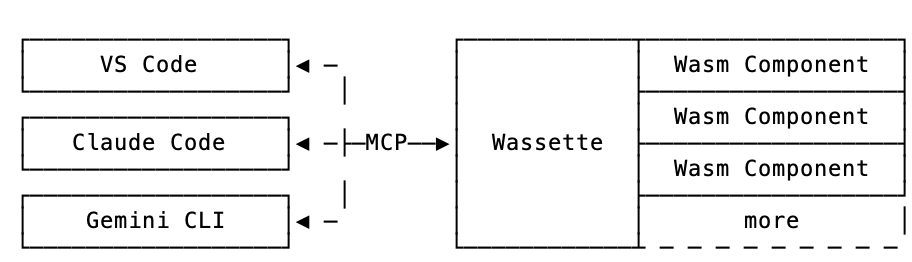
Architecture

An architecture diagram showing the relationship between Wassette, MCP Clients, and Wasm Components

Installation

Quick start: For Linux/macOS, use our one-liner install script:

curl -fsSL https://raw.githubusercontent.com/microsoft/wassette/main/scripts/install.sh | bash

For complete installation instructions for all platforms (including Windows, Homebrew, Nix, Docker, and more), see our Installation Guide.

Using Wassette

wassette FAQ

Can I use this to give my AI assistant new abilities without writing code?
Yes — you install Wassette once, then simply ask your assistant, in a normal chat message, to load a tool from an online library, and it becomes available right away.
Can I use this to try out a new AI tool safely before trusting it?
Yes — every tool runs inside a locked-down sandbox, so you can experiment with something new without worrying it will reach into the rest of your computer.
Which apps does this work with?
Wassette has been set up to work with GitHub Copilot, Copilot CLI, Claude Code, and Codex CLI, with more assistants expected to add support over time.
Do I need an account or a special key to use it?
No — no sign-up or API key was found to be required. You install the free runtime on your computer and start using it right away.
Is this safe for a non-technical person to use?
Yes — the tools it loads run in the same kind of protected sandbox that keeps a web browser tab from touching the rest of your computer, so a tool can't quietly change your files or settings.
How hard is it to set up?
You run a short one-line install command on Mac or Linux — Windows and other install options are also available — then point your AI assistant's settings at it; most people are up and running within a few minutes.
Where do the tools it loads come from?
They come from an online library of pre-built tools that developers have published; you ask your assistant to load one by name or address, and Wassette fetches and runs it for you.