

mcp-link

mcp-link

MCP.Pizza Chef: automation-ai-labs

Many services publish a machine-readable description of everything they can do, and this project reads that description and offers the same actions to your assistant. Ready-made links already exist for Brave Search, DuckDuckGo, Figma, GitHub, Home Assistant, Notion, Slack, Stripe, TMDB, and YouTube; most need your own login token for that service. You add one web address to your app's settings. Be aware that the code has had no updates since April 2025.

Unmaintained ยท no code updates since April 2025
Data
Web/Research

Use This MCP server To

Search the web through Brave from my assistant Read and update pages in my Notion workspace Post a message to a Slack channel by asking Look up film details from TMDB while writing Control lights and devices through Home Assistant Allow only read actions and block the rest

README

MCP Link - Convert Any OpenAPI V3 API to MCP Server

Join our Discord

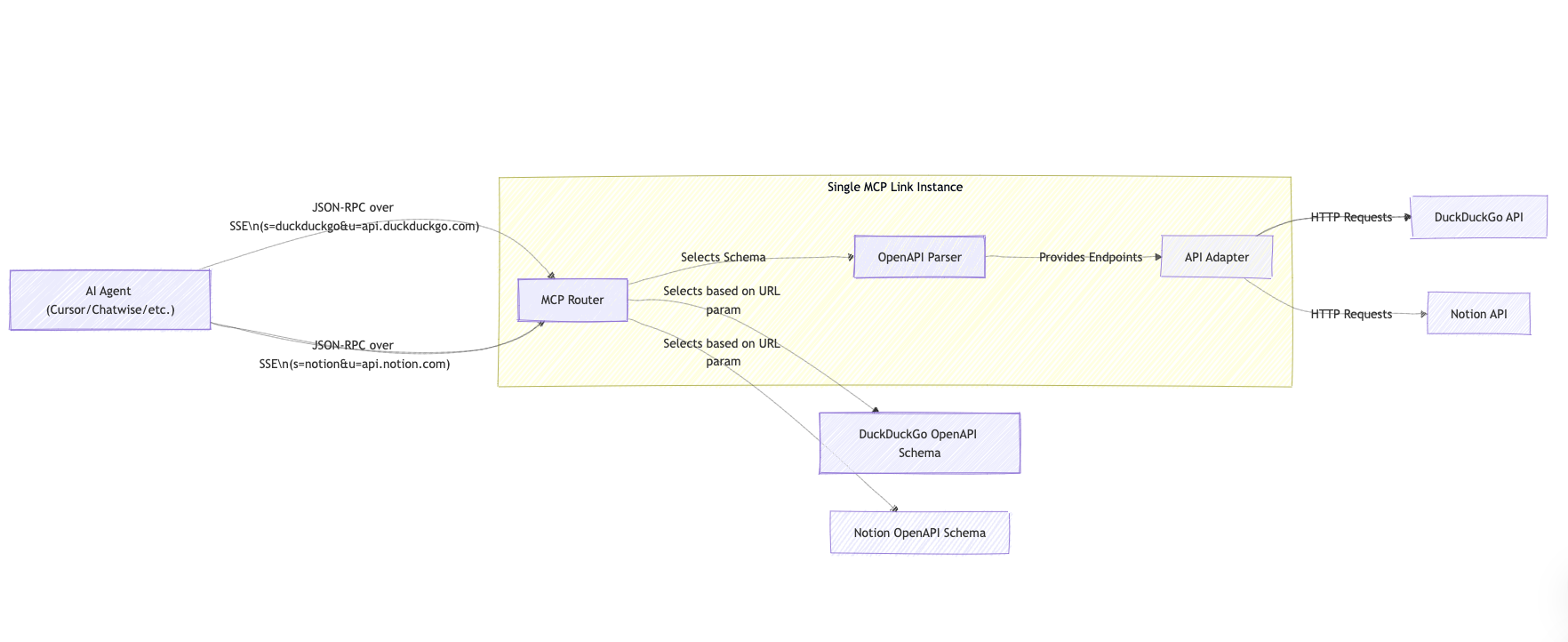
๐Ÿงฉ Architecture

MCP Link

๐Ÿค” Why MCP Link?

There is a notable gap in the current AI Agent ecosystem:

  • Most MCP Servers are simple wrappers around Web APIs
  • Functionality interfaces may not be complete, depending on developer implementation
  • Manual creation of MCP interfaces is time-consuming and error-prone
  • Lack of standardized conversion processes

MCP Link solves these issues through automation and standardization, allowing any API to easily join the AI-driven application ecosystem.

๐ŸŒŸ Key Features

  • Automatic Conversion: Generate complete MCP Servers based on OpenAPI Schema
  • Seamless Integration: Make existing RESTful APIs immediately compatible with AI Agent calling standards
  • Complete Functionality: Ensure all API endpoints and features are correctly mapped
  • Zero Code Modification: Obtain MCP compatibility without modifying the original API implementation
  • Open Standard: Follow the MCP specification to ensure compatibility with various AI Agent frameworks

๐ŸŒ Online Version

Try our hosted version at mcp-link.vercel.app to quickly convert and test your APIs without installation.

๐Ÿš€ Quick Start

Installation

# Clone repository
git clone https://github.com/automation-ai-labs/mcp-link.git
cd mcp-openapi-to-mcp-adapter

# Install dependencies
go mod download

Running

# Specify port
go run main.go serve --port 8080 --host 0.0.0.0

Parameter Description

  • s= - URL of the OpenAPI specification file
  • u= - Base URL of the target API
  • h= - Authentication header format, in the format of header-name:value-prefix
  • f= - Path filter expressions to include or exclude API endpoints. Syntax:
    • +/path/** - Include all endpoints under /path/
    • -/path/** - Exclude all endpoints under /path/
    • +/users/*:GET - Include only GET endpoints for /users/{id}
    • Multiple filters can be separated by semicolons: +/**:GET;-/internal/**
    • Wildcards: * matches any single path segment, ** matches zero or more segments

Examples

_ API MCP Link URL Authentication Method
Brave Brave Search https://mcp-link.vercel.app/links/brave API Key
DuckDuckGo DuckDuckGo https://mcp-link.vercel.app/links/duckduckgo None
Figma Figma https://mcp-link.vercel.app/links/figma API Token
GitHub GitHub https://mcp-link.vercel.app/links/github Bearer Token
Home Assistant Home Assistant https://mcp-link.vercel.app/links/homeassistant Bearer Token
Notion Notion https://mcp-link.vercel.app/links/notion Bearer Token
Slack Slack https://mcp-link.vercel.app/links/slack Bearer Token
Stripe Stripe https://mcp-link.vercel.app/links/stripe Bearer Token
TMDB TMDB https://mcp-link.vercel.app/links/tmdb Bearer Token
YouTube YouTube https://mcp-link.vercel.app/links/youtube Bearer Token

Usage in AI Agents

{
  "mcpServers": {
    "@service-name": {
      "url": "http://localhost:8080/sse?s=[OpenAPI-Spec-URL]&u=[API-Base-URL]&h=[Auth-Header]:[Value-Prefix]"
    }
  }
}

These URLs allow any API with an OpenAPI specification to be immediately converted into an MCP-compatible interface accessible to AI Agents.

๐Ÿ“‹ Future Development

  • MCP Protocol OAuthflow: Implement OAuth authentication flow support for MCP Protocol
  • Resources Support: Add capability to handle resource-based API interactions
  • MIME Types: Enhance support for various MIME types in API requests and responses

mcp-link FAQ

Is this project still maintained?
It looks stalled. The code has had no updates since April 2025, though the hosted converter is still online.
Do I need a key or login?
For most services, yes. You supply your own token for whichever service you are connecting, such as Notion or Slack.
Which services already work out of the box?
Ready-made links exist for Brave Search, DuckDuckGo, Figma, GitHub, Home Assistant, Notion, Slack, Stripe, TMDB, and YouTube.
How hard is the setup?
For the listed services, you copy a link from the hosted site and paste it into your assistant app's settings. No coding needed.
Can I use this to reach a service that isn't on the list?
Yes โ€” if that service publishes a standard description of its features, you can point the converter at it.
Can I stop it from doing risky things?
Yes. A filter setting lets you allow only certain actions, for example read-only ones.
Which apps does it work in?
Any assistant app that lets you add an MCP server by web address, such as Claude Desktop or Cursor.